
Cape Mod — LAN GameProfile Injection
A Fabric mod for Minecraft 1.21.11 that injects a Mojang-signed textures property into the LAN host's GameProfile, allowing any player who joins to see a custom cape without installing any mods.
How It Was Discovered
The Core Question
During an analysis of the Minecraft 1.21.11 decompiled source, the question arose: who manages skins and capes — the client or the server?
The answer, for Java Edition:
| Component | Who sends it? | Who downloads it? |
|---|---|---|
| Skin texture | Server relays the signed URL | Client downloads from textures.minecraft.net |
| Cape texture | Server relays the signed URL | Client downloads from textures.minecraft.net |
textures property |
Server relays the GameProfile from Mojang auth |
Client unpacks and verifies RSA signature |
The Signature Wall
Every player's skin and cape is stored as a textures property in their GameProfile. This property contains:
- A base64 JSON payload with texture URLs
- An RSA signature made with Mojang's private key
The client verifies this signature:
// SkinManager.createLookup() — simplified
Optional<PlayerSkin> skin = future.getNow(Optional.empty())
    .filter(ps -> !isRemote || ps.secure())  // ← the wall
    .orElse(defaultSkin);
For remote players (isRemote = true), only secure (Mojang-signed) textures pass. This prevents spoofing.
The Loophole: Signature Replay
The client only checks that the RSA signature is valid — it does not verify that the profileId inside the JSON payload matches the player's actual UUID.
This means: a textures property taken from any existing Mojang account (like an employee's) can be replayed on any other player. The signature remains valid because it was genuinely made by Mojang — it just happens to be for a different account.
Extracting a Real Signature
Jeb_'s Minecraft profile (UUID 853c80ef-3c37-49fd-aa49-938b674adae6) contains the Mojang Studios Cape (texture ID 9e507afc-5635-9978-a3eb-3e32367042b8). His full textures property was fetched from the Mojang session server:
curl -s "https://sessionserver.mojang.com/session/minecraft/profile/853c80ef-3c37-49fd-aa49-938b674adae6?unsigned=false"
Response (JSON)
{
  "id": "853c80ef-3c37-49fd-aa49-938b674adae6",
  "name": "jeb_",
  "properties": [
    {
      "name": "textures",
      "value": "ewogICJ0aW1lc3...",
      "signature": "RgIPF4d/iTDWJV..."
    }
  ]
}
Decoded Payload
The value field is base64. Decoded, it contains:
{
  "timestamp": 1783619726011,
  "profileId": "853c80ef-3c37-49fd-aa49-938b674adae6",
  "profileName": "jeb_",
  "signatureRequired": true,
  "textures": {
    "SKIN": {
      "url": "http://textures.minecraft.net/texture/7fd9ba42a7c81eeea22f1524271ae85a8e045ce0af5a6ae16c6406ae917e68b5"
    },
    "CAPE": {
      "url": "http://textures.minecraft.net/texture/9e507afc56359978a3eb3e32367042b853cddd0995d17d0da995662913fb00f7"
    }
  }
}
The cape URL matches the Mojang Studios Cape texture ID exactly.
The Signature
The signature field is a base64 RSA-SHA1 signature of the value bytes, made with Mojang's private key. The client verifies it against the public key embedded in the Minecraft jar (/yggdrasil_session_pubkey.der):
// Property.java (authlib)
public boolean isSignatureValid(PublicKey publicKey) {
    Signature sig = Signature.getInstance("SHA1withRSA");
    sig.initVerify(publicKey);
    sig.update(this.value.getBytes());
    return sig.verify(Base64.decodeBase64(this.signature));
}
Why Signature Replay Works
The client's SkinManager.registerTextures() creates a PlayerSkin with the secure flag based on the signature state:
// SkinManager.java line 137
return new PlayerSkin(
    bodyTexture,             // skin PNG
    capeTexture,            // cape PNG (downloaded regardless!)
    elytraTexture,          // elytra PNG
    playerModelType,
    minecraftProfileTextures.signatureState() == SignatureState.SIGNED  // ← secure
);
Then in SkinManager.createLookup(), the secure check filters for remote players:
// SkinManager.java line 105
PlayerSkin skin = optional
    .filter(ps -> !isRemote || ps.secure())  // ← remote players need secure=true
    .orElse(defaultSkin);
The critical observation: the secure flag is set based on the signature validity, not on whether the profileId in the payload matches the player's UUID. The RSA signature from jeb_'s profile is valid — it was genuinely made by Mojang. The fact that it contains jeb_'s UUID instead of the host's UUID is not checked anywhere in the client code.
Code Path

Injecting on LAN
In a LAN world, the host's ServerPlayer is created from an offline or online profile. By intercepting Player.getGameProfile() via a Mixin, we can return a modified GameProfile that carries Jeb_'s textures instead of the host's:
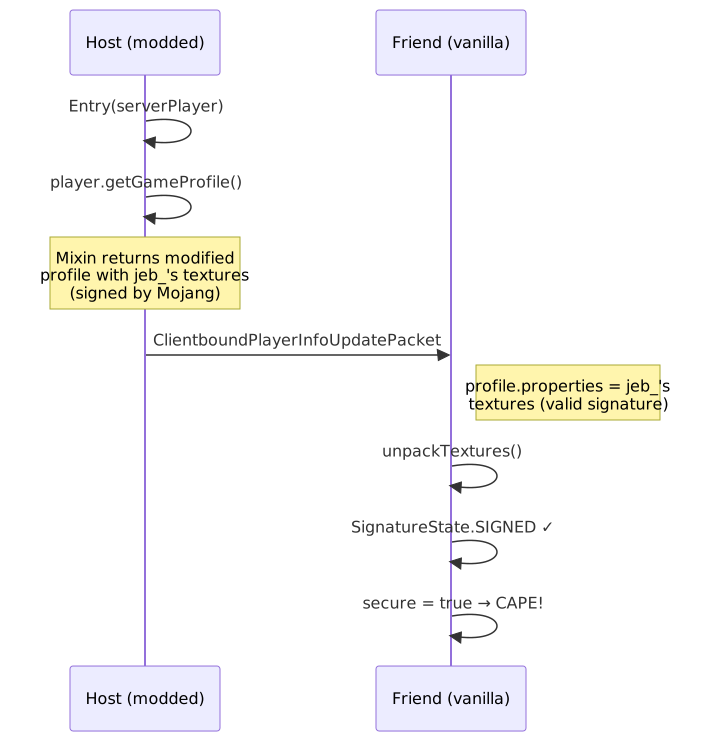
Why This Works
| Check | Result |
|---|---|
| RSA signature validity | ✅ Valid (signed by Mojang for jeb_) |
profileId match in payload |
❌ Mismatch (jeb_'s UUID ≠ host UUID) |
| Does client check UUID match? | No. Only the RSA signature is verified. |
| Is the check bypassed? | No bypass needed — the signature is legitimately valid. |
Broader Implications
Modifying packets in a LAN-tunneled environment (NGROK, playit.gg, Radmin VPN, etc.) opens up many possibilities beyond cosmetics.
The Architecture

Because the integrated server runs in the same process as the modded client, the mod has full control over:
Attack Surface
1. GameProfile Manipulation (this mod)
Inject arbitrary signed textures into any player's GameProfile. Any cosmetic data that exists on Mojang's servers (capes, skins, elytra textures) can be replayed onto any player — as long as you have the signed property.
2. Item Data Injection
The ResolvableProfile component uses PlayerSkin.Patch over the network (serialized with StreamCodec). A mod could forge item components — for example:
- Player heads with any player's skin
- Written books with arbitrary content (JSON text components)
- Enchanted items with illegal enchantments
3. Chat Component Abuse
Chat components (Component) support rich formatting, hover events, click events, and translatable arguments. A mod could:
- Inject chat messages with malicious click/hover events
- Execute commands on click (via
run_commandclick events) on the host's client - Modify the sender UUID of chat messages
4. Registry Data Manipulation
During the configuration phase (after login, before entering the world), the server sends registry data. A mod could:
- Register fake blocks/items
- Modify tag data sent to clients
- Inject custom dimension data
5. Packet-Level Trust Bypass
Minecraft's LAN protocol has no encryption for entity metadata, block updates, or most game packets (encryption is negotiated but the actual game traffic inside the tunnel is plain). A modded host can:
- Spoof entity metadata (rename entities, change their visual state)
- Trigger sound events on the friend's client
- Send fake player list entries
- Inject server brand data
6. Resource Pack Forging
The integrated server can push resource packs. A mod could:
- Serve a resource pack that overrides textures, models, or sounds
- Include shaders or custom rendering
- The friend's client would accept it automatically
Limitations
| Limitation | Reason |
|---|---|
| Only affects the host's outgoing packets | The mixin runs on the integrated server thread |
| Signatures can't be forged | RSA-2048 with Mojang's key — only replay works |
| Can't modify friend's incoming packets | The friend's client processes their own data |
| Can't bypass server-side validation | Some packets are validated server-side |
| Works only on LAN / integrated server | Dedicated servers don't load client mods |
Theoretical Extensions
If combined with a client-side mod on the friend's machine (or a proxy like a custom Fabric server), the possibilities expand:
- Full skin/cape editor: Replace the client's
SkinManager.createLookup()to accept unsigned textures - Anti-cheat bypass: Intercept and sanitize packets on both sides
- Custom protocol extensions: Add new packet types for modded content while maintaining vanilla compatibility
Building
./gradlew build
The JAR will be in build/libs/cape-mod-1.0.0.jar.
Usage
- Install Fabric Loader for Minecraft 1.21.11
- Place
cape-mod-1.0.0.jarin your.minecraft/mods/folder - Launch Minecraft, open a world, and click "Open to LAN"
- Friends who join will see the Mojang Studios Cape on you
Tunneling with NGROK
To let friends join over the internet:
ngrok tcp 25565
Share the NGROK address — friends connect via Direct Connect in Minecraft. No mods needed on their side.
Project Structure
src/main/java/com/example/cape/
├── CapeMod.java                          # Fabric entrypoint
└── mixin/
    ├── ServerPlayerAccessor.java         # @Accessor for private server field
    └── ServerPlayerMixin.java            # @Inject on Player.getGameProfile()
License
MIT