GitHub avatar

Fox's Blog

I used git as a database to run a bot for free on GitHub Actions

How I coded an AI email auto-responder that runs on GitHub Actions

I used git as a database to run a free bot on GitHub Actions

I've got an automatic email responder running 24/7.

It reads my emails, figures out what they're about, and replies all by itself with AI. It remembers previous conversations. It ignores newsletters and noreply@ addresses. It forwards to a human when things get too hot.

Monthly cost: $0.

No server. No VPS. No database. Just GitHub Actions and one insane hack: using git as a database.

You see where this is going? No? Alright, hold on, this is dumb and brilliant at the same time.


The problem: GitHub Actions is stateless

GitHub Actions is free. You can run a cron every 5 minutes, execute your code, for free.

But there's a catch: it's stateless.

Each run starts on a fresh machine. Nothing is saved between executions. The previous run? Forgotten. Wiped. Like it never existed.

For an email responder, that's a huge problem. Like:

"What's the last email I already processed?"

If the bot forgets that every run, it'll either re-answer the same emails in a loop (disaster) or miss emails.

You need persistent state. And normally, persistent state = database. But a database means a server, and a server isn't free anymore.

That's where it gets interesting.


The solution: git tags as a database

Your GitHub repo is already persistent storage. Free. Versioned. Always there.

So why not store state in it?

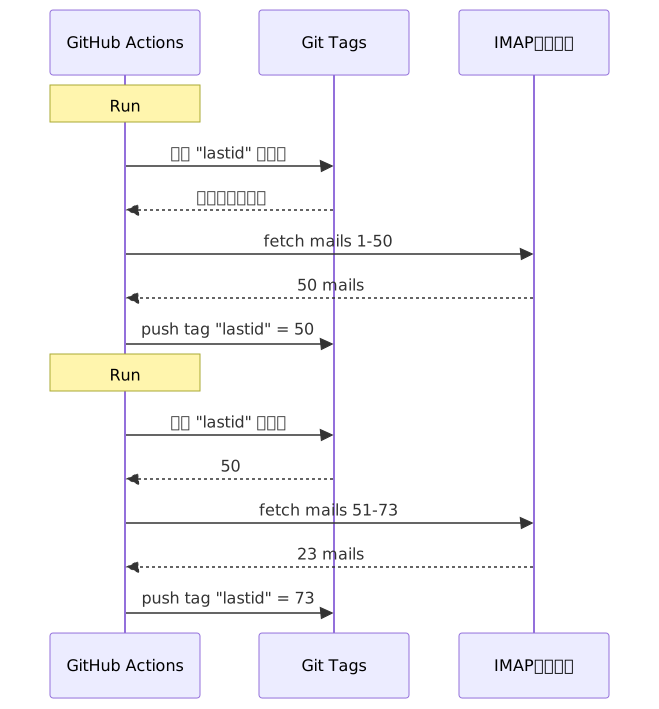
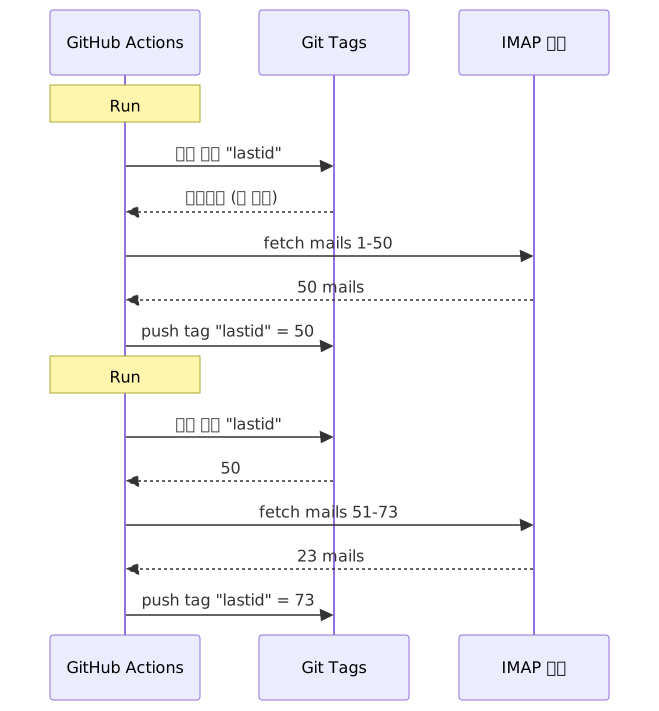
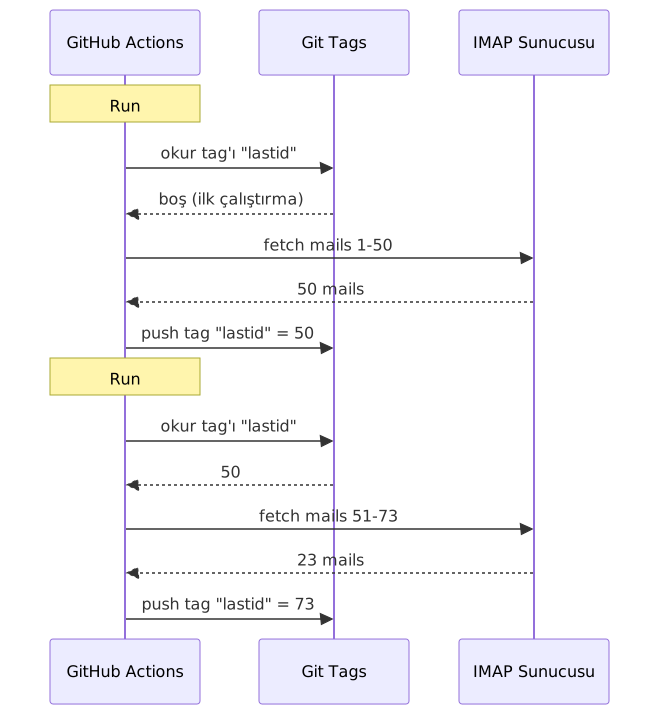
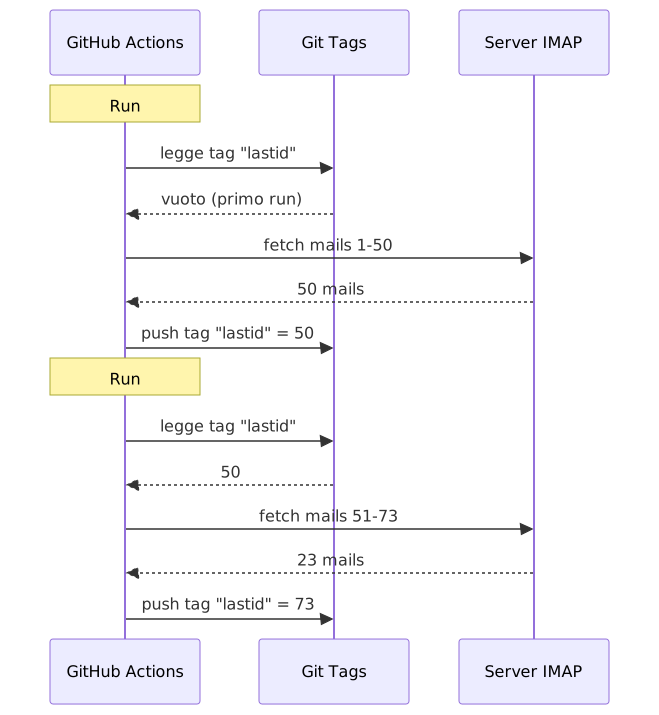
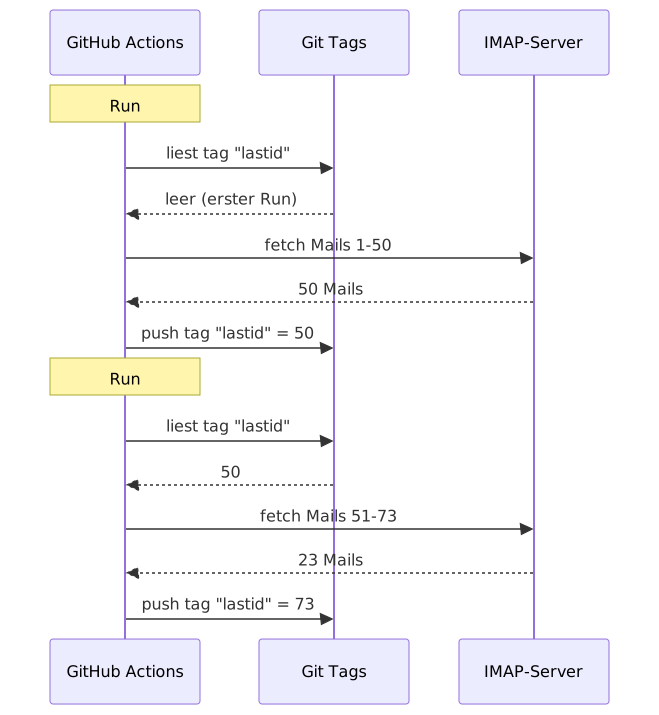
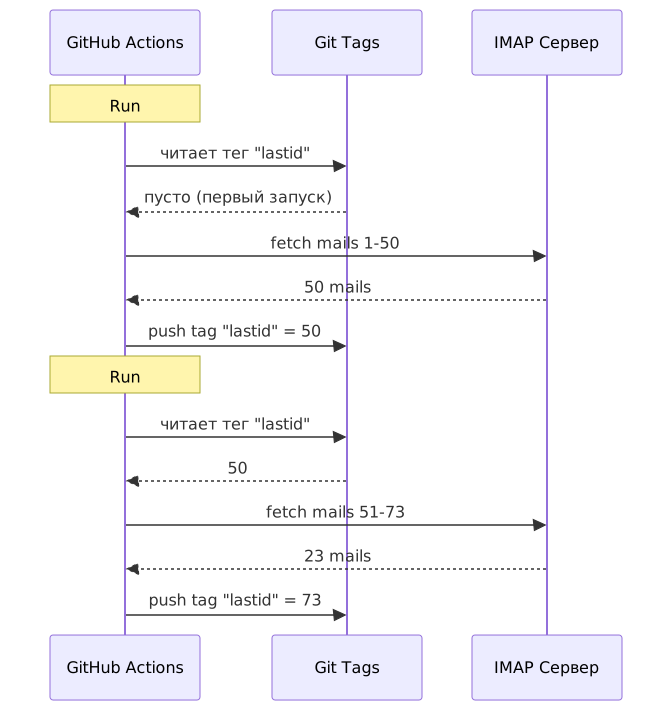
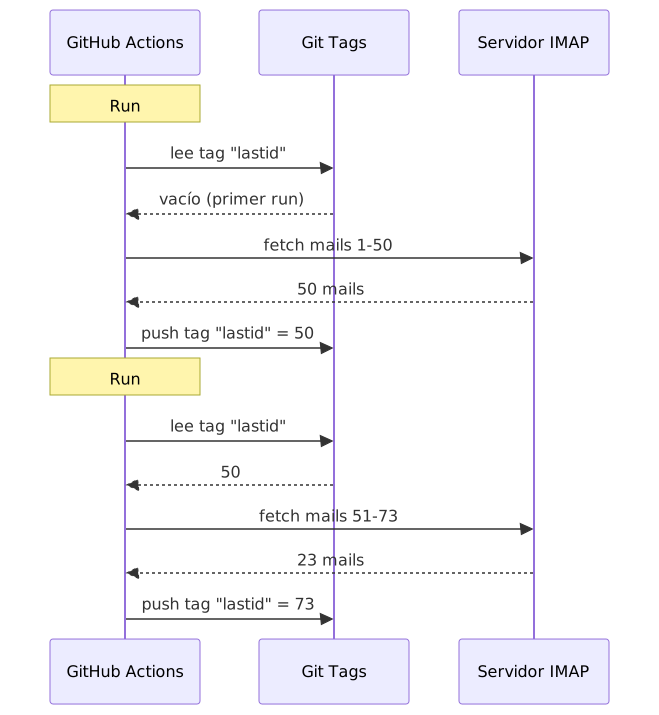
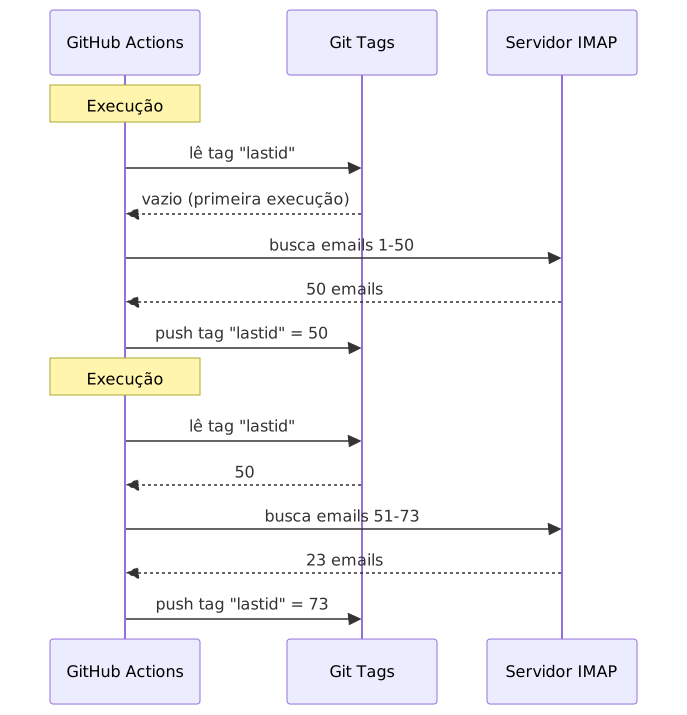
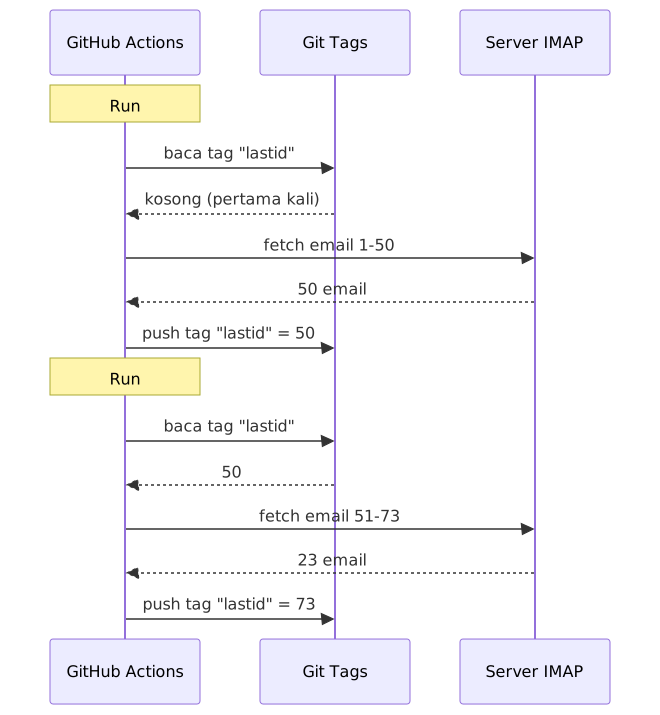
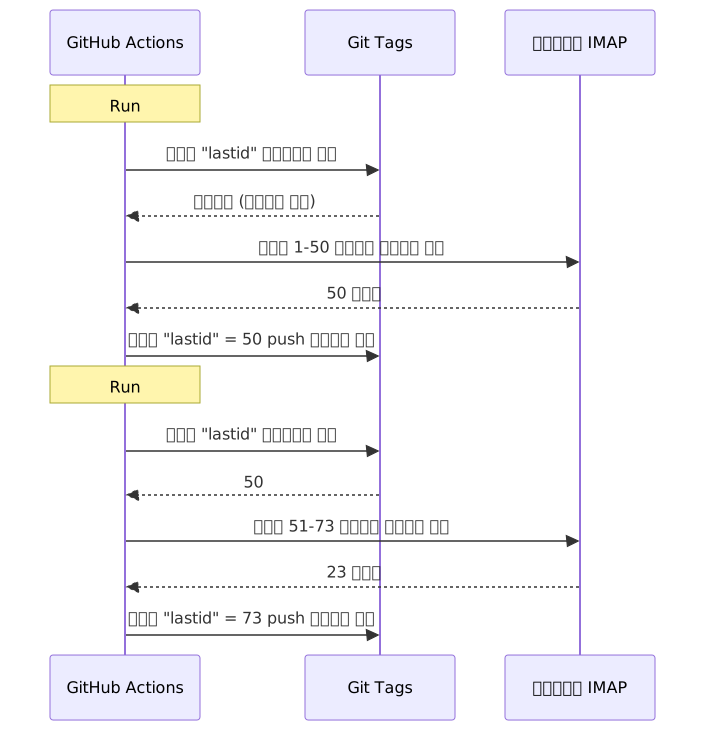
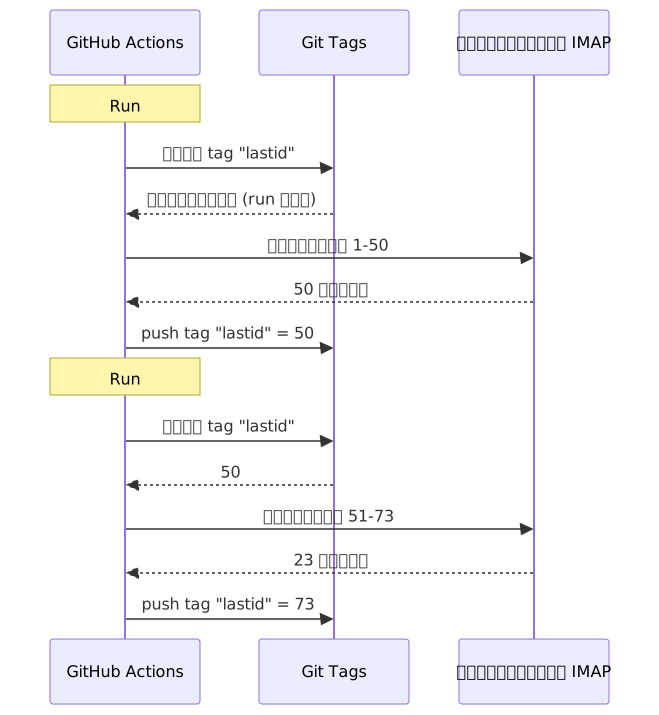
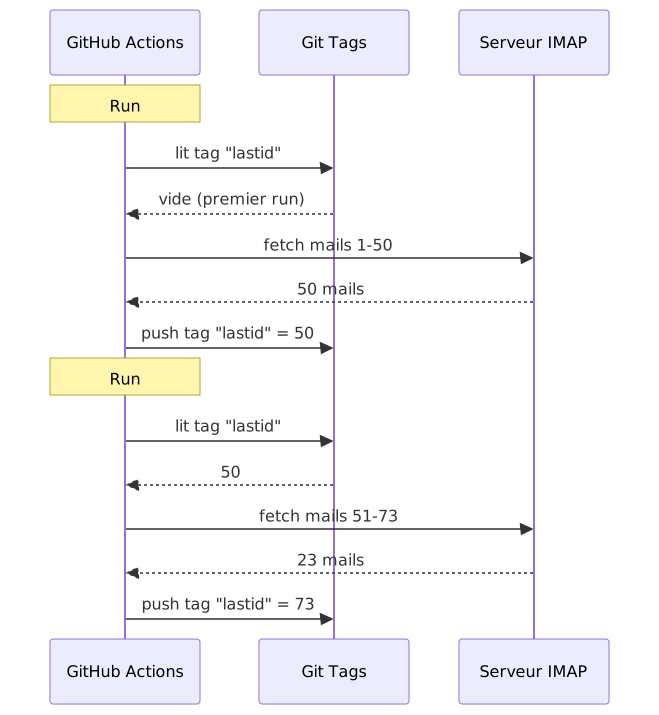
The idea: each run, the bot reads the last processed email UID from a git tag. It processes new emails. Then it re-pushes the tag with the new UID.
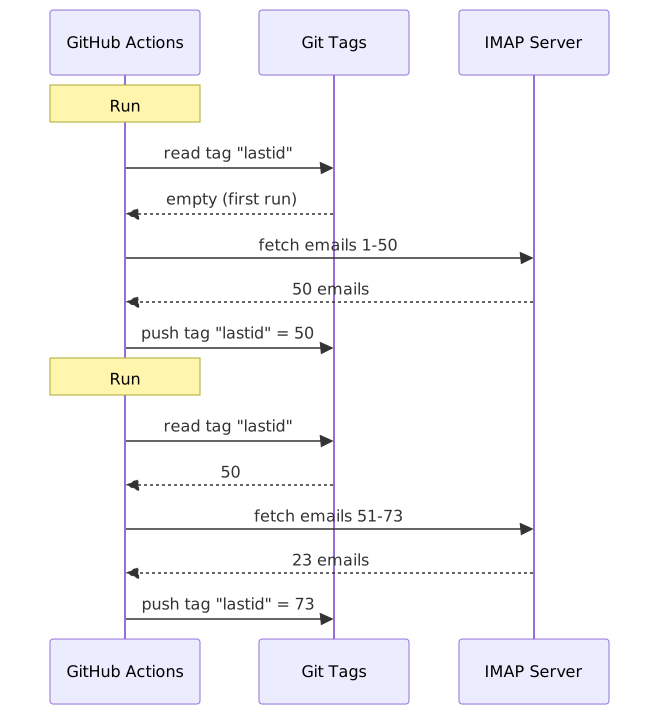
mermaid diagram

The git tag IS the database. A single value, but that's all you need.

Reading state

At the start of the job, you grab the value from the tag:

git fetch origin --tags lastid || true
git show refs/tags/lastid:data/lastId > data/lastId || true

git show refs/tags/lastid:data/lastId means: "give me the content of file data/lastId as it was in the tag lastid".

Boom. You've got your value, no database needed.

Writing state

At the end, you re-create the tag with the new value:

git switch --orphan lastid-tmp   # fresh branch with no history
git rm -rf .                      # wipe everything
mkdir -p data
printf "%s\n" "${LAST_ID_CONTENT}" > data/lastId

git add data/lastId
git commit -m "lastId snapshot"
git tag -f lastid                 # force tag onto this commit
git push --force ...origin lastid # push the tag

You create an orphan branch (no history), put just the lastId file, commit, tag, force push.

Why orphan? So you don't accumulate 10,000 state commits in the repo history. Each update overwrites the previous one. The tag always points to ONE single commit that holds ONE single value.

It's clean. It's free. It's completely broken xD


The second hack: runtime snapshot

There's another problem with GitHub Actions: npm install.

If every run (every 5 minutes) you do npm install + npm run build, you waste 60-90 seconds each time. On a frequent cron, that's minutes of compute wasted for nothing.

Solution: pre-compile the code ONCE, and store it in a git tag too.

The build workflow (which runs when you push to master) does this:

# compile the code
bun install
bun run build

# store dist/ + node_modules/ in a "runtime" tag
git checkout --orphan temp-runtime
git rm -rf .
cp -r "$TMPDIR"/* .
git add dist node_modules package.json bun.lock data
git commit -m "runtime build"
git tag -f runtime
git push --force ...origin runtime

The runtime tag contains the compiled code AND node_modules. Ready to run.

And the cron checks out this tag directly:

- name: Checkout runtime snapshot
  uses: actions/checkout@v4
  with:
    ref: refs/tags/runtime    # pre-built code, not the source
    fetch-depth: 1

# no npm install, no build!
- name: Process emails
  run: node dist/index.js --action

No install. No build. The cron starts instantly and just runs node dist/index.js.

So you have two tags doing two jobs:

  • runtime = code ready to run (updated when you push code)
  • lastid = persistent state (updated every run)

It's elegant as hell.


The bot itself: AI auto-responder

Alright, the git hack is cool, but what does the bot actually do?

It reads your emails via IMAP, understands them with AI (Groq + Llama 3.3 70B), and replies automatically.

Clean service architecture with dependency injection (InversifyJS):

App
├── ImapService      → reads emails (IMAP)
├── SmtpService      → sends replies (SMTP)
├── ParserService    → parses email content
├── ReplyService     → generates AI reply
├── SummaryService   → conversation memory
├── AccountsService  → manages multiple email accounts
└── ConfigService    → config / env vars

Two operation modes

The bot can run in two ways:

Listener mode (real-time): persistent IMAP connection with exponential reconnect. For a VPS.

this.imapService.on("exists", async (data) => {
  console.log(`[MAIL] New email! Total: ${data.count}`);
  // process the new email immediately
});

Action mode (batch): processes new emails since lastId, then exits. For the GitHub Actions cron.

node dist/index.js --action

The --action mode is the one using the git hack. It reads lastId, processes what's new, writes the new lastId, done.

Don't reply to robots

If your bot replies to EVERY email, it'll answer newsletters, notifications, noreply@ addresses. Disaster. Worse: if two bots reply to each other, you get an infinite email loop. Nightmare.

So aggressive filtering:

export function isAutomatedSender(address) {
  const automatedPatterns = [
    "noreply", "no-reply", "donotreply",
    "mailer-daemon", "postmaster", "bounce",
    "newsletter", "notification", "marketing",
    "billing", "receipt", "promo", ...
  ];
  const local = address.split("@")[0].toLowerCase();
  return automatedPatterns.some(p => local.includes(p));
}

And also detection via email headers:

export function isAutomatedByHeaders(headers) {
  return (
    ["bulk", "list", "junk"].includes(headers.precedence) ||
    headers["auto-submitted"] !== "no" ||
    headers["list-unsubscribe"] !== "" ||   // newsletters have this
    /mailchimp|sendgrid|mailgun|brevo/i.test(headers["x-mailer"])
  );
}

List-Unsubscribe in headers? That's a newsletter. Precedence: bulk? Mass-mailing. X-Mailer: Mailchimp? You get the idea. We ignore.

It's like a bouncer at a nightclub: robots don't get in xD

The magic triggers

The AI can decide not to reply at all, or to hand things over to a human. How? With special triggers in its response.

The system prompt tells it:

If it's an automated email/newsletter → reply with <no_reply> If it's too important/sensitive (legal, financial...) → reply with <manual_reply_required> Otherwise → write a real response

And the code reads that:

const aiReply = completion.choices[0].message.content.trim();
const manualTrigger = aiReply.includes(MANUAL_REPLY_TRIGGER);
const noReply = aiReply.includes(NO_REPLY_TRIGGER);

if (noReply) {
  console.log("[MAIL] AI decided to ignore. Skip.");
  return;
}

if (manualTrigger) {
  console.log("[MAIL] Too hot, forwarding to a human.");
  await this.smtpService.sendManualForward(...);
  return;
}

// otherwise send the AI reply
await this.smtpService.sendReply(...);

Like the AI has the right to say "nah I'm not touching this, get a real human". That's wisdom.


Conversation memory

A detail that changes everything: the bot remembers conversations.

When it replies to someone, it saves a summary of the exchange. Next time that person writes, the summary gets re-injected into the prompt.

Storage: one JSON file per contact.

data/customers/
├── me%40gmail.com/
│   ├── alice%40example.com.json
│   └── bob%40client.fr.json

And the summary is itself generated by the AI, which merges the old summary with the new message:

const completion = await groq.chat.completions.create({
  model: "llama-3.3-70b-versatile",
  messages: [
    { role: "system", content: "You are a memory assistant. Merge the old summary with the new message without losing info." },
    { role: "user", content: `Existing summary:\n${existing}\n\nNew message:\n${incomingContent}` }
  ],
  temperature: 0.0,  // deterministic, no creativity
  max_tokens: 800,
});

So the bot builds a compressed memory over time. No need to store every email, just a summary that grows intelligently.

And those JSON files? Well... they're also stored in git, in the runtime tag. Git everywhere xD


The clever thing about prompt length

Small technical detail that made me smile.

Models have a token limit. If your email + summary + persona prompt exceed it, the API returns an error.

The code handles this with cascading truncation + retry:

try {
  // first try with normal limits
  completion = await groq.chat.completions.create({...});
} catch (error) {
  if (!this.isLengthError(error)) throw error;

  // it was a length error: retry with tighter limits
  ({ systemContent, userContent } = this.buildPromptPayload({
    ...,
    limits: {
      systemPromptChars: 2200,  // instead of 3000
      summaryChars: 1800,       // instead of 4000
      personaChars: 900,        // instead of 1500
      userContentChars: 2200,   // instead of 8000
    },
  }));
  completion = await groq.chat.completions.create({...});  // retry
}

If it doesn't pass, you cut shorter and retry. Simple, effective, no crash.


So, concretely, how does it run?

The full flow of a cron run:

1. GitHub Actions triggers (cron every 5 min)
2. Checkout of "runtime" tag (pre-built code)
3. git show refs/tags/lastid → gets the last processed UID
4. node dist/index.js --action
   ├── IMAP connection
   ├── fetch emails since lastId+1
   ├── for each email:
   │   ├── parse content
   │   ├── filter robots (skip if automated)
   │   ├── match recipient account
   │   ├── fetch conversation memory
   │   ├── generate AI reply (Groq)
   │   ├── <no_reply> ? skip
   │   ├── <manual_reply_required> ? forward to human
   │   ├── otherwise: send reply (SMTP)
   │   └── update conversation memory
   └── write new lastId
5. git push --force tag "lastid" with the new value

And it starts again in 5 minutes. Forever. Free.


The 3 things to remember:

  1. Git = free database -- An orphan tag can store your persistent state between stateless runs. git show refs/tags/X:file to read, force-push to write. No DB needed.

  2. Pre-compile into a runtime tag -- Instead of npm install every cron run, store the compiled code + node_modules in a git tag. The cron starts instantly.

  3. An AI bot must know when to shut up -- The <no_reply> and <manual_reply_required> triggers let the AI decide not to reply or to hand things off. Plus anti-robot filtering. Otherwise you create an infinite email loop.

Serverless cron with persistent state, AI, memory, all at $0/month. It's completely broken and I love it xD
J'ai utilisé git comme base de données pour faire tourner un bot gratos

Comment j'ai codé un auto-répondeur email IA qui tourne sur GitHub

J'ai utilisé git comme base de données pour faire tourner un bot gratos sur GitHub Actions

J'ai un répondeur email automatique qui tourne 24/7.

Il lit mes mails, comprend de quoi ça parle, et répond tout seul avec une IA. Il se souvient des conversations précédentes. Il ignore les newsletters et les noreply@. Il forward à un humain quand c'est trop chaud.

Coût mensuel : 0€.

Pas de serveur. Pas de VPS. Pas de base de données. Juste GitHub Actions et un hack de malade : utiliser git comme base de données.

Tu vois le truc venir ? Non ? Bon, accroche-toi, c'est débile et génial à la fois.


Le problème : GitHub Actions est stateless

GitHub Actions c'est gratuit. Tu peux lancer un cron toutes les 5 minutes, faire tourner ton code, gratos.

Mais y'a un souci : c'est stateless.

Chaque run démarre dans une machine vierge. Rien n'est sauvegardé entre deux exécutions. Le run d'avant ? Oublié. Effacé. Comme s'il avait jamais existé.

Pour un répondeur email, c'est un problème énorme. Genre :

"Quel est le dernier mail que j'ai déjà traité ?"

Si le bot oublie ça à chaque run, il va soit re-répondre aux mêmes mails en boucle (catastrophe), soit rater des mails.

Il faut un état persistant. Et normalement, état persistant = base de données. Mais une base de données c'est un serveur, et un serveur c'est plus gratuit.

C'est là que ça devient intéressant.


La solution : git tags comme base de données

Ton repo GitHub, c'est déjà du stockage persistant. Gratuit. Versionné. Toujours là.

Alors pourquoi pas y stocker l'état ?

L'idée : à chaque run, le bot lit le dernier UID email traité depuis un git tag. Il traite les nouveaux mails. Puis il re-push le tag avec le nouvel UID.

mermaid diagram

Le tag git EST la base de données. Une seule valeur, mais c'est tout ce dont on a besoin.

Lire le state

Au début du job, on récupère la valeur depuis le tag :

git fetch origin --tags lastid || true
git show refs/tags/lastid:data/lastId > data/lastId || true

git show refs/tags/lastid:data/lastId ça veut dire : "donne-moi le contenu du fichier data/lastId tel qu'il était dans le tag lastid".

Boom. Tu as ta valeur, sans base de données.

Écrire le state

À la fin, on re-crée le tag avec la nouvelle valeur :

git switch --orphan lastid-tmp   # branche vierge sans historique
git rm -rf .                      # on vide tout
mkdir -p data
printf "%s\n" "${LAST_ID_CONTENT}" > data/lastId

git add data/lastId
git commit -m "lastId snapshot"
git tag -f lastid                 # force le tag sur ce commit
git push --force ...origin lastid # push le tag

On crée une branche orpheline (sans historique), on met juste le fichier lastId, on commit, on tag, on force push.

Pourquoi orpheline ? Pour pas accumuler 10 000 commits de state dans l'historique du repo. Chaque update écrase le précédent. Le tag pointe toujours vers UN seul commit qui contient UNE seule valeur.

C'est propre. C'est gratuit. C'est complètement pété xD


Le deuxième hack : le runtime snapshot

Y'a un autre problème avec GitHub Actions : le npm install.

Si à chaque run (toutes les 5 minutes) tu fais npm install + npm run build, tu gaspilles 60-90 secondes à chaque fois. Sur un cron fréquent, c'est des minutes de compute gaspillées pour rien.

Solution : pré-compiler le code UNE fois, et le stocker dans un tag git aussi.

Le workflow de build (qui tourne quand tu push sur master) fait ça :

# compile le code
bun install
bun run build

# stocke dist/ + node_modules/ dans un tag "runtime"
git checkout --orphan temp-runtime
git rm -rf .
cp -r "$TMPDIR"/* .
git add dist node_modules package.json bun.lock data
git commit -m "runtime build"
git tag -f runtime
git push --force ...origin runtime

Le tag runtime contient le code compilé ET les node_modules. Tout prêt à tourner.

Et le cron, lui, checkout directement ce tag :

- name: Checkout runtime snapshot
  uses: actions/checkout@v4
  with:
    ref: refs/tags/runtime    # le code pré-build, pas le source
    fetch-depth: 1

# pas de npm install, pas de build !
- name: Process emails
  run: node dist/index.js --action

Pas d'install. Pas de build. Le cron démarre instantanément et exécute juste node dist/index.js.

Genre, tu as deux tags qui font deux boulots :

  • runtime = le code prêt à tourner (mis à jour quand tu push du code)
  • lastid = l'état persistant (mis à jour à chaque run)

C'est élégant comme un sale.


Le bot lui-même : auto-répondeur IA

Bon, le hack git c'est cool, mais le bot fait quoi exactement ?

Il lit tes mails via IMAP, les comprend avec une IA (Groq + Llama 3.3 70B), et répond automatiquement.

Architecture en services propres avec injection de dépendances (InversifyJS) :

App
├── ImapService      → lit les mails (IMAP)
├── SmtpService      → envoie les réponses (SMTP)
├── ParserService    → parse le contenu des mails
├── ReplyService     → génère la réponse IA
├── SummaryService   → mémoire de conversation
├── AccountsService  → gère plusieurs comptes email
└── ConfigService    → config / env vars

Deux modes de fonctionnement

Le bot peut tourner de deux façons :

Mode listener (temps réel) : connexion IMAP permanente avec reconnect exponentiel. Pour un VPS.

this.imapService.on("exists", async (data) => {
  console.log(`[MAIL] Nouveau mail ! Total: ${data.count}`);
  // traite le nouveau mail immédiatement
});

Mode action (batch) : traite les nouveaux mails depuis le lastId, puis se ferme. Pour le cron GitHub Actions.

node dist/index.js --action

Le mode --action c'est celui qui utilise le hack git. Il lit lastId, traite ce qui est nouveau, écrit le nouveau lastId, fin.

Ne PAS répondre aux robots

Si ton bot répond à TOUS les mails, il va répondre aux newsletters, aux notifications, aux noreply@. Catastrophe. Pire : si deux bots se répondent l'un à l'autre, t'as une boucle infinie de mails. Le cauchemar.

Donc filtrage agressif :

export function isAutomatedSender(address) {
  const automatedPatterns = [
    "noreply", "no-reply", "donotreply",
    "mailer-daemon", "postmaster", "bounce",
    "newsletter", "notification", "marketing",
    "billing", "receipt", "promo", ...
  ];
  const local = address.split("@")[0].toLowerCase();
  return automatedPatterns.some(p => local.includes(p));
}

Et aussi détection via les headers email :

export function isAutomatedByHeaders(headers) {
  return (
    ["bulk", "list", "junk"].includes(headers.precedence) ||
    headers["auto-submitted"] !== "no" ||
    headers["list-unsubscribe"] !== "" ||   // newsletters ont ça
    /mailchimp|sendgrid|mailgun|brevo/i.test(headers["x-mailer"])
  );
}

List-Unsubscribe dans les headers ? C'est une newsletter. Precedence: bulk ? Du mass-mailing. X-Mailer: Mailchimp ? Tu vois le genre. On ignore.

C'est comme un videur de boîte de nuit : les robots passent pas xD

Les triggers magiques

L'IA peut décider de pas répondre du tout, ou de passer la main à un humain. Comment ? Avec des triggers spéciaux dans sa réponse.

Le prompt système lui dit :

Si c'est un mail automatique/newsletter → réponds <no_reply> Si c'est trop important/sensible (légal, financier...) → réponds <manual_reply_required> Sinon → écris une vraie réponse

Et le code lit ça :

const aiReply = completion.choices[0].message.content.trim();
const manualTrigger = aiReply.includes(MANUAL_REPLY_TRIGGER);
const noReply = aiReply.includes(NO_REPLY_TRIGGER);

if (noReply) {
  console.log("[MAIL] L'IA a décidé d'ignorer. Skip.");
  return;
}

if (manualTrigger) {
  console.log("[MAIL] Trop chaud, je forward à un humain.");
  await this.smtpService.sendManualForward(...);
  return;
}

// sinon on envoie la réponse IA
await this.smtpService.sendReply(...);

Genre l'IA a le droit de dire "non là je touche pas, appelle un vrai humain". C'est de la sagesse.


La mémoire de conversation

Un détail qui change tout : le bot se souvient des conversations.

Quand il répond à quelqu'un, il sauvegarde un résumé de l'échange. La prochaine fois que cette personne écrit, le résumé est réinjecté dans le prompt.

Stockage : un fichier JSON par contact.

data/customers/
├── moi%40gmail.com/
│   ├── alice%40example.com.json
│   └── bob%40client.fr.json

Et le résumé est lui-même généré par l'IA, qui merge l'ancien résumé avec le nouveau message :

const completion = await groq.chat.completions.create({
  model: "llama-3.3-70b-versatile",
  messages: [
    { role: "system", content: "Tu es un assistant de mémoire. Merge l'ancien résumé avec le nouveau message sans perdre d'info." },
    { role: "user", content: `Résumé existant:\n${existing}\n\nNouveau message:\n${incomingContent}` }
  ],
  temperature: 0.0,  // déterministe, pas de créativité
  max_tokens: 800,
});

Donc le bot construit une mémoire compressée au fil du temps. Pas besoin de stocker tous les mails, juste un résumé qui grossit intelligemment.

Et ces fichiers JSON ? Ben... ils sont stockés dans git aussi, dans le runtime tag. Git partout xD


Le truc malin avec la longueur du prompt

Petit détail technique qui m'a fait sourire.

Les modèles ont une limite de tokens. Si ton mail + le résumé + le persona prompt dépassent, l'API renvoie une erreur.

Le code gère ça avec une troncature en cascade + retry :

try {
  // premier essai avec les limites normales
  completion = await groq.chat.completions.create({...});
} catch (error) {
  if (!this.isLengthError(error)) throw error;

  // c'était une erreur de longueur : on re-tente avec des limites plus serrées
  ({ systemContent, userContent } = this.buildPromptPayload({
    ...,
    limits: {
      systemPromptChars: 2200,  // au lieu de 3000
      summaryChars: 1800,       // au lieu de 4000
      personaChars: 900,        // au lieu de 1500
      userContentChars: 2200,   // au lieu de 8000
    },
  }));
  completion = await groq.chat.completions.create({...});  // retry
}

Si ça passe pas, on coupe plus court et on retente. Simple, efficace, pas de crash.


Bon, et concrètement, comment ça tourne ?

Le flow complet d'un run de cron :

1. GitHub Actions se déclenche (cron toutes les 5 min)
2. Checkout du tag "runtime" (code pré-build)
3. git show refs/tags/lastid → récupère le dernier UID traité
4. node dist/index.js --action
   ├── connexion IMAP
   ├── fetch des mails depuis lastId+1
   ├── pour chaque mail :
   │   ├── parse le contenu
   │   ├── filtre les robots (skip si automated)
   │   ├── match le compte destinataire
   │   ├── récupère la mémoire de conversation
   │   ├── génère la réponse IA (Groq)
   │   ├── <no_reply> ? skip
   │   ├── <manual_reply_required> ? forward humain
   │   ├── sinon : envoie la réponse (SMTP)
   │   └── update la mémoire de conversation
   └── écrit le nouveau lastId
5. git push --force tag "lastid" avec la nouvelle valeur

Et ça recommence dans 5 minutes. Pour toujours. Gratos.


Les 3 trucs à retenir :

  1. Git = base de données gratuite -- Un tag orphelin peut stocker ton état persistant entre deux runs stateless. git show refs/tags/X:fichier pour lire, force-push pour écrire. Pas besoin de DB.

  2. Pré-compile dans un tag runtime -- Au lieu de npm install à chaque run du cron, stocke le code compilé + node_modules dans un tag git. Le cron démarre instantanément.

  3. Un bot IA doit savoir se taire -- Les triggers <no_reply> et <manual_reply_required> laissent l'IA décider de pas répondre ou de passer la main. Plus le filtrage anti-robot. Sinon tu crées une boucle de mails infinie.

Serverless cron avec état persistant, IA, mémoire, le tout à 0€/mois. C'est complètement pété et j'adore xD

我用 git 当数据库在 GitHub Actions 上免费跑了一个机器人

如何编写一个在 GitHub Actions 上以 0€/月运行的 AI 邮件自动回复器 -- 使用 git 标签作为数据库和预编译的运行时快照。

我用 git 当数据库,在 GitHub Actions 上白嫖跑了个 bot

我有个 24/7 自动运行的邮件回复机器人。

它能读我的邮件,理解内容,然后用 AI 自动回复。它记得之前的对话。它会忽略 newsletter 和 noreply@,遇到太敏感的内容就转发给真人。

每月成本:0€。

没有服务器。没有 VPS。没有数据库。只有 GitHub Actions 和一个疯狂的 hack:用 git 当数据库。

你猜到套路了吗?没有?行吧,坐稳了,这玩意儿又蠢又天才 xD


问题:GitHub Actions 是无状态的

GitHub Actions 是免费的。你可以每 5 分钟跑一个 cron,跑你的代码,免费。

但有个问题:它是 无状态的。

每次运行都在一台全新的机器上启动。两次执行之间什么都不会保留。上一次的运行?忘了。清掉了。就像从未存在过一样。

对于邮件回复机器人来说,这是个巨大的问题。比如:

"我已经处理过的最后一封邮件是什么?"

如果 bot 每次运行都忘了这个,它要么会反复回复同一批邮件(灾难),要么会漏掉一些邮件。

你需要持久状态。通常,持久状态 = 数据库。但数据库需要服务器,而服务器就不免费了。

这就是事情变得有趣的地方。


解决方案:用 git tag 当数据库

你的 GitHub 仓库本身就是持久存储。免费。有版本控制。永远在那里。

那为什么不把状态存在这里面呢?

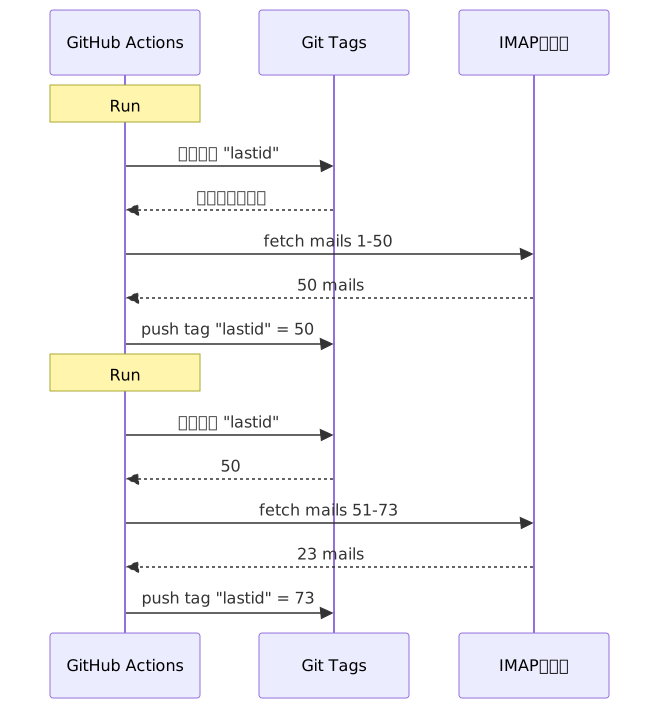
思路:每次运行时,bot 从 git tag 读取已处理的上一个邮件 UID。处理新邮件。然后把 tag 更新为新 UID 再 push 回去。

mermaid diagram

git tag 就是数据库。只有一个值,但这就是我们需要的全部。

读取状态

任务开始时,从 tag 获取值:

git fetch origin --tags lastid || true
git show refs/tags/lastid:data/lastId > data/lastId || true

git show refs/tags/lastid:data/lastId 意思是:"给我 tag lastid 中文件 data/lastId 的内容"。

Boom。拿到值了,不需要数据库。

写入状态

结束时,用新值重新创建 tag:

git switch --orphan lastid-tmp   # 没有历史的新分支
git rm -rf .                      # 清空
mkdir -p data
printf "%s\n" "${LAST_ID_CONTENT}" > data/lastId

git add data/lastId
git commit -m "lastId snapshot"
git tag -f lastid                 # 强制将 tag 指向这个 commit
git push --force ...origin lastid # push tag

我们创建一个 孤儿 分支(没有历史),只放 lastId 文件,commit,tag,force push。

为什么用孤儿分支?为了不在仓库历史里堆积一万个状态 commit。每次更新都会覆盖上一次的。tag 始终只指向 一个 commit,里面只有 一个 值。

干净。免费。完全离谱 xD


第二个 hack:运行时快照

GitHub Actions 还有另一个问题:npm install。

如果每次运行(每 5 分钟)都执行 npm install + npm run build,你每次要浪费 60-90 秒。在频繁的 cron 上,这就是好几分钟的计算资源被浪费了。

解决方案:预编译代码 一次,也存到 git tag 里。

build workflow(当你 push 到 master 时触发)做这些:

# 编译代码
bun install
bun run build

# 把 dist/ + node_modules/ 存到 tag "runtime"
git checkout --orphan temp-runtime
git rm -rf .
cp -r "$TMPDIR"/* .
git add dist node_modules package.json bun.lock data
git commit -m "runtime build"
git tag -f runtime
git push --force ...origin runtime

runtime tag 包含编译后的代码和 node_modules。开箱即用。

而 cron 则直接 checkout 这个 tag:

- name: Checkout runtime snapshot
  uses: actions/checkout@v4
  with:
    ref: refs/tags/runtime    # 预构建代码,不是源码
    fetch-depth: 1

# 没有 npm install,没有 build!
- name: Process emails
  run: node dist/index.js --action

没有安装。没有构建。cron 瞬间启动,直接执行 node dist/index.js。

两个 tag,各司其职:

  • runtime = 可运行的代码(当你 push 代码时更新)
  • lastid = 持久状态(每次运行时更新)

脏得优雅。


Bot 本身:AI 自动回复器

好了,git hack 很酷,但 bot 到底干什么的?

它通过 IMAP 读取你的邮件,用 AI(Groq + Llama 3.3 70B)理解内容,然后自动回复。

使用依赖注入(InversifyJS)的干净服务架构:

App
├── ImapService      → 读取邮件 (IMAP)
├── SmtpService      → 发送回复 (SMTP)
├── ParserService    → 解析邮件内容
├── ReplyService     → 生成 AI 回复
├── SummaryService   → 对话记忆
├── AccountsService  → 管理多个邮箱
└── ConfigService    → 配置 / 环境变量

两种运行模式

Bot 可以两种方式运行:

Listener 模式(实时):持续的 IMAP 连接,带指数退避重连。适用于 VPS。

this.imapService.on("exists", async (data) => {
  console.log(`[MAIL] 新邮件!总数: ${data.count}`);
  // 立即处理新邮件
});

Action 模式(批处理):从 lastId 开始处理新邮件,然后关闭。适用于 GitHub Actions cron。

node dist/index.js --action

--action 模式就是使用 git hack 的那个。它读取 lastId,处理新增内容,写入新 lastId,结束。

不要回复机器人

如果你的 bot 回复 所有 邮件,它会回复 newsletter、通知、noreply@。灾难。更糟的是:如果两个 bot 互相回复,那就是无限的邮件循环。噩梦。

所以要激进地过滤:

export function isAutomatedSender(address) {
  const automatedPatterns = [
    "noreply", "no-reply", "donotreply",
    "mailer-daemon", "postmaster", "bounce",
    "newsletter", "notification", "marketing",
    "billing", "receipt", "promo", ...
  ];
  const local = address.split("@")[0].toLowerCase();
  return automatedPatterns.some(p => local.includes(p));
}

还有通过邮件 header 检测:

export function isAutomatedByHeaders(headers) {
  return (
    ["bulk", "list", "junk"].includes(headers.precedence) ||
    headers["auto-submitted"] !== "no" ||
    headers["list-unsubscribe"] !== "" ||   // newsletter 会有这个
    /mailchimp|sendgrid|mailgun|brevo/i.test(headers["x-mailer"])
  );
}

Header 里有 List-Unsubscribe?那是 newsletter。Precedence: bulk?群发邮件。X-Mailer: Mailchimp?你懂的。直接忽略。

就像夜店的保安:机器人不准进 xD

神奇的触发器

AI 可以决定完全不要回复,或者把问题转给真人。怎么实现?通过回复中的特殊触发器。

系统提示告诉它:

如果是自动邮件/newsletter → 回复 <no_reply> 如果太重要/太敏感(法律、财务等)→ 回复 <manual_reply_required> 否则 → 写真实回复

然后代码解析这个:

const aiReply = completion.choices[0].message.content.trim();
const manualTrigger = aiReply.includes(MANUAL_REPLY_TRIGGER);
const noReply = aiReply.includes(NO_REPLY_TRIGGER);

if (noReply) {
  console.log("[MAIL] AI 决定忽略。跳过。");
  return;
}

if (manualTrigger) {
  console.log("[MAIL] 太烫手了,转发给真人。");
  await this.smtpService.sendManualForward(...);
  return;
}

// 否则发送 AI 回复
await this.smtpService.sendReply(...);

AI 有权说"不,这个我不碰,叫真人来"。这才是智慧。


对话记忆

一个细节改变一切:bot 记得 对话。

当它回复某人时,它保存一份交流摘要。下次这个人再来信,摘要会被重新注入到提示中。

存储方式:每个联系人一个 JSON 文件。

data/customers/
├── moi%40gmail.com/
│   ├── alice%40example.com.json
│   └── bob%40client.fr.json

摘要本身也是 AI 生成的,它把旧摘要和新消息合并:

const completion = await groq.chat.completions.create({
  model: "llama-3.3-70b-versatile",
  messages: [
    { role: "system", content: "你是一个记忆助手。在不丢失信息的前提下合并旧摘要和新消息。" },
    { role: "user", content: `现有摘要:\n${existing}\n\n新消息:\n${incomingContent}` }
  ],
  temperature: 0.0,  // 确定性,不要创造性
  max_tokens: 800,
});

所以 bot 会随着时间的推移构建压缩记忆。不需要存储所有邮件,只需要一个智能增长的摘要。

而这些 JSON 文件呢?嗯...也是存在 git 里的,在 runtime tag 里。无处不在的 git xD


提示长度的巧妙处理

有个让我笑了的小技术细节。

模型有 token 限制。如果你的邮件 + 摘要 + 角色提示超出限制,API 会报错。

代码通过 级联截断 + 重试来处理:

try {
  // 第一次尝试,正常限制
  completion = await groq.chat.completions.create({...});
} catch (error) {
  if (!this.isLengthError(error)) throw error;

  // 是长度错误:用更紧的限制重试
  ({ systemContent, userContent } = this.buildPromptPayload({
    ...,
    limits: {
      systemPromptChars: 2200,  // 代替 3000
      summaryChars: 1800,       // 代替 4000
      personaChars: 900,        // 代替 1500
      userContentChars: 2200,   // 代替 8000
    },
  }));
  completion = await groq.chat.completions.create({...});  // 重试
}

如果还不行,就切得更短再试一次。简单,有效,不会崩溃。


好了,具体怎么运行的?

一次 cron 运行的完整流程:

1. GitHub Actions 触发(每 5 分钟的 cron)
2. Checkout "runtime" tag(预编译代码)
3. git show refs/tags/lastid → 获取已处理的最后 UID
4. node dist/index.js --action
   ├── 连接 IMAP
   ├── 从 lastId+1 开始获取邮件
   ├── 每封邮件:
   │   ├── 解析内容
   │   ├── 过滤机器人(自动的就跳过)
   │   ├── 匹配收件人账户
   │   ├── 获取对话记忆
   │   ├── 生成 AI 回复 (Groq)
   │   ├── <no_reply>?跳过
   │   ├── <manual_reply_required>?转发给真人
   │   ├── 否则:发送回复 (SMTP)
   │   └── 更新对话记忆
   └── 写入新的 lastId
5. git push --force tag "lastid" 带新值

然后 5 分钟后重来。永远如此。免费。


3 个要点:

  1. Git = 免费数据库 -- 一个孤儿 tag 可以在两次无状态运行之间存储你的持久状态。git show refs/tags/X:fichier 来读取,force-push 来写入。不需要数据库。

  2. 预编译到 runtime tag -- 不用每次 cron 运行都执行 npm install,把编译后的代码 + node_modules 存到 git tag。cron 瞬间启动。

  3. AI bot 要知道什么时候闭嘴 -- <no_reply> 和 <manual_reply_required> 触发器让 AI 决定不回复或转给真人。再加上反机器人过滤。否则你会造出无限的邮件循环。

Serverless cron 带持久状态、AI、记忆,全月 0€。完全离谱,但我爱了 xD

gitをデータベースとして使い、GitHub Actionsで無料でボットを動かした話

GitHub Actionsで月0€で動くAIメール自動返信ボットをどうやって作ったか --

GitHub Actionsでgitをデータベース代わりに使って無料botを動かした話

24時間365日動いてる自動メール返信botがあるんだ。

メールを読んで、内容を理解して、AIで自動返信してくれる。前の会話も覚えてる。ニュースレターやnoreply@は無視する。ヤバそうなやつは人間に転送する。

月額料金:0€。

サーバーもなし。VPSもなし。データベースもなし。ただのGitHub Actionsとクソやべーハックだけ:gitをデータベースとして使う。

わかる?わかんないでしょ?よし、覚悟しろよ。バカすぎて逆に天才ってやつだから。


問題:GitHub Actionsはステートレス

GitHub Actionsは無料だ。5分おきにcronを仕掛けて、コードを動かせる。ただで。

でも問題があって:ステートレスなんだ。

実行のたびにまっさらなマシンで起動する。実行間で何も保存されない。前回の実行?忘れ去られる。消される。まるで最初からなかったかのように。

メール返信botにとっては超大問題。こんな感じ:

「最後に処理したメールってどれ?」

もしbotが毎回それを忘れたら、同じメールに無限ループで返信し続けるか(大惨事)、処理し損ねるかのどっちかだ。

永続的な状態が必要だ。普通、永続状態 = データベース。でもデータベースにはサーバーが必要で、サーバーはもう無料じゃない。

ここから面白くなる。


解決策:gitタグをデータベース代わりに

GitHubリポジトリはもう永続ストレージだ。無料で。バージョン管理されてて。いつでもある。

なら状態をそこに保存しちゃえば?

アイデア:実行ごとに、botがgitタグから最後に処理したメールのUIDを読む。新しいメールを処理する。それから新しいUIDでタグを再pushする。

mermaid diagram

gitタグがデータベースなんだ。たった一つの値だけど、それだけで十分。

状態を読む

ジョブの最初に、タグから値を取得する:

git fetch origin --tags lastid || true
git show refs/tags/lastid:data/lastId > data/lastId || true

git show refs/tags/lastid:data/lastId の意味は:'タグlastidに入ってるdata/lastIdファイルの中身をくれ'ってことだ。

ドーン。データベースなしで値が取れた。

状態を書く

最後に、新しい値でタグを再作成する:

git switch --orphan lastid-tmp   # 履歴なしのまっさらブランチ
git rm -rf .                      # 全部消す
mkdir -p data
printf "%s\n" "${LAST_ID_CONTENT}" > data/lastId

git add data/lastId
git commit -m "lastId snapshot"
git tag -f lastid                 # タグをこのコミットに強制
git push --force ...origin lastid # タグをpush

オーファンブランチ(履歴なし)を作って、lastIdファイルだけ置いて、コミットして、タグって、フォースプッシュ。

なんでオーファン?リポジトリの履歴にstateのコミットが10,000個も溜まらないようにするためだ。更新のたびに前のを上書きする。タグは常にたった一つの値を持つたった一つのコミットを指してる。

クリーンだろ。無料だろ。完全にぶっ壊れてる xD


二つ目のハック:ランタイムスナップショット

GitHub Actionsにはもう一つ問題がある:npm install。

毎回の実行(5分おき)でnpm install + npm run buildをやってたら、都度60〜90秒無駄にする。頻繁なcronだと、何分もの計算時間が無駄になる。

解決策:コードを一度だけプレコンパイルして、やっぱりgitタグに保存する。

ビルドワークフロー(masterにpushしたときに動く)はこう:

# コードをコンパイル
bun install
bun run build

# dist/ + node_modules/ を "runtime" タグに保存
git checkout --orphan temp-runtime
git rm -rf .
cp -r "$TMPDIR"/* .
git add dist node_modules package.json bun.lock data
git commit -m "runtime build"
git tag -f runtime
git push --force ...origin runtime

runtimeタグにはコンパイル済みコードとnode_modulesが入ってる。すぐ動ける状態で。

そしてcronの方は直接このタグをチェックアウト:

- name: Checkout runtime snapshot
  uses: actions/checkout@v4
  with:
    ref: refs/tags/runtime    # ソースじゃなくてプリビルドコード
    fetch-depth: 1

# npm installもbuildもなし!
- name: Process emails
  run: node dist/index.js --action

インストールもなし。ビルドもなし。cronが即座に起動して、node dist/index.jsを実行するだけ。

つまり、二つのタグが二つの役割をやってる:

  • runtime = すぐ動けるコード(コードをpushしたときに更新)
  • lastid = 永続状態(実行ごとに更新)

めっちゃエレガントだろ。


bot本体:AI自動返信

さて、gitハックはクールだけど、botは正確に何をするの?

IMAPでメールを読んで、AI(Groq + Llama 3.3 70B)で内容を理解して、自動で返信する。

依存性注入(InversifyJS)を使ったクリーンなサービスアーキテクチャ:

App
├── ImapService      → メールを読む(IMAP)
├── SmtpService      → 返信を送る(SMTP)
├── ParserService    → メール内容をパース
├── ReplyService     → AI返信を生成
├── SummaryService   → 会話の記憶
├── AccountsService  → 複数メールアカウント管理
└── ConfigService    → 設定 / 環境変数

二つの動作モード

botは二通りの動き方ができる:

リスナーモード(リアルタイム):指数バックオフ付きの常時IMAP接続。VPS用。

this.imapService.on("exists", async (data) => {
  console.log(`[MAIL] 新しいメール! 合計: ${data.count}`);
  // 新しいメールを即座に処理
});

アクションモード(バッチ):lastIdから新しいメールを処理して、終了する。GitHub Actionsのcron用。

node dist/index.js --action

--actionモードがgitハックを使うやつだ。lastIdを読み、新しいのを処理し、新しいlastIdを書き、終わり。

ロボットに返信するな

もしbotが全部のメールに返信したら、ニュースレターや通知やnoreply@にも返信しちゃう。大惨事。もっと悪いケース:二つのbotが互いに返信し合ったら無限ループだ。悪夢。

だから攻撃的なフィルタリング:

export function isAutomatedSender(address) {
  const automatedPatterns = [
    "noreply", "no-reply", "donotreply",
    "mailer-daemon", "postmaster", "bounce",
    "newsletter", "notification", "marketing",
    "billing", "receipt", "promo", ...
  ];
  const local = address.split("@")[0].toLowerCase();
  return automatedPatterns.some(p => local.includes(p));
}

そしてメールヘッダーでも検出:

export function isAutomatedByHeaders(headers) {
  return (
    ["bulk", "list", "junk"].includes(headers.precedence) ||
    headers["auto-submitted"] !== "no" ||
    headers["list-unsubscribe"] !== "" ||   // ニュースレターはこれがある
    /mailchimp|sendgrid|mailgun|brevo/i.test(headers["x-mailer"])
  );
}

ヘッダーにList-Unsubscribe?ニュースレターだ。Precedence: bulk?大量送信だ。X-Mailer: Mailchimp?察しろって話だ。無視。

まるでクラブの警備員だな:ロボットは通さない xD

魔法のトリガー

AIは返信しないことを決めたり、人間にパスしたりできる。どうやって?返信の中の特別なトリガーで。

システムプロンプトはこう言ってる:

自動メール/ニュースレターの場合 → <no_reply>って返せ 重要すぎる/センシティブすぎる場合(法律、金銭...)→ <manual_reply_required>って返せ それ以外 → ちゃんとした返信を書け

そしてコードがそれを読む:

const aiReply = completion.choices[0].message.content.trim();
const manualTrigger = aiReply.includes(MANUAL_REPLY_TRIGGER);
const noReply = aiReply.includes(NO_REPLY_TRIGGER);

if (noReply) {
  console.log("[MAIL] AIが無視することにした。スキップ。");
  return;
}

if (manualTrigger) {
  console.log("[MAIL] ヤバい、人間に転送する。");
  await this.smtpService.sendManualForward(...);
  return;
}

// それ以外はAI返信を送る
await this.smtpService.sendReply(...);

つまりAIには「いや、これは触らん、人間呼べ」って言う権利がある。賢い。


会話の記憶

全てを変える細かい点:botは会話を覚えてる。

誰かに返信したとき、やり取りの要約を保存する。次にその人がメールを書いたとき、要約がプロンプトに再注入される。

保存方法:連絡先ごとにJSONファイル。

data/customers/
├── moi%40gmail.com/
│   ├── alice%40example.com.json
│   └── bob%40client.fr.json

そして要約自体もAIが生成していて、古い要約と新しいメッセージをマージする:

const completion = await groq.chat.completions.create({
  model: "llama-3.3-70b-versatile",
  messages: [
    { role: "system", content: "君は記憶アシスタントだ。情報を失わずに古い要約と新しいメッセージをマージしてくれ。" },
    { role: "user", content: `既存の要約:\n${existing}\n\n新しいメッセージ:\n${incomingContent}` }
  ],
  temperature: 0.0,  // 決定論的、創造性ゼロ
  max_tokens: 800,
});

つまりbotは時間とともに圧縮された記憶を構築していく。全部のメールを保存する必要はなくて、賢く成長していく要約だけでいい。

で、このJSONファイル?えっと...これもgitに保存されてるんだ、ランタイムタグの中に。どこもかしこもgit xD


プロンプト長さの賢い工夫

思わずニヤけた細かいテクニック。

モデルにはトークン制限がある。メール + 要約 + ペルソナプロンプトが超えると、APIがエラーを返す。

コードは段階的トランケーション + リトライで処理してる:

try {
  // 通常の制限で最初の試行
  completion = await groq.chat.completions.create({...});
} catch (error) {
  if (!this.isLengthError(error)) throw error;

  // 長さエラーだった:より厳しい制限で再試行
  ({ systemContent, userContent } = this.buildPromptPayload({
    ...,
    limits: {
      systemPromptChars: 2200,  // 3000の代わり
      summaryChars: 1800,       // 4000の代わり
      personaChars: 900,        // 1500の代わり
      userContentChars: 2200,   // 8000の代わり
    },
  }));
  completion = await groq.chat.completions.create({...});  // リトライ
}

それでもダメなら、もっと短く切って再試行。シンプル、効率的、クラッシュなし。


で、具体的にどう動くの?

cron実行の完全なフロー:

1. GitHub Actionsが起動(5分おきのcron)
2. "runtime"タグをチェックアウト(プリビルドコード)
3. git show refs/tags/lastid → 最後に処理したUIDを取得
4. node dist/index.js --action
   ├── IMAP接続
   ├── lastId+1以降のメールをfetch
   ├── 各メールに対して:
   │   ├── 内容をパース
   │   ├── ロボットをフィルター(自動化ならスキップ)
   │   ├── 受信者アカウントをマッチ
   │   ├── 会話の記憶を取得
   │   ├── AI返信を生成(Groq)
   │   ├── <no_reply>?スキップ
   │   ├── <manual_reply_required>?人間に転送
   │   ├── それ以外:返信を送信(SMTP)
   │   └── 会話の記憶を更新
   └── 新しいlastIdを書き込み
5. git push --force タグ "lastid" に新しい値

そして5分後にまた繰り返す。永遠に。無料で。


覚えるべき3つのこと:

  1. Git = 無料データベース -- オーファンタグがステートレスな実行間の永続状態を保存できる。読み取りはgit show refs/tags/X:ファイル、書き込みはforce-push。DB不要。

  2. ランタイムタグにプリコンパイル -- cronの実行ごとにnpm installする代わりに、コンパイル済みコード + node_modulesをgitタグに保存。cronが即座に起動する。

  3. AI botは黙ることを覚えなきゃ -- <no_reply>と<manual_reply_required>トリガーでAIが返信しないかパスするかを決められる。それにアンチロボットフィルタリング。さもないと無限メールループが発生する。

サーバーレスクロンに永続状態、AI、記憶、全部まとめて月額0€。完全にぶっ壊れてて大好き xD

git을 데이터베이스로 써서 GitHub Actions에서 공짜로 봇 돌린 썰

GitHub Actions에서 월 0€로 돌아가는 AI 이메일 자동응답 봇을 어떻게 만들었는지 -- git 태그를

GitHub Actions에서 깃을 데이터베이스로 써서 봇을 공짜로 돌린 썰

24/7 돌아가는 자동 이메일 답장기를 만들었어.

내 메일 읽고, 내용 이해하고, AI가 알아서 답장해줘. 이전 대화 내용도 기억해. 뉴스레터랑 noreply@는 씹고, 너무 중요한 건 사람한테 포워딩해.

월 비용: 0€.

서버 없음. VPS 없음. 데이터베이스 없음. 그냥 GitHub Actions랑 미친 해킹 하나: 깃을 데이터베이스로 쓰기.

감 잡았어? 아니지? 좋아, 잡아타, 병신 같으면서도 동시에 쩌는 거야 xD


문제: GitHub Actions는 Stateless야

GitHub Actions는 공짜야. 5분마다 cron 돌려서 코드 실행시켜도 공짜.

근데 문제가 있어: stateless야.

매 실행마다 깨끗한 머신에서 시작해. 두 실행 사이에 아무것도 저장 안 돼. 이전 실행? 까먹음. 지워짐. 아예 없었던 것처럼.

이메일 답장기한테 이건 엄청난 문제야. 예를 들어:

"내가 이미 처리한 마지막 메일이 뭐였더라?"

봇이 매 실행마다 그걸 까먹으면, 같은 메일한테 계속 답장을 보내거나 (재앙) 아니면 메일을 놓치게 돼.

영속적인 상태가 필요해. 근데 보통 영속 상태 = 데이터베이스야. 근데 데이터베이스는 서버가 필요하고, 서버는 더 이상 공짜가 아니지.

여기서부터 재미있어지는 거야.


해결책: git 태그를 데이터베이스로 쓰기

니 GitHub 레포는 이미 영속적인 저장소야. 공짜. 버전 관리됨. 항상 거기 있어.

그럼 거기 상태를 저장하면 안 될 이유가 뭐야?

아이디어: 매 실행마다 봇이 git tag에서 마지막으로 처리한 이메일 UID를 읽어. 새 메일을 처리하고. 그리고 새 UID로 태그를 다시 푸시해.

mermaid diagram

git 태그가 곧 데이터베이스야. 하나의 값만 저장하지만, 그게 전부야.

상태 읽기

작업 시작할 때, 태그에서 값을 가져와:

git fetch origin --tags lastid || true
git show refs/tags/lastid:data/lastId > data/lastId || true

git show refs/tags/lastid:data/lastId 이건 이런 뜻이야: "태그 lastid에 있는 data/lastId 파일 내용을 보여줘".

빵. 데이터베이스 없이 값을 가져왔어.

상태 쓰기

끝나면, 새 값으로 태그를 다시 만들어:

git switch --orphan lastid-tmp   # 브랜치 orpheline (히스토리 없음)
git rm -rf .                      # 다 비움
mkdir -p data
printf "%s\n" "${LAST_ID_CONTENT}" > data/lastId

git add data/lastId
git commit -m "lastId snapshot"
git tag -f lastid                 # 이 커밋에 태그 강제 설정
git push --force ...origin lastid # 태그 푸시

Orpheline 브랜치 (히스토리 없음)를 만들고, lastId 파일만 넣고, 커밋하고, 태그 달고, force push 해.

왜 orpheline이냐고? 레포 히스토리에 상태 커밋 10,000개 쌓이는 걸 방지하려고. 매 업데이트가 이전 걸 덮어써. 태그는 항상 하나의 값만 가진 하나의 커밋만 가리켜.

깔끔해. 공짜야. 완전 개쩔어 xD


두 번째 해킹: 런타임 스냅샷

GitHub Actions에 또 다른 문제가 있어: npm install.

매 실행마다 (5분마다) npm install + npm run build를 하면, 매번 60-90초를 낭비하게 돼. 빈번한 cron에서는 몇 분의 컴퓨팅 시간이 그냥 낭비되는 거야.

해결책: 코드를 한 번만 미리 컴파일하고, 그걸 git 태그에 저장하는 거야.

빌드 워크플로우 (master에 push 할 때 실행됨)는 이렇게 해:

# 코드 컴파일
bun install
bun run build

# dist/ + node_modules/를 "runtime" 태그에 저장
git checkout --orphan temp-runtime
git rm -rf .
cp -r "$TMPDIR"/* .
git add dist node_modules package.json bun.lock data
git commit -m "runtime build"
git tag -f runtime
git push --force ...origin runtime

runtime 태그는 컴파일된 코드와 node_modules를 둘 다 담고 있어. 바로 실행 가능한 상태.

그리고 cron은 이 태그를 바로 체크아웃해:

- name: Checkout runtime snapshot
  uses: actions/checkout@v4
  with:
    ref: refs/tags/runtime    # 미리 빌드된 코드, 소스 아님
    fetch-depth: 1

# npm install, build 없음!
- name: Process emails
  run: node dist/index.js --action

install 없음. build 없음. cron이 즉시 시작해서 바로 node dist/index.js만 실행해.

쉽게 말해, 두 개의 태그가 각자 역할을 하는 거야:

  • runtime = 실행 준비된 코드 (코드 push 할 때 업데이트)
  • lastid = 영속 상태 (매 실행마다 업데이트)

존나 우아하지 xD


봇 자체: AI 자동 응답기

자, git 해킹은 쩌는데, 봇이 정확히 뭘 할까?

IMAP으로 메일을 읽고, AI(Groq + Llama 3.3 70B)로 내용을 이해하고, 자동으로 답장해.

의존성 주입(InversifyJS)으로 깔끔하게 서비스 아키텍처 구성:

App
├── ImapService      → 메일 읽기 (IMAP)
├── SmtpService      → 답장 보내기 (SMTP)
├── ParserService    → 메일 내용 파싱
├── ReplyService     → AI 답장 생성
├── SummaryService   → 대화 메모리
├── AccountsService  → 여러 이메일 계정 관리
└── ConfigService    → 설정 / 환경 변수

두 가지 동작 모드

봇은 두 가지 방식으로 돌아갈 수 있어:

Listener 모드 (실시간) : 지수 백오프 재연결이 있는 영구 IMAP 연결. VPS용.

this.imapService.on("exists", async (data) => {
  console.log(`[MAIL] Nouveau mail ! Total: ${data.count}`);
  // 새 메일 즉시 처리
});

Action 모드 (배치) : lastId부터 새 메일을 처리하고 종료해. GitHub Actions cron용.

node dist/index.js --action

--action 모드가 git 해킹을 사용하는 거야. lastId를 읽고, 새 메일을 처리하고, 새 lastId를 쓰고, 끝.

로봇한테 답장하지 않기

봇이 모든 메일에 답장하면, 뉴스레터, 알림, noreply@한테도 답장하게 돼. 재앙이야. 더 심한 건: 두 봇이 서로 답장하다가 무한 메일 루프에 빠지는 거야. 악몽.

그러니까 공격적으로 필터링:

export function isAutomatedSender(address) {
  const automatedPatterns = [
    "noreply", "no-reply", "donotreply",
    "mailer-daemon", "postmaster", "bounce",
    "newsletter", "notification", "marketing",
    "billing", "receipt", "promo", ...
  ];
  const local = address.split("@")[0].toLowerCase();
  return automatedPatterns.some(p => local.includes(p));
}

그리고 이메일 헤더로도 감지:

export function isAutomatedByHeaders(headers) {
  return (
    ["bulk", "list", "junk"].includes(headers.precedence) ||
    headers["auto-submitted"] !== "no" ||
    headers["list-unsubscribe"] !== "" ||   // 뉴스레터는 이게 있음
    /mailchimp|sendgrid|mailgun|brevo/i.test(headers["x-mailer"])
  );
}

헤더에 List-Unsubscribe 있어? 뉴스레터야. Precedence: bulk? 대량 메일링이지. X-Mailer: Mailchimp? 감 잡았지. 무시해.

마치 클럽 경비원 같아: 로봇은 못 들어와 xD

매직 트리거

AI가 아예 답장을 안 하거나, 사람한테 넘길 수도 있어. 어떻게? 응답에 특별한 트리거를 넣는 거야.

시스템 프롬프트가 이렇게 말해:

자동 메일/뉴스레터면 → <no_reply>라고 답해 너무 중요/민감하면 (법률, 금융...) → <manual_reply_required>라고 답해 그 외에는 → 진짜 답장을 써

그리고 코드가 이걸 읽어:

const aiReply = completion.choices[0].message.content.trim();
const manualTrigger = aiReply.includes(MANUAL_REPLY_TRIGGER);
const noReply = aiReply.includes(NO_REPLY_TRIGGER);

if (noReply) {
  console.log("[MAIL] L'IA a décidé d'ignorer. Skip.");
  return;
}

if (manualTrigger) {
  console.log("[MAIL] Trop chaud, je forward à un humain.");
  await this.smtpService.sendManualForward(...);
  return;
}

// 아니면 AI 답장 전송
await this.smtpService.sendReply(...);

AI가 "아니, 이건 내가 못 건드리겠어, 진짜 사람 불러"라고 말할 권리가 있는 거야. 지혜롭네.


대화 기억

모든 걸 바꾸는 디테일: 봇이 대화를 기억해.

누군가한테 답장할 때, 그 교환 내용의 요약을 저장해. 다음에 그 사람이 메일을 보내면, 그 요약이 프롬프트에 다시 주입돼.

저장: 연락처당 JSON 파일 하나.

data/customers/
├── moi%40gmail.com/
│   ├── alice%40example.com.json
│   └── bob%40client.fr.json

요약 자체도 AI가 생성해, 이전 요약과 새 메시지를 병합하는 방식으로:

const completion = await groq.chat.completions.create({
  model: "llama-3.3-70b-versatile",
  messages: [
    { role: "system", content: "Tu es un assistant de mémoire. Merge l'ancien résumé avec le nouveau message sans perdre d'info." },
    { role: "user", content: `Résumé existant:\n${existing}\n\nNouveau message:\n${incomingContent}` }
  ],
  temperature: 0.0,  // 결정적, 창의성 없음
  max_tokens: 800,
});

그래서 봇은 시간이 지나면서 압축된 기억을 만들어가. 모든 메일을 저장할 필요 없이, 똑똑하게 커지는 요약 하나면 돼.

그리고 이 JSON 파일들은? 음... 이것도 git에 저장돼, runtime 태그 안에. git이 전부야 xD


프롬프트 길이에 대한 똑똑한 처리

피식 웃게 만든 작은 기술적 디테일.

모델에는 토큰 제한이 있어. 메일 + 요약 + 페르소나 프롬프트가 초과하면 API가 에러를 반환해.

코드는 캐스케이드 자르기 + 재시도로 처리해:

try {
  // 첫 번째 시도: 기본 제한으로
  completion = await groq.chat.completions.create({...});
} catch (error) {
  if (!this.isLengthError(error)) throw error;

  // 길이 에러였음: 더 빡빡한 제한으로 재시도
  ({ systemContent, userContent } = this.buildPromptPayload({
    ...,
    limits: {
      systemPromptChars: 2200,  // 3000 대신
      summaryChars: 1800,       // 4000 대신
      personaChars: 900,        // 1500 대신
      userContentChars: 2200,   // 8000 대신
    },
  }));
  completion = await groq.chat.completions.create({...});  // 재시도
}

안 되면 더 짧게 자르고 다시 시도해. 간단하고, 효과적이고, crash 없음.


자, 그럼 실제로 어떻게 돌아가는 거야?

cron 실행의 전체 플로우:

1. GitHub Actions 실행 (5분마다 cron)
2. "runtime" 태그 체크아웃 (미리 빌드된 코드)
3. git show refs/tags/lastid → 마지막으로 처리한 UID 가져오기
4. node dist/index.js --action
   ├── IMAP 연결
   ├── lastId+1부터 새 메일 가져오기
   ├── 각 메일마다:
   │   ├── 내용 파싱
   │   ├── 로봇 필터링 (자동 발송이면 스킵)
   │   ├── 수신 계정 매칭
   │   ├── 대화 메모리 불러오기
   │   ├── AI 답장 생성 (Groq)
   │   ├── <no_reply> ? 스킵
   │   ├── <manual_reply_required> ? 사람 포워딩
   │   ├── 아니면 : 답장 전송 (SMTP)
   │   └── 대화 메모리 업데이트
   └── 새 lastId 쓰기
5. git push --force tag "lastid" (새 값으로)

그리고 5분 후에 다시 시작해. 영원히. 공짜로.


기억할 3가지:

  1. Git = 공짜 데이터베이스 -- Orpheline 태그 하나로 stateless 실행 사이에 영속 상태를 저장할 수 있어. git show refs/tags/X:fichier로 읽고, force-push로 써. DB 따위 필요 없어.

  2. runtime 태그에 미리 컴파일 -- cron 실행마다 npm install 하는 대신, 컴파일된 코드 + node_modules를 git 태그에 저장해. cron이 즉시 시작돼.

  3. AI 봇은 침묵할 줄 알아야 해 -- <no_reply>와 <manual_reply_required> 트리거로 AI가 답장하지 않거나 패스할지 결정하게 해. 거기에 봇 필터링까지. 안 그러면 무한 메일 루프가 생겨.

서버리스 cron + 영속 상태 + AI + 메모리, 모두 0€/월. 완전 개쩌고 사랑해 xD

GitHub Actions'ta ücretsiz bot çalıştırmak için git'i veritabanı olarak

GitHub Actions'ta ayda 0€'ya çalışan bir yapay zeka e-posta

Git'i veritabanı olarak kullandım ve GitHub Actions'da bedavaya bir bot çalıştırdım

7/24 çalışan otomatik bir email yanıtlayıcım var.

Maillerimi okuyor, ne hakkında olduğunu anlıyor ve bir AI ile kendi başına cevap veriyor. Önceki konuşmaları hatırlıyor. Newsletter'ları ve noreply@ları görmezden geliyor. İşler kızışınca bir insana yönlendiriyor.

Aylık maliyet: 0€.

Sunucu yok. VPS yok. Veritabanı yok. Sadece GitHub Actions ve çılgın bir hack: git'i veritabanı olarak kullanmak.

Nereye geldiğimi görüyor musun? Hayır mı? Peki, hazır ol, bu hem aptalca hem de dâhiyane.


Sorun: GitHub Actions Stateless

GitHub Actions bedava. Her 5 dakikada bir cron çalıştırabilirsin, kodunu çalıştırabilirsin, beleş.

Ama bir sorun var: stateless.

Her run bomboş bir makinede başlıyor. İki çalıştırma arasında hiçbir şey kaydedilmiyor. Önceki run mı? Unutuldu. Silindi. Hiç var olmamış gibi.

Bir email yanıtlayıcı için bu dev bir sorun. Mesela:

"Son işlediğim email hangisiydi?"

Bot her seferinde bunu unutursa, ya aynı maillere tekrar tekrar cevap verir (felaket), ya da mailleri kaçırır.

Kalıcı bir durum lazım. Ve normalde kalıcı durum = veritabanı. Ama veritabanı bir sunucu demek ve sunucu artık bedava değil.

İşte burası işin ilginçleştiği yer.


Çözüm: Git Tag'lerini Veritabanı Olarak Kullanmak

GitHub repo'n zaten kalıcı depolama. Bedava. Version'lanmış. Hep orada.

O zaman neden durumu orada saklamıyorsun?

Fikir: her run'da bot son işlenen email UID'sini bir git tag'inden okuyor. Yeni mailleri işliyor. Sonra tag'i yeni UID ile tekrar push'luyor.

mermaid diagram

Git tag'i veritabanının TA KENDİSİ. Tek bir değer, ama ihtiyacın olan tek şey bu.

State'i Okumak

Job'un başında, değeri tag'den alıyoruz:

git fetch origin --tags lastid || true
git show refs/tags/lastid:data/lastId > data/lastId || true

git show refs/tags/lastid:data/lastId şu anlama geliyor: "bana data/lastId dosyasının lastid tag'indeki halinin içeriğini ver".

Boom. Değerin sende, veritabanı olmadan.

State'i Yazmak

Sonunda, tag'i yeni değerle yeniden oluşturuyoruz:

git switch --orphan lastid-tmp   # branche vierge sans historique
git rm -rf .                      # on vide tout
mkdir -p data
printf "%s\n" "${LAST_ID_CONTENT}" > data/lastId

git add data/lastId
git commit -m "lastId snapshot"
git tag -f lastid                 # force le tag sur ce commit
git push --force ...origin lastid # push le tag

Orphan bir branch oluşturuyoruz (geçmişsiz), sadece lastId dosyasını koyuyoruz, commit, tag, force push.

Neden orphan? Çünkü repo geçmişinde 10.000 tane state commit'i biriktirmek istemeyiz. Her update bir öncekinin üzerine yazar. Tag her zaman TEK bir değer içeren TEK bir commit'i gösterir.

Tertemiz. Bedava. Tamamen kırık dökük xD


İkinci Hack: Runtime Snapshot'ı

GitHub Actions'la ilgili başka bir sorun daha var: npm install.

Her run'da (her 5 dakikada bir) npm install + npm run build yaparsan, her seferinde 60-90 saniye boşa harcarsın. Sık bir cron'da bu, boşa harcanmış dakikalarca compute demek.

Çözüm: kodu BİR kere önceden derle ve onu da bir git tag'inde sakla.

Build workflow'u (master'a push yaptığında çalışan) şunu yapıyor:

# compile le code
bun install
bun run build

# stocke dist/ + node_modules/ dans un tag "runtime"
git checkout --orphan temp-runtime
git rm -rf .
cp -r "$TMPDIR"/* .
git add dist node_modules package.json bun.lock data
git commit -m "runtime build"
git tag -f runtime
git push --force ...origin runtime

runtime tag'i derlenmiş kodu VE node_modules'u içeriyor. Çalışmaya hazır.

Cron ise direkt bu tag'i checkout ediyor:

- name: Checkout runtime snapshot
  uses: actions/checkout@v4
  with:
    ref: refs/tags/runtime    # le code pré-build, pas le source
    fetch-depth: 1

# pas de npm install, pas de build !
- name: Process emails
  run: node dist/index.js --action

Install yok. Build yok. Cron anında başlıyor ve sadece node dist/index.js çalıştırıyor.

Yani iki tag'in var, iki farklı iş yapıyorlar:

  • runtime = çalışmaya hazır kod (kod push'ladığında güncellenir)
  • lastid = kalıcı durum (her run'da güncellenir)

Bu nasıl bir eleganlık, hasta eder.


Bot'un Kendisi: AI Otomatik Yanıtlayıcı

Tamam, git hack'i cool, ama bot tam olarak ne yapıyor?

IMAP üzerinden maillerini okuyor, bir AI ile anlıyor (Groq + Llama 3.3 70B) ve otomatik olarak cevaplıyor.

Dependency injection'lı temiz servis mimarisi (InversifyJS):

App
├── ImapService      → lit les mails (IMAP)
├── SmtpService      → envoie les réponses (SMTP)
├── ParserService    → parse le contenu des mails
├── ReplyService     → génère la réponse IA
├── SummaryService   → mémoire de conversation
├── AccountsService  → gère plusieurs comptes email
└── ConfigService    → config / env vars

İki Çalışma Modu

Bot iki şekilde çalışabiliyor:

Listener modu (gerçek zamanlı): üstel yeniden bağlanma ile kalıcı IMAP bağlantısı. Bir VPS için.

this.imapService.on("exists", async (data) => {
  console.log(`[MAIL] Nouveau mail ! Total: ${data.count}`);
  // traite le nouveau mail immédiatement
});

Action modu (batch): lastId'den itibaren yeni mailleri işler, sonra kapanır. GitHub Actions cron'u için.

node dist/index.js --action

--action modu git hack'ini kullanan mod. lastId'yi okur, yenileri işler, yeni lastId'yi yazar, biter.

Robotlara CEVAP VERME

Bot'un TÜM maillere cevap verirse, newsletter'lara, bildirimlere, noreplylara cevap verir. Felaket. Daha kötüsü: iki bot birbirine cevap verirse, sonsuz bir email döngüsüne girersin. Kâbus.

Bu yüzden agresif filtreleme:

export function isAutomatedSender(address) {
  const automatedPatterns = [
    "noreply", "no-reply", "donotreply",
    "mailer-daemon", "postmaster", "bounce",
    "newsletter", "notification", "marketing",
    "billing", "receipt", "promo", ...
  ];
  const local = address.split("@")[0].toLowerCase();
  return automatedPatterns.some(p => local.includes(p));
}

Ve ayrıca email header'ları ile tespit:

export function isAutomatedByHeaders(headers) {
  return (
    ["bulk", "list", "junk"].includes(headers.precedence) ||
    headers["auto-submitted"] !== "no" ||
    headers["list-unsubscribe"] !== "" ||   // newsletters ont ça
    /mailchimp|sendgrid|mailgun|brevo/i.test(headers["x-mailer"])
  );
}

Header'larda List-Unsubscribe mı var? Bu bir newsletter. Precedence: bulk mı? Toplu mail. X-Mailer: Mailchimp mı? Anladın işte. Görmezden geliyoruz.

Gece kulübü fedaisi gibi: robotlar geçemez xD

Sihirli Trigger'lar

AI hiç cevap vermemeye veya bir insana devretmeye karar verebilir. Nasıl mı? Cevabındaki özel trigger'larla.

Sistem prompt'u ona şunu söylüyor:

Eğer otomatik bir mail/newsletter ise → <no_reply> cevabı ver Çok önemli/hassas bir şeyse (hukuki, finansal...) → <manual_reply_required> cevabı ver Yoksa → gerçek bir cevap yaz

Ve kod bunu okuyor:

const aiReply = completion.choices[0].message.content.trim();
const manualTrigger = aiReply.includes(MANUAL_REPLY_TRIGGER);
const noReply = aiReply.includes(NO_REPLY_TRIGGER);

if (noReply) {
  console.log("[MAIL] L'IA a décidé d'ignorer. Skip.");
  return;
}

if (manualTrigger) {
  console.log("[MAIL] Trop chaud, je forward à un humain.");
  await this.smtpService.sendManualForward(...);
  return;
}

// sinon on envoie la réponse IA
await this.smtpService.sendReply(...);

Yani AI'nin "hayır ben bu işe bulaşmam, gerçek bir insan çağır" deme hakkı var. İşte bu bilgelik.


Konuşma Hafızası

Her şeyi değiştiren bir detay: bot konuşmaları hatırlıyor.

Birine cevap verdiğinde, konuşmanın bir özetini kaydediyor. Bir dahaki sefere o kişi yazdığında, özet tekrar prompt'a enjekte ediliyor.

Depolama: her kişi için bir JSON dosyası.

data/customers/
├── moi%40gmail.com/
│   ├── alice%40example.com.json
│   └── bob%40client.fr.json

Ve özetin kendisi de AI tarafından oluşturuluyor, eski özeti yeni mesajla birleştiriyor:

const completion = await groq.chat.completions.create({
  model: "llama-3.3-70b-versatile",
  messages: [
    { role: "system", content: "Tu es un assistant de mémoire. Merge l'ancien résumé avec le nouveau message sans perdre d'info." },
    { role: "user", content: `Résumé existant:\n${existing}\n\nNouveau message:\n${incomingContent}` }
  ],
  temperature: 0.0,  // déterministe, pas de créativité
  max_tokens: 800,
});

Yani bot zamanla sıkıştırılmış bir hafıza inşa ediyor. Tüm mailleri saklamaya gerek yok, sadece akıllıca büyüyen bir özet.

Peki bu JSON dosyaları? Şey... onlar da git'te saklanıyor, runtime tag'inin içinde. Her yerde git xD


Prompt Uzunluğuyla İlgili Zekice Oyun

Beni gülümseten küçük bir teknik detay.

Modellerin bir token limiti var. Eğer mail'in + özet + persona prompt'u aşarsa, API hata döndürüyor.

Kod bunu kademeli kırpma + yeniden deneme ile yönetiyor:

try {
  // premier essai avec les limites normales
  completion = await groq.chat.completions.create({...});
} catch (error) {
  if (!this.isLengthError(error)) throw error;

  // c'était une erreur de longueur : on re-tente avec des limites plus serrées
  ({ systemContent, userContent } = this.buildPromptPayload({
    ...,
    limits: {
      systemPromptChars: 2200,  // au lieu de 3000
      summaryChars: 1800,       // au lieu de 4000
      personaChars: 900,        // au lieu de 1500
      userContentChars: 2200,   // au lieu de 8000
    },
  }));
  completion = await groq.chat.completions.create({...});  // retry
}

Olmazsa, daha kısa kesip tekrar deniyoruz. Basit, etkili, crash yok.


Peki, somut olarak nasıl çalışıyor?

Bir cron run'ının komple akışı:

1. GitHub Actions se déclenche (cron toutes les 5 min)
2. Checkout du tag "runtime" (code pré-build)
3. git show refs/tags/lastid → récupère le dernier UID traité
4. node dist/index.js --action
   ├── connexion IMAP
   ├── fetch des mails depuis lastId+1
   ├── pour chaque mail :
   │   ├── parse le contenu
   │   ├── filtre les robots (skip si automated)
   │   ├── match le compte destinataire
   │   ├── récupère la mémoire de conversation
   │   ├── génère la réponse IA (Groq)
   │   ├── <no_reply> ? skip
   │   ├── <manual_reply_required> ? forward humain
   │   ├── sinon : envoie la réponse (SMTP)
   │   └── update la mémoire de conversation
   └── écrit le nouveau lastId
5. git push --force tag "lastid" avec la nouvelle valeur

Ve 5 dakika sonra tekrar başlıyor. Sonsuza kadar. Beleş.


Unutulmaması gereken 3 şey:

  1. Git = bedava veritabanı -- Orphan bir tag iki stateless run arasında kalıcı durumunu saklayabilir. Okumak için git show refs/tags/X:dosya, yazmak için force-push. DB'ye gerek yok.

  2. Runtime tag'inde ön-derle -- Her cron run'ında npm install yapmak yerine, derlenmiş kodu + node_modules'u bir git tag'inde sakla. Cron anında başlıyor.

  3. Bir AI bot susmasını bilmeli -- <no_reply> ve <manual_reply_required> trigger'ları AI'nin cevap vermemeye veya devretmeye karar vermesini sağlar. Bir de anti-robot filtreleme. Yoksa sonsuz bir email döngüsü yaratırsın.

Kalıcı durumlu, AI'lı, hafızalı serverless cron, hepsi ayda 0€. Tamamen kırık dökük ve buna bayılıyorum xD

Ho usato git come database per far girare un bot gratis su GitHub Actions

Come ho codificato un auto-risponditore email con IA che gira su

Ho usato git come database per far girare un bot gratis su GitHub Actions

Ho un risponditore automatico email che gira 24/7.

Legge le mie mail, capisce di cosa parlano, e risponde da solo con un'IA. Si ricorda delle conversazioni precedenti. Ignora le newsletter e i noreply@. Inoltra a un umano quando è troppo caldo.

Costo mensile: 0€.

Niente server. Niente VPS. Niente database. Solo GitHub Actions e un hack pazzesco: usare git come database.

Vedi dove voglio arrivare? No? Beh, tieniti forte, è stupido e geniale allo stesso tempo.


Il problema: GitHub Actions è stateless

GitHub Actions è gratuito. Puoi lanciare un cron ogni 5 minuti, far girare il tuo codice, gratis.

Ma c'è un problema: è stateless.

Ogni run parte in una macchina vergine. Niente viene salvato tra un'esecuzione e l'altra. Il run precedente? Dimenticato. Cancellato. Come se non fosse mai esistito.

Per un risponditore email, è un problema enorme. Tipo:

"Qual è l'ultima mail che ho già processato?"

Se il bot se lo dimentica a ogni run, o risponde sempre agli stessi messaggi in loop (catastrofe), oppure si perde delle mail.

Serve uno stato persistente. E normalmente, stato persistente = database. Ma un database è un server, e un server non è più gratuito.

È qui che diventa interessante.


La soluzione: git tags come database

Il tuo repo GitHub è già storage persistente. Gratuito. Versionato. Sempre lì.

Allora perché non usarci per salvare lo stato?

L'idea: a ogni run, il bot legge l'ultimo UID email processato da un git tag. Processa le nuove mail. Poi re-pusha il tag col nuovo UID.

mermaid diagram

Il tag git È il database. Un singolo valore, ma è tutto quello che serve.

Leggere lo stato

All'inizio del job, recuperi il valore dal tag:

git fetch origin --tags lastid || true
git show refs/tags/lastid:data/lastId > data/lastId || true

git show refs/tags/lastid:data/lastId significa: "dammi il contenuto del file data/lastId così com'era nel tag lastid".

Boom. Hai il tuo valore, senza database.

Scrivere lo stato

Alla fine, ricrei il tag col nuovo valore:

git switch --orphan lastid-tmp   # branch vergine senza storico
git rm -rf .                      # si svuota tutto
mkdir -p data
printf "%s\n" "${LAST_ID_CONTENT}" > data/lastId

git add data/lastId
git commit -m "lastId snapshot"
git tag -f lastid                 # forza il tag su questo commit
git push --force ...origin lastid # push del tag

Si crea un branch orfano (senza storico), si mette solo il file lastId, si committa, si targa, si force pusha.

Perché orfano? Per non accumulare 10 000 commit di stato nello storico del repo. Ogni update sovrascrive il precedente. Il tag punta sempre a UN singolo commit che contiene UN singolo valore.

È pulito. È gratuito. È completamente rotto xD


Il secondo hack: lo snapshot del runtime

C'è un altro problema con GitHub Actions: il npm install.

Se a ogni run (ogni 5 minuti) fai npm install + npm run build, sprechi 60-90 secondi ogni volta. Su un cron frequente, sono minuti di compute sprecati per niente.

Soluzione: pre-compilare il codice UNA volta, e conservarlo in un tag git.

Il workflow di build (che gira quando pushi su master) fa questo:

# compila il codice
bun install
bun run build

# salva dist/ + node_modules/ in un tag "runtime"
git checkout --orphan temp-runtime
git rm -rf .
cp -r "$TMPDIR"/* .
git add dist node_modules package.json bun.lock data
git commit -m "runtime build"
git tag -f runtime
git push --force ...origin runtime

Il tag runtime contiene il codice compilato E i node_modules. Tutto pronto per girare.

E il cron, invece, fa checkout direttamente di questo tag:

- name: Checkout runtime snapshot
  uses: actions/checkout@v4
  with:
    ref: refs/tags/runtime    # il codice pre-build, non il sorgente
    fetch-depth: 1

# niente npm install, niente build!
- name: Process emails
  run: node dist/index.js --action

Niente install. Niente build. Il cron parte istantaneamente ed esegue solo node dist/index.js.

Praticamente hai due tag che fanno due lavori:

  • runtime = il codice pronto per girare (aggiornato quando pushi codice)
  • lastid = lo stato persistente (aggiornato a ogni run)

È elegante da far schifo.


Il bot stesso: auto-risponditore IA

Ok, l'hack git è figo, ma il bot cosa fa esattamente?

Legge le tue mail via IMAP, le capisce con un'IA (Groq + Llama 3.3 70B), e risponde automaticamente.

Architettura in servizi puliti con dependency injection (InversifyJS):

App
├── ImapService      → legge le mail (IMAP)
├── SmtpService      → invia le risposte (SMTP)
├── ParserService    → analizza il contenuto delle mail
├── ReplyService     → genera la risposta IA
├── SummaryService   → memoria di conversazione
├── AccountsService  → gestisce più account email
└── ConfigService    → config / env vars

Due modalità di funzionamento

Il bot può girare in due modi:

Modalità listener (tempo reale): connessione IMAP permanente con reconnect esponenziale. Per un VPS.

this.imapService.on("exists", async (data) => {
  console.log(`[MAIL] Nuova mail! Totale: ${data.count}`);
  // processa la nuova mail immediatamente
});

Modalità action (batch): processa le nuove mail dal lastId, poi si chiude. Per il cron di GitHub Actions.

node dist/index.js --action

La modalità --action è quella che usa l'hack git. Legge lastId, processa ciò che è nuovo, scrive il nuovo lastId, fine.

NON rispondere ai bot

Se il tuo bot risponde a TUTTE le mail, risponderà a newsletter, notifiche, noreply@. Catastrofe. Peggio: se due bot si rispondono a vicenda, hai un loop infinito di mail. L'incubo.

Quindi filtraggio aggressivo:

export function isAutomatedSender(address) {
  const automatedPatterns = [
    "noreply", "no-reply", "donotreply",
    "mailer-daemon", "postmaster", "bounce",
    "newsletter", "notification", "marketing",
    "billing", "receipt", "promo", ...
  ];
  const local = address.split("@")[0].toLowerCase();
  return automatedPatterns.some(p => local.includes(p));
}

E anche rilevazione tramite gli header email:

export function isAutomatedByHeaders(headers) {
  return (
    ["bulk", "list", "junk"].includes(headers.precedence) ||
    headers["auto-submitted"] !== "no" ||
    headers["list-unsubscribe"] !== "" ||   // le newsletter hanno questo
    /mailchimp|sendgrid|mailgun|brevo/i.test(headers["x-mailer"])
  );
}

List-Unsubscribe negli header? È una newsletter. Precedence: bulk? Mass-mailing. X-Mailer: Mailchimp? Hai capito il tipo. Ignoriamo.

È come un buttafuori di discoteca: i robot non passano xD

I trigger magici

L'IA può decidere di non rispondere affatto, o di passare la mano a un umano. Come? Con trigger speciali nella sua risposta.

Il prompt di sistema le dice:

Se è una mail automatica/newsletter → rispondi <no_reply> Se è troppo importante/sensibile (legale, finanziario...) → rispondi <manual_reply_required> Altrimenti → scrivi una risposta vera

E il codice legge così:

const aiReply = completion.choices[0].message.content.trim();
const manualTrigger = aiReply.includes(MANUAL_REPLY_TRIGGER);
const noReply = aiReply.includes(NO_REPLY_TRIGGER);

if (noReply) {
  console.log("[MAIL] L'IA ha deciso di ignorare. Skip.");
  return;
}

if (manualTrigger) {
  console.log("[MAIL] Troppo caldo, inoltro a un umano.");
  await this.smtpService.sendManualForward(...);
  return;
}

// altrimenti si invia la risposta IA
await this.smtpService.sendReply(...);

Tipo l'IA ha il diritto di dire "no, qui non ci metto le mani, chiama un umano vero". È saggia.


La memoria di conversazione

Un dettaglio che cambia tutto: il bot si ricorda delle conversazioni.

Quando risponde a qualcuno, salva un riassunto dello scambio. La prossima volta che quella persona scrive, il riassunto viene reiniettato nel prompt.

Storage: un file JSON per contatto.

data/customers/
├── moi%40gmail.com/
│   ├── alice%40example.com.json
│   └── bob%40client.fr.json

E il riassunto è esso stesso generato dall'IA, che fa il merge del vecchio riassunto col nuovo messaggio:

const completion = await groq.chat.completions.create({
  model: "llama-3.3-70b-versatile",
  messages: [
    { role: "system", content: "Sei un assistente di memoria. Fai il merge del vecchio riassunto col nuovo messaggio senza perdere informazioni." },
    { role: "user", content: `Riassunto esistente:\n${existing}\n\nNuovo messaggio:\n${incomingContent}` }
  ],
  temperature: 0.0,  // deterministico, niente creatività
  max_tokens: 800,
});

Quindi il bot costruisce una memoria compressa nel tempo. Non c'è bisogno di conservare tutte le mail, solo un riassunto che cresce intelligentemente.

E questi file JSON? Beh... sono salvati in git anche loro, nel tag runtime. Git dappertutto xD


La cosa furba con la lunghezza del prompt

Piccolo dettaglio tecnico che mi ha fatto sorridere.

I modelli hanno un limite di token. Se la tua mail + il riassunto + il persona prompt sforano, l'API restituisce un errore.

Il codice gestisce tutto con un troncamento a cascata + retry:

try {
  // primo tentativo con i limiti normali
  completion = await groq.chat.completions.create({...});
} catch (error) {
  if (!this.isLengthError(error)) throw error;

  // era un errore di lunghezza: si riprova con limiti più stretti
  ({ systemContent, userContent } = this.buildPromptPayload({
    ...,
    limits: {
      systemPromptChars: 2200,  // invece di 3000
      summaryChars: 1800,       // invece di 4000
      personaChars: 900,        // invece di 1500
      userContentChars: 2200,   // invece di 8000
    },
  }));
  completion = await groq.chat.completions.create({...});  // retry
}

Se non passa, tagli più corto e riprovi. Semplice, efficace, niente crash.


Ok, e concretamente, come gira?

Il flow completo di un run del cron:

1. GitHub Actions si attiva (cron ogni 5 min)
2. Checkout del tag "runtime" (codice pre-build)
3. git show refs/tags/lastid → recupera l'ultimo UID processato
4. node dist/index.js --action
   ├── connessione IMAP
   ├── fetch delle mail da lastId+1
   ├── per ogni mail :
   │   ├── analizza il contenuto
   │   ├── filtra i bot (skip se automated)
   │   ├── matcha l'account destinatario
   │   ├── recupera la memoria di conversazione
   │   ├── genera la risposta IA (Groq)
   │   ├── <no_reply> ? skip
   │   ├── <manual_reply_required> ? inoltro umano
   │   ├── altrimenti : invia la risposta (SMTP)
   │   └── aggiorna la memoria di conversazione
   └── scrive il nuovo lastId
5. git push --force tag "lastid" col nuovo valore

E ricomincia tra 5 minuti. Per sempre. Gratis.


Le 3 cose da ricordare:

  1. Git = database gratuito -- Un tag orfano può salvare il tuo stato persistente tra due run stateless. git show refs/tags/X:file per leggere, force-push per scrivere. Niente DB.

  2. Pre-compila in un tag runtime -- Invece di npm install a ogni run del cron, salva il codice compilato + node_modules in un tag git. Il cron parte istantaneamente.

  3. Un bot IA deve saper stare zitto -- I trigger <no_reply> e <manual_reply_required> lasciano che l'IA decida di non rispondere o di passare la mano. Più il filtraggio anti-bot. Altrimenti crei un loop infinito di mail.

Serverless cron con stato persistente, IA, memoria, tutto a 0€/mese. È completamente rotto e lo adoro xD

Ich habe git als Datenbank benutzt, um einen Bot kostenlos auf GitHub

Wie ich einen KI-E-Mail-Autoresponder codiert habe, der auf GitHub

Ich hab git als Datenbank benutzt, um einen kostenlosen Bot auf GitHub Actions laufen zu lassen

Ich hab einen automatischen E-Mail-Beantworter, der 24/7 läuft.

Er liest meine Mails, checkt worum es geht, und antwortet selbstständig mit KI. Er erinnert sich an frühere Unterhaltungen. Er ignoriert Newsletter und noreply@. Er leitet weiter an einen Menschen, wenn's zu heiß wird.

Monatliche Kosten: 0€.

Kein Server. Kein VPS. Keine Datenbank. Nur GitHub Actions und ein kranker Hack: git als Datenbank benutzen.

Du siehst, worauf das hinausläuft? Nein? Gut, halt dich fest, das ist bescheuert und genial zugleich.


Das Problem: GitHub Actions ist stateless

GitHub Actions ist kostenlos. Du kannst einen Cron alle 5 Minuten starten, deinen Code laufen lassen, umsonst.

Aber es gibt ein Problem: es ist stateless.

Jeder Run startet in einer leeren Maschine. Nichts bleibt zwischen zwei Ausführungen erhalten. Der vorherige Run? Vergessen. Gelöscht. Als hätte es ihn nie gegeben.

Für einen E-Mail-Beantworter ist das ein riesiges Problem. So wie:

"Was ist die letzte E-Mail, die ich schon verarbeitet habe?"

Wenn der Bot das bei jedem Run vergisst, antwortet er entweder immer wieder auf dieselben Mails (Katastrophe) oder verpasst welche.

Man braucht einen persistenten Zustand. Und normalerweise bedeutet persistenter Zustand = Datenbank. Aber eine Datenbank braucht einen Server, und ein Server ist nicht mehr kostenlos.

Hier wird's interessant.


Die Lösung: git tags als Datenbank

Dein GitHub-Repo ist schon persistenter Speicher. Kostenlos. Versioniert. Immer da.

Warum also nicht den Zustand da speichern?

Die Idee: bei jedem Run liest der Bot die letzte verarbeitete E-Mail-UID aus einem git tag. Er verarbeitet die neuen Mails. Dann pusht er den Tag mit der neuen UID.

mermaid diagram

Der git tag IST die Datenbank. Ein einziger Wert, aber mehr brauchen wir nicht.

State lesen

Am Anfang des Jobs holt man den Wert aus dem Tag:

git fetch origin --tags lastid || true
git show refs/tags/lastid:data/lastId > data/lastId || true

git show refs/tags/lastid:data/lastId heißt: "gib mir den Inhalt der Datei data/lastId so wie er im Tag lastid war".

Boom. Du hast deinen Wert, ohne Datenbank.

State schreiben

Am Ende erstellt man den Tag mit dem neuen Wert neu:

git switch --orphan lastid-tmp   # leere Branche ohne Verlauf
git rm -rf .                      # alles leeren
mkdir -p data
printf "%s\n" "${LAST_ID_CONTENT}" > data/lastId

git add data/lastId
git commit -m "lastId snapshot"
git tag -f lastid                 # Tag forcieren auf diesen Commit
git push --force ...origin lastid # Tag pushen

Man erstellt eine orphane Branche (ohne Verlauf), legt nur die Datei lastId rein, committed, taggt, force-pusht.

Warum orphant? Damit nicht 10.000 State-Commits im Repo-Verlauf landen. Jedes Update überschreibt das vorherige. Der Tag zeigt immer auf EXACT EINEN Commit, der EXACT EINEN Wert enthält.

Das ist sauber. Das ist kostenlos. Das ist komplett kaputt xD


Der zweite Hack: der Runtime-Snapshot

Es gibt noch ein Problem mit GitHub Actions: das npm install.

Wenn du bei jedem Run (alle 5 Minuten) npm install + npm run build machst, verschwendest du 60-90 Sekunden jedes Mal. Bei einem häufigen Cron sind das Minuten an Compute, die für nichts draufgehen.

Lösung: Den Code EIN MAL vorkompilieren und auch in einem git tag speichern.

Der Build-Workflow (der läuft, wenn du auf master pushst) macht das:

# kompiliert den Code
bun install
bun run build

# speichert dist/ + node_modules/ in einem tag "runtime"
git checkout --orphan temp-runtime
git rm -rf .
cp -r "$TMPDIR"/* .
git add dist node_modules package.json bun.lock data
git commit -m "runtime build"
git tag -f runtime
git push --force ...origin runtime

Der Tag runtime enthält den kompilierten Code UND die node_modules. Fertig zum Laufen.

Und der Cron checkt direkt diesen Tag aus:

- name: Checkout runtime snapshot
  uses: actions/checkout@v4
  with:
    ref: refs/tags/runtime    # der vorgebaute Code, nicht der Source
    fetch-depth: 1

# kein npm install, kein build !
- name: Process emails
  run: node dist/index.js --action

Kein Install. Kein Build. Der Cron startet sofort und führt nur node dist/index.js aus.

Du hast also zwei Tags mit zwei Jobs:

  • runtime = der fertige Code (aktualisiert, wenn du Code pushst)
  • lastid = der persistente Zustand (aktualisiert bei jedem Run)

Das ist elegant wie Sau.


Der Bot selbst: KI-Auto-Antworter

Okay, der git-Hack ist cool, aber was macht der Bot genau?

Er liest deine Mails per IMAP, versteht sie mit einer KI (Groq + Llama 3.3 70B), und antwortet automatisch.

Architektur in sauberen Services mit Dependency Injection (InversifyJS):

App
├── ImapService      → liest Mails (IMAP)
├── SmtpService      → sendet Antworten (SMTP)
├── ParserService    → parsed Mail-Inhalte
├── ReplyService     → generiert KI-Antwort
├── SummaryService   → Gesprächsgedächtnis
├── AccountsService  → verwaltet mehrere E-Mail-Konten
└── ConfigService    → Config / Umgebungsvariablen

Zwei Betriebsmodi

Der Bot kann auf zwei Arten laufen:

Listener-Modus (Echtzeit): Permanente IMAP-Verbindung mit exponentiellem Reconnect. Für einen VPS.

this.imapService.on("exists", async (data) => {
  console.log(`[MAIL] Neue Mail! Total: ${data.count}`);
  // verarbeitet die neue Mail sofort
});

Action-Modus (Batch): Verarbeitet neue Mails ab lastId und beendet sich dann. Für den GitHub Actions Cron.

node dist/index.js --action

Der --action-Modus ist der, der den git-Hack verwendet. Er liest lastId, verarbeitet Neues, schreibt das neue lastId, Ende.

Nicht auf Bots antworten

Wenn dein Bot auf ALLE Mails antwortet, antwortet er auch auf Newsletter, Benachrichtigungen, noreply@. Katastrophe. Schlimmer: wenn zwei Bots sich gegenseitig antworten, hast du eine Endlosschleife von Mails. Der Albtraum.

Also aggressives Filtern:

export function isAutomatedSender(address) {
  const automatedPatterns = [
    "noreply", "no-reply", "donotreply",
    "mailer-daemon", "postmaster", "bounce",
    "newsletter", "notification", "marketing",
    "billing", "receipt", "promo", ...
  ];
  const local = address.split("@")[0].toLowerCase();
  return automatedPatterns.some(p => local.includes(p));
}

Und auch Erkennung über E-Mail-Header:

export function isAutomatedByHeaders(headers) {
  return (
    ["bulk", "list", "junk"].includes(headers.precedence) ||
    headers["auto-submitted"] !== "no" ||
    headers["list-unsubscribe"] !== "" ||   // Newsletter haben das
    /mailchimp|sendgrid|mailgun|brevo/i.test(headers["x-mailer"])
  );
}

List-Unsubscribe in den Headern? Das ist ein Newsletter. Precedence: bulk? Massenmailing. X-Mailer: Mailchimp? Du checkst. Wird ignoriert.

Wie ein Türsteher im Club: Bots kommen nicht rein xD

Die magischen Trigger

Die KI kann entscheiden, gar nicht zu antworten, oder an einen Menschen weiterzuleiten. Wie? Mit speziellen Triggern in ihrer Antwort.

Das System-Prompt sagt ihr:

Wenn es eine automatisierte Mail/Newsletter ist → antworte <no_reply> Wenn es zu wichtig/sensibel ist (rechtlich, finanziell...) → antworte <manual_reply_required> Sonst → schreib eine richtige Antwort

Und der Code checkt das:

const aiReply = completion.choices[0].message.content.trim();
const manualTrigger = aiReply.includes(MANUAL_REPLY_TRIGGER);
const noReply = aiReply.includes(NO_REPLY_TRIGGER);

if (noReply) {
  console.log("[MAIL] Die KI hat beschlossen zu ignorieren. Skip.");
  return;
}

if (manualTrigger) {
  console.log("[MAIL] Zu heiß, ich leite an einen Menschen weiter.");
  await this.smtpService.sendManualForward(...);
  return;
}

// sonst wird die KI-Antwort gesendet
await this.smtpService.sendReply(...);

Die KI darf also sagen "nee, da fass ich nix an, hol einen echten Menschen". Das nenn ich Weisheit.


Das Gesprächsgedächtnis

Ein Detail, das alles verändert: der Bot erinnert sich an Unterhaltungen.

Wenn er jemandem antwortet, speichert er eine Zusammenfassung des Austauschs. Wenn diese Person das nächste Mal schreibt, wird die Zusammenfassung wieder ins Prompt injiziert.

Speicherung: eine JSON-Datei pro Kontakt.

data/customers/
├── moi%40gmail.com/
│   ├── alice%40example.com.json
│   └── bob%40client.fr.json

Und die Zusammenfassung wird selbst von der KI generiert, die alte Zusammenfassung mit der neuen Nachricht merged:

const completion = await groq.chat.completions.create({
  model: "llama-3.3-70b-versatile",
  messages: [
    { role: "system", content: "Du bist ein Gedächtnis-Assistent. Merge die alte Zusammenfassung mit der neuen Nachricht, ohne Info zu verlieren." },
    { role: "user", content: `Bestehende Zusammenfassung:\n${existing}\n\nNeue Nachricht:\n${incomingContent}` }
  ],
  temperature: 0.0,  // deterministisch, keine Kreativität
  max_tokens: 800,
});

Der Bot baut sich also mit der Zeit ein komprimiertes Gedächtnis auf. Kein Grund, alle Mails zu speichern, nur eine Zusammenfassung, die intelligent wächst.

Und diese JSON-Dateien? Tja... die werden auch in git gespeichert, im runtime-tag. Git überall xD


Der clevere Trick mit der Prompt-Länge

Kleines technisches Detail, das mich zum Grinsen gebracht hat.

Die Modelle haben ein Token-Limit. Wenn deine Mail + die Zusammenfassung + das Persona-Prompt zu lang sind, gibt die API einen Fehler zurück.

Der Code handhabt das mit einer Kaskadentrunkierung + Retry:

try {
  // erster Versuch mit normalen Limits
  completion = await groq.chat.completions.create({...});
} catch (error) {
  if (!this.isLengthError(error)) throw error;

  // war ein Längenfehler: nochmal mit engeren Limits
  ({ systemContent, userContent } = this.buildPromptPayload({
    ...,
    limits: {
      systemPromptChars: 2200,  // statt 3000
      summaryChars: 1800,       // statt 4000
      personaChars: 900,        // statt 1500
      userContentChars: 2200,   // statt 8000
    },
  }));
  completion = await groq.chat.completions.create({...});  // retry
}

Wenn's nicht klappt, wird kürzer getrunkiert und nochmal versucht. Einfach, effektiv, kein Crash.


Okay, und konkret, wie läuft das?

Der komplette Flow eines Cron-Runs:

1. GitHub Actions wird getriggert (Cron alle 5 Min)
2. Checkout des Tags "runtime" (vorgebauter Code)
3. git show refs/tags/lastid → holt die letzte verarbeitete UID
4. node dist/index.js --action
   ├── IMAP-Verbindung
   ├── Holt Mails ab lastId+1
   ├── Für jede Mail:
   │   ├── Parse Inhalt
   │   ├── Filter Bots (skip wenn automated)
   │   ├── Match Empfängerkonto
   │   ├── Hole Gesprächsgedächtnis
   │   ├── Generiere KI-Antwort (Groq)
   │   ├── <no_reply> ? skip
   │   ├── <manual_reply_required> ? an Menschen weiterleiten
   │   ├── sonst: sende Antwort (SMTP)
   │   └── Update Gesprächsgedächtnis
   └── Schreibe neue lastId
5. git push --force tag "lastid" mit dem neuen Wert

Und das wiederholt sich in 5 Minuten. Für immer. Umsonst.


Die 3 Dinge zum Merken:

  1. Git = kostenlose Datenbank -- Ein orphaner Tag kann deinen persistenten Zustand zwischen zwei stateless Runs speichern. git show refs/tags/X:datei zum Lesen, force-push zum Schreiben. Keine DB nötig.

  2. Pre-compile in einen runtime-Tag -- Statt npm install bei jedem Cron-Run, speicher den kompilierten Code + node_modules in einem git-Tag. Der Cron startet sofort.

  3. Ein KI-Bot muss schweigen können -- Die Trigger <no_reply> und <manual_reply_required> lassen die KI entscheiden, nicht zu antworten oder weiterzuleiten. Dazu das Anti-Bot-Filtering. Sonst erzeugst du eine Endlos-Mail-Schleife.

Serverless Cron mit persistentem Zustand, KI, Gedächtnis, das Ganze für 0€/Monat. Das ist komplett kaputt und ich liebe es xD

Я использовал git как базу данных, чтобы запустить бота бесплатно на

Как я написал автоответчик на ИИ, который работает на GitHub

Я использую git как базу данных, чтобы крутить бота на GitHub Actions бесплатно

У меня есть автоответчик на email, который работает 24/7.

Он читает мои письма, понимает о чём речь, и отвечает сам с помощью ИИ. Он помнит предыдущие разговоры. Игнорит рассылки и noreply@. Пересылает человеку, если тема слишком серьёзная.

Месячная стоимость: 0€.

Никакого сервера. Никакого VPS. Никакой базы данных. Просто GitHub Actions и безумный хак: использовать git как базу данных.

Чуешь, к чему дело идёт? Нет? Ну, держись, это тупо и гениально одновременно.


Проблема: GitHub Actions -- stateless

GitHub Actions -- это бесплатно. Можно запускать cron каждые 5 минут, гонять свой код, бесплатно.

Но есть проблема: он stateless.

Каждый запуск стартует с чистой машины. Ничего не сохраняется между выполнениями. Прошлый запуск? Забыт. Стёрт. Как будто его никогда не было.

Для автоответчика это огромная проблема. Типа:

"Какое последнее письмо я уже обработал?"

Если бот будет забывать это при каждом запуске, он либо начнёт снова отвечать на те же письма (катастрофа), либо пропустит письма.

Нужно постоянное состояние. А обычно постоянное состояние = база данных. Но база данных -- это сервер, а сервер -- это уже не бесплатно.

Вот тут становится интересно.


Решение: git-теги как база данных

Твой репозиторий на GitHub -- это уже постоянное хранилище. Бесплатное. Версионированное. Всегда на месте.

Так почему бы не хранить там состояние?

Идея: при каждом запуске бот читает последний обработанный UID письма из git-тега. Обрабатывает новые письма. А затем пушит тег с новым UID.

mermaid diagram

Git-тег И ЕСТЬ база данных. Одно значение, но этого достаточно.

Чтение состояния

В начале джобы забираем значение из тега:

git fetch origin --tags lastid || true
git show refs/tags/lastid:data/lastId > data/lastId || true

git show refs/tags/lastid:data/lastId означает: "дай мне содержимое файла data/lastId таким, каким оно было в теге lastid".

Бум. У тебя есть значение, без базы данных.

Запись состояния

В конце пересоздаём тег с новым значением:

git switch --orphan lastid-tmp   # чистая ветка без истории
git rm -rf .                      # всё очищаем
mkdir -p data
printf "%s\n" "${LAST_ID_CONTENT}" > data/lastId

git add data/lastId
git commit -m "lastId snapshot"
git tag -f lastid                 # форсим тег на этот коммит
git push --force ...origin lastid # пушим тег

Создаём сиротскую ветку (без истории), кладём туда только файл lastId, коммитим, тегаем, форс-пушим.

Почему сиротскую? Чтобы не накапливать 10 000 коммитов состояния в истории репозитория. Каждое обновление затирает предыдущее. Тег всегда указывает на ОДИН коммит, содержащий ОДНО значение.

Это чисто. Это бесплатно. Это полный разнос xD


Второй хак: снапшот рантайма

Есть ещё одна проблема с GitHub Actions: npm install.

Если при каждом запуске (каждые 5 минут) делать npm install + npm run build, ты тратишь 60-90 секунд каждый раз. На частом кроне это минуты вычислительного времени впустую.

Решение: скомпилировать код ОДИН раз и сохранить его в git-теге.

Воркфлоу сборки (запускается при пуше в master) делает это:

# компилит код
bun install
bun run build

# сохраняет dist/ + node_modules/ в тег "runtime"
git checkout --orphan temp-runtime
git rm -rf .
cp -r "$TMPDIR"/* .
git add dist node_modules package.json bun.lock data
git commit -m "runtime build"
git tag -f runtime
git push --force ...origin runtime

Тег runtime содержит скомпилированный код И node_modules. Всё готово к запуску.

А cron, в свою очередь, чекаутит напрямую этот тег:

- name: Checkout runtime snapshot
  uses: actions/checkout@v4
  with:
    ref: refs/tags/runtime    # пред-собранный код, не исходники
    fetch-depth: 1

# никакого npm install, никакого build!
- name: Process emails
  run: node dist/index.js --action

Никакой установки. Никакой сборки. Крон стартует мгновенно и просто выполняет node dist/index.js.

Типа, у тебя два тега для двух задач:

  • runtime = код, готовый к запуску (обновляется при пуше кода)
  • lastid = постоянное состояние (обновляется при каждом запуске)

Это элегантно до безобразия.


Сам бот: ИИ-автоответчик

Ладно, хак с git -- это круто, но что конкретно делает бот?

Он читает твои письма через IMAP, понимает их с помощью ИИ (Groq + Llama 3.3 70B) и отвечает автоматически.

Архитектура с чистыми сервисами и внедрением зависимостей (InversifyJS):

App
├── ImapService      → читает письма (IMAP)
├── SmtpService      → отправляет ответы (SMTP)
├── ParserService    → парсит содержимое писем
├── ReplyService     → генерирует ответ ИИ
├── SummaryService   → память разговоров
├── AccountsService  → управляет несколькими email-аккаунтами
└── ConfigService    → конфиг / переменные окружения

Два режима работы

Бот может работать двумя способами:

Режим listener (реальное время): постоянное IMAP-соединение с экспоненциальным реконнектом. Для VPS.

this.imapService.on("exists", async (data) => {
  console.log(`[MAIL] Новое письмо! Всего: ${data.count}`);
  // обрабатывает новое письмо немедленно
});

Режим action (батч): обрабатывает новые письма начиная с lastId, затем завершается. Для крона GitHub Actions.

node dist/index.js --action

Режим --action -- это тот, который использует хак с git. Он читает lastId, обрабатывает новое, записывает новый lastId, конец.

НЕ отвечать роботам

Если твой бот будет отвечать на ВСЕ письма, он начнёт отвечать на рассылки, уведомления, noreply@. Катастрофа. Хуже того: если два бота начнут переписываться друг с другом, получится бесконечный цикл писем. Кошмар.

Поэтому агрессивная фильтрация:

export function isAutomatedSender(address) {
  const automatedPatterns = [
    "noreply", "no-reply", "donotreply",
    "mailer-daemon", "postmaster", "bounce",
    "newsletter", "notification", "marketing",
    "billing", "receipt", "promo", ...
  ];
  const local = address.split("@")[0].toLowerCase();
  return automatedPatterns.some(p => local.includes(p));
}

А также детекция через заголовки email:

export function isAutomatedByHeaders(headers) {
  return (
    ["bulk", "list", "junk"].includes(headers.precedence) ||
    headers["auto-submitted"] !== "no" ||
    headers["list-unsubscribe"] !== "" ||   // у рассылок есть это
    /mailchimp|sendgrid|mailgun|brevo/i.test(headers["x-mailer"])
  );
}

List-Unsubscribe в заголовках? Это рассылка. Precedence: bulk? Массовая рассылка. X-Mailer: Mailchimp? Ну ты понял. Игнорим.

Это как вышибала в ночном клубе: роботы не проходят xD

Магические триггеры

ИИ может решить вообще не отвечать или передать дело человеку. Как? С помощью специальных триггеров в своём ответе.

Системный промпт говорит ему:

Если это автоматическое письмо/рассылка → отвечай <no_reply> Если это слишком важно/чувствительно (юридическое, финансовое...) → отвечай <manual_reply_required> Иначе → напиши настоящий ответ

И код читает это:

const aiReply = completion.choices[0].message.content.trim();
const manualTrigger = aiReply.includes(MANUAL_REPLY_TRIGGER);
const noReply = aiReply.includes(NO_REPLY_TRIGGER);

if (noReply) {
  console.log("[MAIL] ИИ решил проигнорировать. Skip.");
  return;
}

if (manualTrigger) {
  console.log("[MAIL] Слишком горячо, пересылаю человеку.");
  await this.smtpService.sendManualForward(...);
  return;
}

// иначе отправляем ответ ИИ
await this.smtpService.sendReply(...);

Типа, ИИ имеет право сказать "нет, я в это не лезу, зови настоящего человека". Это мудрость.


Память разговоров

Деталь, которая всё меняет: бот помнит разговоры.

Когда он отвечает кому-то, он сохраняет саммари переписки. В следующий раз, когда этот человек напишет, саммари снова подставляется в промпт.

Хранение: один JSON-файл на контакт.

data/customers/
├── moi%40gmail.com/
│   ├── alice%40example.com.json
│   └── bob%40client.fr.json

А саммари тоже генерируется ИИ, который мержит старое саммари с новым сообщением:

const completion = await groq.chat.completions.create({
  model: "llama-3.3-70b-versatile",
  messages: [
    { role: "system", content: "Ты ассистент памяти. Склей старое саммари с новым сообщением без потери информации." },
    { role: "user", content: `Существующее саммари:\n${existing}\n\nНовое сообщение:\n${incomingContent}` }
  ],
  temperature: 0.0,  // детерминированно, без креатива
  max_tokens: 800,
});

Так что бот постепенно строит сжатую память. Не нужно хранить все письма, просто саммари, которое умно растёт.

И эти JSON-файлы? Ну... они тоже хранятся в git, в теге runtime. Git везде xD


Хитрость с длиной промпта

Маленькая техническая деталь, которая меня позабавила.

У моделей есть лимит токенов. Если твоё письмо + саммари + промпт персонажа превышают его, API возвращает ошибку.

Код обрабатывает это каскадным урезанием + повтор:

try {
  // первая попытка с обычными лимитами
  completion = await groq.chat.completions.create({...});
} catch (error) {
  if (!this.isLengthError(error)) throw error;

  // это была ошибка длины: пробуем снова с более жёсткими лимитами
  ({ systemContent, userContent } = this.buildPromptPayload({
    ...,
    limits: {
      systemPromptChars: 2200,  // вместо 3000
      summaryChars: 1800,       // вместо 4000
      personaChars: 900,        // вместо 1500
      userContentChars: 2200,   // вместо 8000
    },
  }));
  completion = await groq.chat.completions.create({...});  // повтор
}

Если не проходит -- режем ещё короче и пробуем снова. Просто, эффективно, без падений.


Ну и конкретно, как это работает?

Полный поток одного запуска крона:

1. GitHub Actions срабатывает (cron каждые 5 мин)
2. Чекаут тега "runtime" (пред-собранный код)
3. git show refs/tags/lastid → получает последний обработанный UID
4. node dist/index.js --action
   ├── подключение IMAP
   ├── загрузка писем с lastId+1
   ├── для каждого письма:
   │   ├── парсинг содержимого
   │   ├── фильтр роботов (skip если автоматическое)
   │   ├── определение аккаунта получателя
   │   ├── получение памяти разговора
   │   ├── генерация ответа ИИ (Groq)
   │   ├── <no_reply> ? skip
   │   ├── <manual_reply_required> ? пересылка человеку
   │   ├── иначе: отправка ответа (SMTP)
   │   └── обновление памяти разговора
   └── запись нового lastId
5. git push --force тега "lastid" с новым значением

И всё повторяется через 5 минут. Навсегда. Бесплатно.


3 вещи, которые нужно запомнить:

  1. Git = бесплатная база данных -- Сиротский тег может хранить твоё постоянное состояние между stateless-запусками. git show refs/tags/X:файл для чтения, force-push для записи. Никакой БД не нужно.

  2. Пре-компиляция в тег runtime -- Вместо npm install при каждом запуске крона, храни скомпилированный код + node_modules в git-теге. Крон стартует мгновенно.

  3. ИИ-бот должен уметь молчать -- Триггеры <no_reply> и <manual_reply_required> позволяют ИИ решить не отвечать или передать дело человеку. Плюс анти-робот фильтрация. Иначе создашь бесконечный цикл писем.

Serverless cron с постоянным состоянием, ИИ, памятью -- всё за 0€/мес. Это полный разнос, и я обожаю это xD

Usé git como base de datos para hacer funcionar un bot gratis en GitHub Actions

Cómo codifiqué un auto-respondedor de email con IA que funciona en

Usé git como base de datos para hacer funcionar un bot gratis en GitHub Actions

Tengo un respondedor de email automático que funciona 24/7.

Lee mis mails, entiende de qué hablan, y responde solo con una IA. Recuerda conversaciones anteriores. Ignora newsletters y noreply@. Reenvía a un humano cuando es demasiado heavy.

Coste mensual: 0€.

Sin servidor. Sin VPS. Sin base de datos. Solo GitHub Actions y un hack de locos: usar git como base de datos.

¿Ves por dónde voy? ¿No? Bueno, agárrate, que es estúpido y genial a la vez.


El problema: GitHub Actions es stateless

GitHub Actions es gratis. Puedes lanzar un cron cada 5 minutos, hacer funcionar tu código, gratis.

Pero hay un problema: es stateless.

Cada ejecución arranca en una máquina virgen. Nada se guarda entre ejecuciones. ¿La ejecución anterior? Olvidada. Borrada. Como si nunca hubiera existido.

Para un respondedor de email, eso es un problema enorme. O sea:

"¿Cuál es el último mail que ya procesé?"

Si el bot olvida eso en cada ejecución, va a re-responder los mismos mails en bucle (catástrofe) o va a saltarse mails.

Hace falta un estado persistente. Y normalmente, estado persistente = base de datos. Pero una base de datos es un servidor, y un servidor ya no es gratis.

Ahí es donde se pone interesante.


La solución: git tags como base de datos

Tu repo de GitHub ya es almacenamiento persistente. Gratis. Versionado. Siempre ahí.

Entonces, ¿por qué no guardar el estado ahí?

La idea: en cada ejecución, el bot lee el último UID de email procesado desde un git tag. Procesa los mails nuevos. Luego vuelve a hacer push del tag con el nuevo UID.

mermaid diagram

El tag git ES la base de datos. Un solo valor, pero es todo lo que necesitas.

Leer el estado

Al inicio del job, recuperas el valor desde el tag:

git fetch origin --tags lastid || true
git show refs/tags/lastid:data/lastId > data/lastId || true

git show refs/tags/lastid:data/lastId significa: "dame el contenido del archivo data/lastId tal como estaba en el tag lastid".

Boom. Ya tienes el valor, sin base de datos.

Escribir el estado

Al final, recreas el tag con el nuevo valor:

git switch --orphan lastid-tmp   # rama virgen sin historial
git rm -rf .                      # vaciamos todo
mkdir -p data
printf "%s\n" "${LAST_ID_CONTENT}" > data/lastId

git add data/lastId
git commit -m "lastId snapshot"
git tag -f lastid                 # forzamos el tag en este commit
git push --force ...origin lastid # hacemos push del tag

Creas una rama huérfana (sin historial), pones solo el archivo lastId, commiteas, taggeas, haces force push.

¿Por qué huérfana? Para no acumular 10 000 commits de estado en el historial del repo. Cada actualización sobreescribe la anterior. El tag siempre apunta a UN solo commit que contiene UN solo valor.

Es limpio. Es gratis. Es completamente roto xD


El segundo hack: el runtime snapshot

Hay otro problema con GitHub Actions: el npm install.

Si en cada ejecución (cada 5 minutos) haces npm install + npm run build, pierdes 60-90 segundos cada vez. En un cron frecuente, son minutos de compute desperdiciados para nada.

Solución: pre-compilar el código UNA vez, y almacenarlo en un git tag también.

El workflow de build (que se ejecuta cuando haces push a master) hace esto:

# compila el código
bun install
bun run build

# guarda dist/ + node_modules/ en un tag "runtime"
git checkout --orphan temp-runtime
git rm -rf .
cp -r "$TMPDIR"/* .
git add dist node_modules package.json bun.lock data
git commit -m "runtime build"
git tag -f runtime
git push --force ...origin runtime

El tag runtime contiene el código compilado Y los node_modules. Listo para ejecutar.

Y el cron, directamente hace checkout de ese tag:

- name: Checkout runtime snapshot
  uses: actions/checkout@v4
  with:
    ref: refs/tags/runtime    # el código pre-compilado, no el fuente
    fetch-depth: 1

# sin npm install, sin build
- name: Process emails
  run: node dist/index.js --action

Sin install. Sin build. El cron arranca al instante y ejecuta solo node dist/index.js.

O sea, tienes dos tags que hacen dos trabajos:

  • runtime = el código listo para ejecutar (actualizado cuando haces push de código)
  • lastid = el estado persistente (actualizado en cada ejecución)

Es elegante como él solo.


El bot en sí: auto-respondedor IA

Bueno, el hack de git está guay, pero ¿qué hace el bot exactamente?

Lee tus mails via IMAP, los entiende con una IA (Groq + Llama 3.3 70B), y responde automáticamente.

Arquitectura en servicios limpios con inyección de dependencias (InversifyJS):

App
├── ImapService      → lee los mails (IMAP)
├── SmtpService      → envía las respuestas (SMTP)
├── ParserService    → parsea el contenido de los mails
├── ReplyService     → genera la respuesta IA
├── SummaryService   → memoria de conversación
├── AccountsService  → gestiona varias cuentas email
└── ConfigService    → config / env vars

Dos modos de funcionamiento

El bot puede funcionar de dos formas:

Modo listener (tiempo real): conexión IMAP permanente con reconexión exponencial. Para un VPS.

this.imapService.on("exists", async (data) => {
  console.log(`[MAIL] Nuevo mail recibido! Total: ${data.count}`);
  // procesa el nuevo mail inmediatamente
});

Modo action (batch): procesa los mails nuevos desde el lastId, luego se cierra. Para el cron de GitHub Actions.

node dist/index.js --action

El modo --action es el que usa el hack de git. Lee lastId, procesa lo nuevo, escribe el nuevo lastId, fin.

NO responder a robots

Si tu bot responde a TODOS los mails, va a responder a newsletters, notificaciones, noreply@. Catástrofe. Peor: si dos bots se responden el uno al otro, tienes un bucle infinito de mails. La pesadilla.

Así que filtrado agresivo:

export function isAutomatedSender(address) {
  const automatedPatterns = [
    "noreply", "no-reply", "donotreply",
    "mailer-daemon", "postmaster", "bounce",
    "newsletter", "notification", "marketing",
    "billing", "receipt", "promo", ...
  ];
  const local = address.split("@")[0].toLowerCase();
  return automatedPatterns.some(p => local.includes(p));
}

Y también detección via headers de email:

export function isAutomatedByHeaders(headers) {
  return (
    ["bulk", "list", "junk"].includes(headers.precedence) ||
    headers["auto-submitted"] !== "no" ||
    headers["list-unsubscribe"] !== "" ||   // las newsletters tienen esto
    /mailchimp|sendgrid|mailgun|brevo/i.test(headers["x-mailer"])
  );
}

¿List-Unsubscribe en los headers? Es una newsletter. ¿Precedence: bulk? Es mass-mailing. ¿X-Mailer: Mailchimp? Ya te haces una idea. Lo ignoramos.

Es como un portero de discoteca: los robots no pasan xD

Los triggers mágicos

La IA puede decidir no responder, o pasar el tema a un humano. ¿Cómo? Con triggers especiales en su respuesta.

El prompt del sistema le dice:

Si es un mail automático/newsletter → responde <no_reply> Si es demasiado importante/sensible (legal, financiero...) → responde <manual_reply_required> Si no → escribe una respuesta de verdad

Y el código lee eso:

const aiReply = completion.choices[0].message.content.trim();
const manualTrigger = aiReply.includes(MANUAL_REPLY_TRIGGER);
const noReply = aiReply.includes(NO_REPLY_TRIGGER);

if (noReply) {
  console.log("[MAIL] La IA decidió ignorar. Skip.");
  return;
}

if (manualTrigger) {
  console.log("[MAIL] Demasiado heavy, reenvío a un humano.");
  await this.smtpService.sendManualForward(...);
  return;
}

// si no, enviamos la respuesta IA
await this.smtpService.sendReply(...);

O sea, la IA tiene derecho a decir "no, aquí no meto las manos, llama a un humano de verdad". Eso es sabiduría.


La memoria de conversación

Un detalle que lo cambia todo: el bot recuerda las conversaciones.

Cuando responde a alguien, guarda un resumen del intercambio. La próxima vez que esa persona escriba, el resumen se reinyecta en el prompt.

Almacenamiento: un archivo JSON por contacto.

data/customers/
├── moi%40gmail.com/
│   ├── alice%40example.com.json
│   └── bob%40client.fr.json

Y el resumen lo genera la propia IA, que fusiona el resumen antiguo con el mensaje nuevo:

const completion = await groq.chat.completions.create({
  model: "llama-3.3-70b-versatile",
  messages: [
    { role: "system", content: "Eres un asistente de memoria. Fusiona el resumen antiguo con el mensaje nuevo sin perder información." },
    { role: "user", content: `Resumen existente:\n${existing}\n\nNuevo mensaje:\n${incomingContent}` }
  ],
  temperature: 0.0,  // determinista, sin creatividad
  max_tokens: 800,
});

Así que el bot construye una memoria comprimida con el tiempo. Sin necesidad de guardar todos los mails, solo un resumen que crece inteligentemente.

¿Y esos archivos JSON? Pues... también están guardados en git, en el runtime tag. Git por todas partes xD


El truco listo con la longitud del prompt

Pequeño detalle técnico que me hizo sonreír.

Los modelos tienen un límite de tokens. Si tu mail + el resumen + el persona prompt se pasan, la API devuelve un error.

El código lo maneja con un truncado en cascada + retry:

try {
  // primer intento con los límites normales
  completion = await groq.chat.completions.create({...});
} catch (error) {
  if (!this.isLengthError(error)) throw error;

  // fue un error de longitud: reintentamos con límites más ajustados
  ({ systemContent, userContent } = this.buildPromptPayload({
    ...,
    limits: {
      systemPromptChars: 2200,  // en vez de 3000
      summaryChars: 1800,       // en vez de 4000
      personaChars: 900,        // en vez de 1500
      userContentChars: 2200,   // en vez de 8000
    },
  }));
  completion = await groq.chat.completions.create({...});  // retry
}

Si no funciona, recortamos más y reintentamos. Simple, eficaz, sin crash.


Bueno, y concretamente, ¿cómo funciona?

El flujo completo de una ejecución de cron:

1. GitHub Actions se dispara (cron cada 5 min)
2. Checkout del tag "runtime" (código pre-compilado)
3. git show refs/tags/lastid → obtiene el último UID procesado
4. node dist/index.js --action
   ├── conexión IMAP
   ├── fetch de los mails desde lastId+1
   ├── para cada mail:
   │   ├── parsea el contenido
   │   ├── filtra robots (skip si automated)
   │   ├── coincide con la cuenta destinataria
   │   ├── recupera la memoria de conversación
   │   ├── genera la respuesta IA (Groq)
   │   ├── <no_reply> ? skip
   │   ├── <manual_reply_required> ? reenvío a humano
   │   ├── si no: envía la respuesta (SMTP)
   │   └── actualiza la memoria de conversación
   └── escribe el nuevo lastId
5. git push --force tag "lastid" con el nuevo valor

Y vuelve a empezar en 5 minutos. Para siempre. Gratis.


Las 3 cosas que recordar:

  1. Git = base de datos gratis -- Un tag huérfano puede guardar tu estado persistente entre ejecuciones stateless. git show refs/tags/X:archivo para leer, force-push para escribir. Sin necesidad de DB.

  2. Pre-compila en un tag runtime -- En vez de npm install en cada ejecución del cron, guarda el código compilado + node_modules en un tag git. El cron arranca al instante.

  3. Un bot IA debe saber callarse -- Los triggers <no_reply> y <manual_reply_required> dejan que la IA decida no responder o pasar la pelota. Más el filtrado anti-robot. Si no, creas un bucle infinito de mails.

Serverless cron con estado persistente, IA, memoria, todo a 0€/mes. Está completamente roto y me encanta xD

Usei git como banco de dados pra rodar um bot de graça no GitHub Actions

Como eu programei um auto-respondedor de email IA que roda no GitHub

Usei git como banco de dados pra rodar um bot de graça no GitHub Actions

Eu tenho um respondedor automático de email que roda 24/7.

Ele lê meus emails, entende do que se trata, e responde sozinho com uma IA. Ele se lembra de conversas anteriores. Ele ignora newsletters e noreply@. Ele encaminha pra um humano quando é complicado demais.

Custo mensal: 0€.

Sem servidor. Sem VPS. Sem banco de dados. Só GitHub Actions e um hack doido: usar git como banco de dados.

Tá ligado? Não? Então segura essa, é idiota e genial ao mesmo tempo.


O problema: GitHub Actions é stateless

GitHub Actions é grátis. Você pode rodar um cron a cada 5 minutos, executar seu código, de graça.

Mas tem um problema: é stateless.

Cada execução começa numa máquina limpa. Nada é salvo entre uma execução e outra. A execução anterior? Esquecida. Apagada. Como se nunca tivesse existido.

Pra um respondedor de email, isso é um problema enorme. Tipo:

"Qual foi o último email que já processei?"

Se o bot esquecer disso a cada execução, ele vai ou responder aos mesmos emails em loop (catástrofe), ou perder emails.

É preciso um estado persistente. E normalmente, estado persistente = banco de dados. Mas um banco de dados é um servidor, e um servidor já não é grátis.

É aqui que a coisa fica interessante.


A solução: git tags como banco de dados

Seu repositório GitHub já é armazenamento persistente. Grátis. Versionado. Sempre lá.

Então por que não armazenar o estado nele?

A ideia: a cada execução, o bot lê o último UID de email processado a partir de uma git tag. Ele processa os novos emails. Depois ele faz push da tag com o novo UID.

mermaid diagram

A tag git É o banco de dados. Um único valor, mas é tudo que precisamos.

Ler o estado

No início do job, recuperamos o valor da tag:

git fetch origin --tags lastid || true
git show refs/tags/lastid:data/lastId > data/lastId || true

git show refs/tags/lastid:data/lastId significa: "me dá o conteúdo do arquivo data/lastId como estava na tag lastid".

Boom. Você tem seu valor, sem banco de dados.

Escrever o estado

No final, recriamos a tag com o novo valor:

git switch --orphan lastid-tmp   # branch limpa sem histórico
git rm -rf .                      # limpa tudo
mkdir -p data
printf "%s\n" "${LAST_ID_CONTENT}" > data/lastId

git add data/lastId
git commit -m "lastId snapshot"
git tag -f lastid                 # força a tag neste commit
git push --force ...origin lastid # push da tag

Criamos uma branch órfã (sem histórico), colocamos só o arquivo lastId, commitamos, tagueamos, fazemos force push.

Por que órfã? Pra não acumular 10.000 commits de estado no histórico do repositório. Cada atualização sobrescreve a anterior. A tag sempre aponta pra UM único commit que contém UM único valor.

É limpo. É grátis. É completamente louco xD


O segundo hack: o runtime snapshot

Tem outro problema com GitHub Actions: o npm install.

Se a cada execução (a cada 5 minutos) você fizer npm install + npm run build, você desperdiça 60-90 segundos toda vez. Num cron frequente, são minutos de computação jogados fora.

Solução: pré-compilar o código UMA vez, e armazenar numa tag git também.

O workflow de build (que roda quando você faz push na master) faz isso:

# compila o código
bun install
bun run build

# armazena dist/ + node_modules/ numa tag "runtime"
git checkout --orphan temp-runtime
git rm -rf .
cp -r "$TMPDIR"/* .
git add dist node_modules package.json bun.lock data
git commit -m "runtime build"
git tag -f runtime
git push --force ...origin runtime

A tag runtime contém o código compilado E os node_modules. Tudo pronto pra rodar.

E o cron faz checkout direto dessa tag:

- name: Checkout runtime snapshot
  uses: actions/checkout@v4
  with:
    ref: refs/tags/runtime    # o código pré-compilado, não o fonte
    fetch-depth: 1

# sem npm install, sem build!
- name: Process emails
  run: node dist/index.js --action

Sem install. Sem build. O cron inicia instantaneamente e executa só node dist/index.js.

Tipo, você tem duas tags que fazem dois trabalhos:

  • runtime = o código pronto pra rodar (atualizado quando você faz push)
  • lastid = o estado persistente (atualizado a cada execução)

É elegante pra caramba.


O bot em si: auto-respondedor IA

Beleza, o hack git é legal, mas o que o bot faz exatamente?

Ele lê seus emails via IMAP, entende eles com uma IA (Groq + Llama 3.3 70B), e responde automaticamente.

Arquitetura em serviços limpos com injeção de dependência (InversifyJS):

App
├── ImapService      → lê os emails (IMAP)
├── SmtpService      → envia as respostas (SMTP)
├── ParserService    → parseia o conteúdo dos emails
├── ReplyService     → gera a resposta IA
├── SummaryService   → memória de conversa
├── AccountsService  → gerencia múltiplas contas de email
└── ConfigService    → config / env vars

Dois modos de funcionamento

O bot pode rodar de duas formas:

Modo listener (tempo real): conexão IMAP permanente com reconexão exponencial. Pra um VPS.

this.imapService.on("exists", async (data) => {
  console.log(`[MAIL] Novo email! Total: ${data.count}`);
  // processa o novo email imediatamente
});

Modo action (batch): processa os novos emails a partir do lastId, depois encerra. Pro cron do GitHub Actions.

node dist/index.js --action

O modo --action é o que usa o hack git. Ele lê lastId, processa o que é novo, escreve o novo lastId, fim.

NÃO responder pra robôs

Se seu bot responder a TODOS os emails, ele vai responder newsletters, notificações, noreply@. Catástrofe. Pior: se dois bots responderem um ao outro, você tem um loop infinito de emails. O pesadelo.

Então filtragem agressiva:

export function isAutomatedSender(address) {
  const automatedPatterns = [
    "noreply", "no-reply", "donotreply",
    "mailer-daemon", "postmaster", "bounce",
    "newsletter", "notification", "marketing",
    "billing", "receipt", "promo", ...
  ];
  const local = address.split("@")[0].toLowerCase();
  return automatedPatterns.some(p => local.includes(p));
}

E também detecção pelos headers do email:

export function isAutomatedByHeaders(headers) {
  return (
    ["bulk", "list", "junk"].includes(headers.precedence) ||
    headers["auto-submitted"] !== "no" ||
    headers["list-unsubscribe"] !== "" ||   // newsletters têm isso
    /mailchimp|sendgrid|mailgun|brevo/i.test(headers["x-mailer"])
  );
}

List-Unsubscribe nos headers? É newsletter. Precedence: bulk? É mass-mailing. X-Mailer: Mailchimp? Sacou. A gente ignora.

É como um segurança de balada: robôs não passam xD

Os triggers mágicos

A IA pode decidir não responder, ou passar a bola pra um humano. Como? Com triggers especiais na resposta dela.

O prompt do sistema diz:

Se for um email automático/newsletter → responde <no_reply> Se for muito importante/sensível (jurídico, financeiro...) → responde <manual_reply_required> Senão → escreve uma resposta de verdade

E o código lê isso:

const aiReply = completion.choices[0].message.content.trim();
const manualTrigger = aiReply.includes(MANUAL_REPLY_TRIGGER);
const noReply = aiReply.includes(NO_REPLY_TRIGGER);

if (noReply) {
  console.log("[MAIL] A IA decidiu ignorar. Skip.");
  return;
}

if (manualTrigger) {
  console.log("[MAIL] Complicado demais, vou encaminhar pra um humano.");
  await this.smtpService.sendManualForward(...);
  return;
}

// senão envia a resposta da IA
await this.smtpService.sendReply(...);

Tipo, a IA tem o direito de dizer "não, nisso eu não vou mexer, chama um humano de verdade". É sabedoria.


A memória de conversa

Um detalhe que faz toda diferença: o bot se lembra das conversas.

Quando ele responde alguém, ele salva um resumo da troca. Da próxima vez que essa pessoa escrever, o resumo é reinserido no prompt.

Armazenamento: um arquivo JSON por contato.

data/customers/
├── moi%40gmail.com/
│   ├── alice%40example.com.json
│   └── bob%40client.fr.json

E o resumo é ele mesmo gerado pela IA, que mescla o resumo antigo com a nova mensagem:

const completion = await groq.chat.completions.create({
  model: "llama-3.3-70b-versatile",
  messages: [
    { role: "system", content: "Você é um assistente de memória. Mescle o resumo antigo com a nova mensagem sem perder informação." },
    { role: "user", content: `Resumo existente:\n${existing}\n\nNova mensagem:\n${incomingContent}` }
  ],
  temperature: 0.0,  // determinístico, sem criatividade
  max_tokens: 800,
});

Então o bot constrói uma memória comprimida ao longo do tempo. Sem precisar armazenar todos os emails, só um resumo que cresce inteligentemente.

E esses arquivos JSON? Bem... eles também são armazenados no git, na tag runtime. Git em todo lugar xD


O truque esperto com o tamanho do prompt

Pequeno detalhe técnico que me fez sorrir.

Os modelos têm um limite de tokens. Se seu email + o resumo + o prompt de persona ultrapassarem, a API retorna um erro.

O código lida com isso com uma truncagem em cascata + retry:

try {
  // primeira tentativa com limites normais
  completion = await groq.chat.completions.create({...});
} catch (error) {
  if (!this.isLengthError(error)) throw error;

  // foi um erro de tamanho: tenta de novo com limites mais apertados
  ({ systemContent, userContent } = this.buildPromptPayload({
    ...,
    limits: {
      systemPromptChars: 2200,  // em vez de 3000
      summaryChars: 1800,       // em vez de 4000
      personaChars: 900,        // em vez de 1500
      userContentChars: 2200,   // em vez de 8000
    },
  }));
  completion = await groq.chat.completions.create({...});  // retry
}

Se não passar, corta mais curto e tenta de novo. Simples, eficaz, sem crash.


Beleza, e na prática, como funciona?

O fluxo completo de uma execução do cron:

1. GitHub Actions é disparado (cron a cada 5 min)
2. Checkout da tag "runtime" (código pré-compilado)
3. git show refs/tags/lastid → recupera o último UID processado
4. node dist/index.js --action
   ├── conexão IMAP
   ├── busca dos emails a partir de lastId+1
   ├── pra cada email :
   │   ├── parseia o conteúdo
   │   ├── filtra robôs (pula se for automated)
   │   ├── identifica a conta de destino
   │   ├── recupera a memória de conversa
   │   ├── gera a resposta IA (Groq)
   │   ├── <no_reply> ? pula
   │   ├── <manual_reply_required> ? encaminha pra humano
   │   ├── senão : envia a resposta (SMTP)
   │   └── atualiza a memória de conversa
   └── escreve o novo lastId
5. git push --force tag "lastid" com o novo valor

E recomeça em 5 minutos. Pra sempre. De graça.


Os 3 takeaways:

  1. Git = banco de dados grátis -- Uma tag órfã pode armazenar seu estado persistente entre duas execuções stateless. git show refs/tags/X:arquivo pra ler, force-push pra escrever. Sem precisar de DB.

  2. Pré-compilação numa tag runtime -- Em vez de npm install a cada execução do cron, armazena o código compilado + node_modules numa tag git. O cron inicia instantaneamente.

  3. Um bot IA precisa saber calar a boca -- Os triggers <no_reply> e <manual_reply_required> deixam a IA decidir não responder ou passar a bola. Mais o filtro anti-robô. Senão você cria um loop infinito de emails.

Serverless cron com estado persistente, IA, memória, tudo por 0€/mês. É completamente louco e eu adoro xD

Saya pakai git sebagai database untuk menjalankan bot gratis di GitHub Actions

Cara saya membuat auto-reply email AI yang berjalan di GitHub Actions

Saya pakai git sebagai database untuk menjalankan bot gratis di GitHub Actions

Saya punya reply email otomatis yang jalan 24/7.

Dia baca email saya, paham isinya, dan jawab sendiri pakai AI. Dia ingat percakapan sebelumnya. Dia abaikan newsletter dan noreply@. Dia forward ke manusia kalau terlalu panas.

Biaya bulanan: 0€.

Tanpa server. Tanpa VPS. Tanpa database. Cuma GitHub Actions dan hack gila: pake git sebagai database.

Kamu kebayang? Belum? OK, berpeganganlah, ini konyol sekaligus brilian.


Masalahnya: GitHub Actions itu stateless

GitHub Actions itu gratis. Kamu bisa jalankan cron tiap 5 menit, jalanin kode, gratis.

Tapi ada masalah: dia stateless.

Setiap run mulai dari mesin kosong. Gak ada yang tersimpan antar eksekusi. Run sebelumnya? Dilupakan. Dihapus. Seolah tak pernah ada.

Untuk reply email, ini masalah besar. Misalnya:

"Email terakhir mana yang sudah saya proses?"

Kalau bot lupa ini tiap run, dia bakal jawab ulang email yang sama (bencana), atau malah kelewat.

Kita butuh state persisten. Dan biasanya, state persisten = database. Tapi database itu server, dan server itu gak gratis.

Nah, di sinilah jadi menarik.


Solusinya: git tags sebagai database

Repo GitHub kamu, itu sudah penyimpanan persisten. Gratis. Versioned. Selalu ada.

Jadi kenapa gak simpan state di situ?

Idenya: setiap run, bot baca UID email terakhir yang diproses dari sebuah git tag. Dia proses email baru. Lalu push ulang tag dengan UID baru.

mermaid diagram

Tag git ITU database-nya. Satu nilai aja, tapi itu yang kita butuhin.

Membaca state

Di awal job, kita ambil nilai dari tag:

git fetch origin --tags lastid || true
git show refs/tags/lastid:data/lastId > data/lastId || true

git show refs/tags/lastid:data/lastId artinya: "kasih saya isi file data/lastId seperti yang ada di tag lastid".

Boom. Kamu punya nilainya, tanpa database.

Di akhir, kita buat ulang tag dengan nilai baru:

git switch --orphan lastid-tmp   # branch kosong tanpa history
git rm -rf .                      # hapus semua
mkdir -p data
printf "%s\n" "${LAST_ID_CONTENT}" > data/lastId

git add data/lastId
git commit -m "lastId snapshot"
git tag -f lastid                 # paksa tag ke commit ini
git push --force ...origin lastid # push tag

Kita bikin branch orphan (tanpa history), taruh aja file lastId, commit, tag, force push.

Kenapa orphan? Biar gak numpuk 10.000 commit state di history repo. Tiap update timpa yang sebelumnya. Tag selalu mengarah ke SATU commit yang berisi SATU nilai.

Bersih. Gratis. Kocak banget xD


Hack kedua: runtime snapshot

Ada masalah lain sama GitHub Actions: npm install.

Kalau tiap run (tiap 5 menit) kamu jalanin npm install + npm run build, kamu buang 60-90 detik tiap kali. Di cron yang sering, itu menit-menit compute yang terbuang percuma.

Solusi: pre-compile kode SEKALI, dan simpan di tag git juga.

Workflow build (yang jalan pas kamu push ke master) ngelakuin ini:

# compile kode
bun install
bun run build

# simpan dist/ + node_modules/ di tag "runtime"
git checkout --orphan temp-runtime
git rm -rf .
cp -r "$TMPDIR"/* .
git add dist node_modules package.json bun.lock data
git commit -m "runtime build"
git tag -f runtime
git push --force ...origin runtime

Tag runtime berisi kode yang sudah di-compile DAN node_modules. Siap jalan.

Dan cron-nya checkout langsung tag ini:

- name: Checkout runtime snapshot
  uses: actions/checkout@v4
  with:
    ref: refs/tags/runtime    # kode pre-build, bukan source
    fetch-depth: 1

# gak ada npm install, gak ada build!
- name: Process emails
  run: node dist/index.js --action

Gak ada install. Gak ada build. Cron langsung start dan jalanin node dist/index.js.

Jadi, kamu punya dua tag yang punya dua tugas:

  • runtime = kode siap jalan (diupdate pas kamu push kode)
  • lastid = state persisten (diupdate tiap run)

Elegan banget.


Bot-nya sendiri: auto-reply AI

Oke, hack git-nya keren, tapi bot-nya ngapain sebenernya?

Dia baca email lewat IMAP, pahamin dengan AI (Groq + Llama 3.3 70B), dan jawab otomatis.

Arsitektur dengan services bersih dan dependency injection (InversifyJS):

App
├── ImapService      → baca email (IMAP)
├── SmtpService      → kirim jawaban (SMTP)
├── ParserService    → parse konten email
├── ReplyService     → generate jawaban AI
├── SummaryService   → memori percakapan
├── AccountsService  → kelola beberapa akun email
└── ConfigService    → config / env vars

Dua mode operasi

Bot bisa jalan dengan dua cara:

Mode listener (real-time): koneksi IMAP permanen dengan exponential backoff. Untuk VPS.

this.imapService.on("exists", async (data) => {
  console.log(`[MAIL] Email baru! Total: ${data.count}`);
  // proses email baru langsung
});

Mode action (batch): proses email baru dari lastId, lalu tutup. Untuk cron GitHub Actions.

node dist/index.js --action

Mode --action adalah yang pakai hack git. Dia baca lastId, proses yang baru, tulis lastId baru, selesai.

JANGAN jawab robot

Kalau bot kamu jawab SEMUA email, dia bakal jawab newsletter, notifikasi, noreply@. Bencana. Lebih parah: kalau dua bot saling jawab, kamu dapat infinite loop email. Mimpi buruk.

Makanya filtering agresif:

export function isAutomatedSender(address) {
  const automatedPatterns = [
    "noreply", "no-reply", "donotreply",
    "mailer-daemon", "postmaster", "bounce",
    "newsletter", "notification", "marketing",
    "billing", "receipt", "promo", ...
  ];
  const local = address.split("@")[0].toLowerCase();
  return automatedPatterns.some(p => local.includes(p));
}

Dan juga deteksi lewat header email:

export function isAutomatedByHeaders(headers) {
  return (
    ["bulk", "list", "junk"].includes(headers.precedence) ||
    headers["auto-submitted"] !== "no" ||
    headers["list-unsubscribe"] !== "" ||   // newsletter punya ini
    /mailchimp|sendgrid|mailgun|brevo/i.test(headers["x-mailer"])
  );
}

List-Unsubscribe di headers? Itu newsletter. Precedence: bulk? Mass-mailing. X-Mailer: Mailchimp? Udah kebayang. Kita abaikan.

Ini kayak bouncer klub malam: robot gak lolos xD

Trigger ajaib

AI bisa mutusin gak jawab sama sekali, atau kasih ke manusia. Caranya? Dengan trigger khusus di jawabannya.

System prompt-nya bilang:

Kalau ini email otomatis/newsletter → jawab <no_reply> Kalau terlalu penting/sensitif (legal, finansial...) → jawab <manual_reply_required> Kalau nggak → tulis jawaban beneran

Dan kode bacanya:

const aiReply = completion.choices[0].message.content.trim();
const manualTrigger = aiReply.includes(MANUAL_REPLY_TRIGGER);
const noReply = aiReply.includes(NO_REPLY_TRIGGER);

if (noReply) {
  console.log("[MAIL] AI mutusin buat diabaikan. Skip.");
  return;
}

if (manualTrigger) {
  console.log("[MAIL] Kepanasan, saya forward ke manusia.");
  await this.smtpService.sendManualForward(...);
  return;
}

// kalo nggak, kirim jawaban AI
await this.smtpService.sendReply(...);

Jadi AI punya hak buat bilang "gak, ini gak saya sentuh, panggil manusia beneran". Bijak.


Memori percakapan

Satu detail yang bikin beda: bot ingat percakapan.

Pas dia jawab seseorang, dia simpan ringkasan pertukaran. Nanti pas orang itu nulis lagi, ringkasannya dimasukin lagi ke prompt.

Penyimpanan: satu file JSON per kontak.

data/customers/
├── moi%40gmail.com/
│   ├── alice%40example.com.json
│   └── bob%40client.fr.json

Dan ringkasan itu sendiri di-generate oleh AI, yang menggabung ringkasan lama dengan pesan baru:

const completion = await groq.chat.completions.create({
  model: "llama-3.3-70b-versatile",
  messages: [
    { role: "system", content: "Kamu adalah asisten memori. Gabungkan ringkasan lama dengan pesan baru tanpa kehilangan info." },
    { role: "user", content: `Ringkasan yang ada:\n${existing}\n\nPesan baru:\n${incomingContent}` }
  ],
  temperature: 0.0,  // deterministik, tanpa kreativitas
  max_tokens: 800,
});

Jadi bot membangun memori terkompresi seiring waktu. Gak perlu simpan semua email, cukup ringkasan yang makin cerdas.

Dan file-file JSON ini? Ya... disimpan di git juga, di runtime tag. Git di mana-mana xD


Trik cerdas dengan panjang prompt

Detail teknis kecil yang bikin saya senyum.

Model punya batas token. Kalau email + ringkasan + persona prompt kelebihan, API balikin error.

Kode menanganinya dengan truncation berantai + retry:

try {
  // percobaan pertama dengan batas normal
  completion = await groq.chat.completions.create({...});
} catch (error) {
  if (!this.isLengthError(error)) throw error;

  // error panjang: coba lagi dengan batas lebih ketat
  ({ systemContent, userContent } = this.buildPromptPayload({
    ...,
    limits: {
      systemPromptChars: 2200,  // dari 3000
      summaryChars: 1800,       // dari 4000
      personaChars: 900,        // dari 1500
      userContentChars: 2200,   // dari 8000
    },
  }));
  completion = await groq.chat.completions.create({...});  // retry
}

Kalau masih gak bisa, kita potong lebih pendek dan coba lagi. Simpel, efektif, gak crash.


Nah, secara konkret, gimana cara kerjanya?

Flow lengkap dari satu run cron:

1. GitHub Actions terpicu (cron tiap 5 menit)
2. Checkout tag "runtime" (kode pre-build)
3. git show refs/tags/lastid → ambil UID terakhir yang diproses
4. node dist/index.js --action
   ├── koneksi IMAP
   ├── fetch email sejak lastId+1
   ├── untuk setiap email:
   │   ├── parse konten
   │   ├── filter robot (skip kalau automated)
   │   ├── cocokkan akun tujuan
   │   ├── ambil memori percakapan
   │   ├── generate jawaban AI (Groq)
   │   ├── <no_reply> ? skip
   │   ├── <manual_reply_required> ? forward manusia
   │   ├── kalau nggak: kirim jawaban (SMTP)
   │   └── update memori percakapan
   └── tulis lastId baru
5. git push --force tag "lastid" dengan nilai baru

Dan ini berulang lagi dalam 5 menit. Selamanya. Gratis.


3 hal yang perlu diingat:

  1. Git = database gratis -- Tag orphan bisa menyimpan state persisten di antara dua run stateless. git show refs/tags/X:fichier untuk baca, force-push untuk tulis. Gak perlu DB.

  2. Pre-compile dalam tag runtime -- Daripada npm install tiap run cron, simpan kode compiled + node_modules di tag git. Cron jalan instan.

  3. Bot AI harus tahu kapan diam -- Trigger <no_reply> dan <manual_reply_required> biarin AI mutusin gak jawab atau kasih ke manusia. Plus filtering anti-robot. Kalau gak, kamu bikin infinite loop email.

Serverless cron dengan state persisten, AI, memori, semuanya 0€/bulan. Ini konyol banget dan saya suka xD

मैंने git को डेटाबेस की तरह इस्तेमाल करके GitHub Actions पर मुफ्त बॉट बनाया

कैसे मैंने एक AI ईमेल ऑटो-रिप्लायर कोड किया जो GitHub Actions पर 0€/महीने

मैंने git को डेटाबेस की तरह इस्तेमाल करके GitHub Actions पर मुफ्त बॉट बनाया

मेरे पास एक ऑटोमैटिक ईमेल रिप्लायर है जो 24/7 चलता है।

यह मेरे मेल पढ़ता है, समझता है कि किस बारे में बात है, और AI से अपने आप जवाब देता है। यह पिछली बातचीत को याद रखता है। यह न्यूज़लेटर और noreply@ को इग्नोर करता है। जब बहुत संवेदनशील हो तो इंसान को फॉरवर्ड करता है।

मासिक खर्च : 0€.

कोई सर्वर नहीं। कोई VPS नहीं। कोई डेटाबेस नहीं। बस GitHub Actions और एक दिमागी हैक : git को डेटाबेस की तरह इस्तेमाल करना।

समझे क्या हो रहा है? नहीं? अच्छा, पकड़ो, यह बेवकूफी भी है और शानदार भी।


समस्या : GitHub Actions स्टेटलेस है

GitHub Actions मुफ्त है। तुम हर 5 मिनट में cron चला सकते हो, अपना कोड चला सकते हो, मुफ्त।

लेकिन एक समस्या है : यह स्टेटलेस है।

हर रन एक खाली मशीन पर शुरू होता है। दो रनों के बीच कुछ सेव नहीं होता। पिछला रन? भूल गया। मिटा दिया। जैसे कभी था ही नहीं।

एक ईमेल रिप्लायर के लिए, यह एक बड़ी समस्या है। जैसे :

"आखिरी मेल जो मैंने प्रोसेस किया वह कौन सा था?"

अगर बॉट हर रन पर यह भूल जाए, तो वह या तो उन्हीं मेलों का बार-बार जवाब देगा (आपदा), या मेल छोड़ देगा।

एक पर्सिस्टेंट स्टेट चाहिए। और आमतौर पर, पर्सिस्टेंट स्टेट = डेटाबेस। लेकिन डेटाबेस का मतलब सर्वर, और सर्वर का मतलब मुफ्त नहीं।

यहाँ यह दिलचस्प हो जाता है।


समाधान : git टैग को डेटाबेस की तरह

तुम्हारा GitHub रिपॉजिटरी पहले से ही पर्सिस्टेंट स्टोरेज है। मुफ्त। वर्शन्ड। हमेशा मौजूद।

तो क्यों न वहाँ स्टेट स्टोर किया जाए?

आइडिया : हर रन पर, बॉट एक git टैग से आखिरी प्रोसेस किया गया UID पढ़ता है। वह नए मेल प्रोसेस करता है। फिर नए UID के साथ टैग को फिर से push करता है।

mermaid diagram

git टैग ही डेटाबेस है। एक ही वैल्यू, लेकिन हमें बस इतना चाहिए।

स्टेट पढ़ना

जॉब की शुरुआत में, टैग से वैल्यू ली जाती है :

git fetch origin --tags lastid || true
git show refs/tags/lastid:data/lastId > data/lastId || true

git show refs/tags/lastid:data/lastId का मतलब : "मुझे data/lastId फ़ाइल की सामग्री दे जैसी वह lastid टैग में थी"।

बूम। तुम्हें अपनी वैल्यू मिल गई, बिना डेटाबेस के।

स्टेट लिखना

अंत में, नई वैल्यू के साथ टैग फिर से बनाया जाता है :

git switch --orphan lastid-tmp   # बिना हिस्ट्री वाली नई ब्रांच
git rm -rf .                      # सब खाली करो
mkdir -p data
printf "%s\n" "${LAST_ID_CONTENT}" > data/lastId

git add data/lastId
git commit -m "lastId snapshot"
git tag -f lastid                 # इस कमिट पर टैग फ़ोर्स करो
git push --force ...origin lastid # टैग push करो

हम एक ऑर्फ़न ब्रांच बनाते हैं (बिना हिस्ट्री), बस lastId फ़ाइल डालते हैं, कमिट करते हैं, टैग करते हैं, फ़ोर्स push करते हैं।

ऑर्फ़न क्यों? ताकि रिपॉजिटरी हिस्ट्री में 10,000 स्टेट कमिट जमा न हों। हर अपडेट पिछले को मिटा देता है। टैग हमेशा एक ही कमिट की ओर इशारा करता है जिसमें एक ही वैल्यू है।

यह साफ है। यह मुफ्त है। यह पूरी तरह पागलपन है xD


दूसरा हैक : runtime स्नैपशॉट

GitHub Actions की एक और समस्या है : npm install।

अगर हर रन (हर 5 मिनट) पर तुम npm install + npm run build करते हो, तो तुम हर बार 60-90 सेकंड बर्बाद करते हो। बार-बार cron पर, यह कंप्यूट समय की बर्बादी है।

समाधान : कोड को एक बार प्री-कंपाइल करो, और उसे भी git टैग में स्टोर करो।

Build वर्कफ़्लो (जो master पर push करने पर चलता है) यह करता है :

# कोड कंपाइल करो
bun install
bun run build

# dist/ + node_modules/ को "runtime" टैग में स्टोर करो
git checkout --orphan temp-runtime
git rm -rf .
cp -r "$TMPDIR"/* .
git add dist node_modules package.json bun.lock data
git commit -m "runtime build"
git tag -f runtime
git push --force ...origin runtime

runtime टैग में कंपाइल किया हुआ कोड और node_modules दोनों हैं। चलने के लिए पूरी तरह तैयार।

और cron सीधे इस टैग को checkout करता है :

- name: Checkout runtime snapshot
  uses: actions/checkout@v4
  with:
    ref: refs/tags/runtime    # प्री-बिल्ट कोड, सोर्स नहीं
    fetch-depth: 1

# कोई npm install नहीं, कोई build नहीं !
- name: Process emails
  run: node dist/index.js --action

कोई install नहीं। कोई build नहीं। cron तुरंत शुरू होता है और बस node dist/index.js चलाता है।

जैसे, तुम्हारे पास दो टैग हैं जो दो काम करते हैं :

  • runtime = चलने के लिए तैयार कोड (जब तुम कोड push करते हो तो अपडेट होता है)
  • lastid = पर्सिस्टेंट स्टेट (हर रन पर अपडेट होता है)

बड़ी बदमाशी से सुंदर है।


बॉट खुद : AI ऑटो-रिप्लायर

अच्छा, git हैक तो मस्त है, लेकिन बॉट असल में क्या करता है?

यह IMAP के ज़रिए तुम्हारे मेल पढ़ता है, उन्हें AI (Groq + Llama 3.3 70B) से समझता है, और ऑटोमैटिक जवाब देता है।

डिपेंडेंसी इंजेक्शन (InversifyJS) के साथ साफ सर्विस आर्किटेक्चर :

App
├── ImapService      → मेल पढ़ता है (IMAP)
├── SmtpService      → जवाब भेजता है (SMTP)
├── ParserService    → मेल की सामग्री पार्स करता है
├── ReplyService     → AI जवाब जनरेट करता है
├── SummaryService   → बातचीत की मेमोरी
├── AccountsService  → कई ईमेल अकाउंट प्रबंधित करता है
└── ConfigService    → कॉन्फ़िग / env वेरिएबल

दो मोड में काम करना

बॉट दो तरह से चल सकता है :

Listener मोड (रियल-टाइम) : एक्सपोनेंशियल रीकनेक्ट के साथ स्थायी IMAP कनेक्शन। VPS के लिए।

this.imapService.on("exists", async (data) => {
  console.log(`[MAIL] नया मेल! कुल: ${data.count}`);
  // नए मेल को तुरंत प्रोसेस करो
});

Action मोड (batch) : lastId से नए मेल प्रोसेस करता है, फिर बंद हो जाता है। GitHub Actions cron के लिए।

node dist/index.js --action

--action मोड वह है जो git हैक का इस्तेमाल करता है। वह lastId पढ़ता है, जो नया है उसे प्रोसेस करता है, नया lastId लिखता है, खत्म।

रोबोट को जवाब न दें

अगर तुम्हारा बॉट सभी मेलों का जवाब देता है, तो वह न्यूज़लेटर, नोटिफिकेशन, noreply@ का जवाब देगा। आपदा। बुरा : अगर दो बॉट एक-दूसरे को जवाब देते हैं, तो मेल का अंतहीन लूप बन जाता है। बुरा सपना।

इसलिए आक्रामक फ़िल्टरिंग :

export function isAutomatedSender(address) {
  const automatedPatterns = [
    "noreply", "no-reply", "donotreply",
    "mailer-daemon", "postmaster", "bounce",
    "newsletter", "notification", "marketing",
    "billing", "receipt", "promo", ...
  ];
  const local = address.split("@")[0].toLowerCase();
  return automatedPatterns.some(p => local.includes(p));
}

और ईमेल हेडर के ज़रिए डिटेक्शन भी :

export function isAutomatedByHeaders(headers) {
  return (
    ["bulk", "list", "junk"].includes(headers.precedence) ||
    headers["auto-submitted"] !== "no" ||
    headers["list-unsubscribe"] !== "" ||   // न्यूज़लेटर में यह होता है
    /mailchimp|sendgrid|mailgun|brevo/i.test(headers["x-mailer"])
  );
}

हेडर में List-Unsubscribe? यह न्यूज़लेटर है। Precedence: bulk? मास-मेलिंग है। X-Mailer: Mailchimp? समझ गए। हम इग्नोर करते हैं।

यह नाइट क्लब के बाउंसर जैसा है : रोबोट अंदर नहीं आ सकते xD

जादुई ट्रिगर

AI तय कर सकता है कि बिल्कुल जवाब न दें, या इंसान को सौंप दें। कैसे? अपने जवाब में खास ट्रिगर के साथ।

सिस्टम प्रॉम्प्ट उसे बताता है :

अगर यह ऑटोमैटिक मेल/न्यूज़लेटर है → <no_reply> जवाब दो अगर यह बहुत महत्वपूर्ण/संवेदनशील है (कानूनी, वित्तीय...) → <manual_reply_required> जवाब दो नहीं तो → एक सच्चा जवाब लिखो

और कोड यह पढ़ता है :

const aiReply = completion.choices[0].message.content.trim();
const manualTrigger = aiReply.includes(MANUAL_REPLY_TRIGGER);
const noReply = aiReply.includes(NO_REPLY_TRIGGER);

if (noReply) {
  console.log("[MAIL] AI ने इग्नोर करने का फैसला किया। Skip.");
  return;
}

if (manualTrigger) {
  console.log("[MAIL] बहुत संवेदनशील, इंसान को फॉरवर्ड कर रहा हूँ।");
  await this.smtpService.sendManualForward(...);
  return;
}

// नहीं तो AI जवाब भेजो
await this.smtpService.sendReply(...);

जैसे AI को यह कहने का अधिकार है कि "नहीं, यह मैं नहीं छूऊँगा, असली इंसान को बुलाओ"। यह समझदारी है।


बातचीत की मेमोरी

एक छोटी सी डिटेल जो सब कुछ बदल देती है : बॉट बातचीत को याद रखता है।

जब वह किसी को जवाब देता है, तो बातचीत का सारांश सेव करता है। अगली बार जब वही व्यक्ति लिखता है, तो सारांश फिर से प्रॉम्प्ट में डाला जाता है।

स्टोरेज : हर संपर्क के लिए एक JSON फ़ाइल।

data/customers/
├── moi%40gmail.com/
│   ├── alice%40example.com.json
│   └── bob%40client.fr.json

और सारांश खुद AI द्वारा जनरेट किया जाता है, जो पुराने सारांश को नए संदेश के साथ मर्ज करता है :

const completion = await groq.chat.completions.create({
  model: "llama-3.3-70b-versatile",
  messages: [
    { role: "system", content: "तुम एक मेमोरी असिस्टेंट हो। पुराने सारांश को नए संदेश के साथ बिना जानकारी खोए मर्ज करो।" },
    { role: "user", content: `मौजूदा सारांश:\n${existing}\n\nनया संदेश:\n${incomingContent}` }
  ],
  temperature: 0.0,  // डिटरमिनिस्टिक, कोई क्रिएटिविटी नहीं
  max_tokens: 800,
});

तो बॉट समय के साथ एक कंप्रेस्ड मेमोरी बनाता है। सभी मेल स्टोर करने की ज़रूरत नहीं, बस एक सारांश जो समझदारी से बढ़ता है।

और ये JSON फ़ाइलें? वे भी git में स्टोर होती हैं, runtime टैग में। हर जगह git xD


प्रॉम्प्ट लंबाई का चालाक तरीका

छोटी तकनीकी डिटेल जिसने मुझे मुस्कुराने पर मजबूर कर दिया।

मॉडल की एक टोकन सीमा होती है। अगर तुम्हारा मेल + सारांश + persona प्रॉम्प्ट उससे ज़्यादा हो, तो API एरर लौटाता है।

कोड इसे कैस्केडिंग ट्रंकेशन + retry से हैंडल करता है :

try {
  // पहली कोशिश सामान्य सीमाओं के साथ
  completion = await groq.chat.completions.create({...});
} catch (error) {
  if (!this.isLengthError(error)) throw error;

  // लंबाई की एरर थी : छोटी सीमाओं के साथ फिर से कोशिश करो
  ({ systemContent, userContent } = this.buildPromptPayload({
    ...,
    limits: {
      systemPromptChars: 2200,  // 3000 की जगह
      summaryChars: 1800,       // 4000 की जगह
      personaChars: 900,        // 1500 की जगह
      userContentChars: 2200,   // 8000 की जगह
    },
  }));
  completion = await groq.chat.completions.create({...});  // retry
}

अगर फिर भी नहीं हुआ, तो और छोटा काटो और फिर से कोशिश करो। सरल, प्रभावी, कोई क्रैश नहीं।


अच्छा, और असल में यह कैसे चलता है?

एक cron रन का पूरा फ्लो :

1. GitHub Actions ट्रिगर होता है (हर 5 मिनट में cron)
2. "runtime" टैग checkout करता है (प्री-बिल्ट कोड)
3. git show refs/tags/lastid → आखिरी प्रोसेस किया गया UID लेता है
4. node dist/index.js --action
   ├── IMAP कनेक्शन
   ├── lastId+1 से मेल फ़ेच करता है
   ├── हर मेल के लिए :
   │   ├── सामग्री पार्स करता है
   │   ├── रोबोट फ़िल्टर करता है (automated हो तो skip)
   │   ├── प्राप्तकर्ता अकाउंट मैच करता है
   │   ├── बातचीत की मेमोरी लेता है
   │   ├── AI जवाब जनरेट करता है (Groq)
   │   ├── <no_reply> ? skip
   │   ├── <manual_reply_required> ? इंसान को फॉरवर्ड
   │   ├── नहीं तो : जवाब भेजता है (SMTP)
   │   └── बातचीत की मेमोरी अपडेट करता है
   └── नया lastId लिखता है
5. नई वैल्यू के साथ git push --force टैग "lastid"

और यह 5 मिनट में फिर से शुरू हो जाता है। हमेशा के लिए। मुफ्त।


याद रखने वाली 3 बातें :

  1. Git = मुफ्त डेटाबेस -- एक ऑर्फ़न टैग तुम्हारा पर्सिस्टेंट स्टेट दो स्टेटलेस रनों के बीच स्टोर कर सकता है। git show refs/tags/X:fichier पढ़ने के लिए, force-push लिखने के लिए। DB की ज़रूरत नहीं।

  2. runtime टैग में प्री-कंपाइल करो -- हर cron रन पर npm install करने की बजाय, कंपाइल कोड + node_modules को git टैग में स्टोर करो। cron तुरंत शुरू होता है।

  3. AI बॉट को चुप रहना आना चाहिए -- <no_reply> और <manual_reply_required> ट्रिगर AI को जवाब न देने या इंसान को सौंपने का फैसला करने देते हैं। साथ में एंटी-रोबोट फ़िल्टरिंग। नहीं तो तुम एक अंतहीन मेल लूप बनाओगे।

Serverless cron पर्सिस्टेंट स्टेट, AI, मेमोरी के साथ, पूरी चीज़ 0€/महीने। यह पूरी तरह पागलपन है और मुझे यह पसंद है xD

استخدمت git كقاعدة بيانات لتشغيل بوت مجاني على GitHub Actions

كيف برمجت ردّادًا آليًا للبريد الإلكتروني بالذكاء الاصطناعي يعمل على GitHub

استخدمت git كقاعدة بيانات لتشغيل بوت مجاني على GitHub Actions

عندي ردّاد بريد إلكتروني آلي يعمل 24/7.

يقرأ إيميلاتي، يفهم موضوعها، ويرد تلقائيًا بالذكاء الاصطناعي. يتذكر المحادثات السابقة. يتجاهل النشرات الإخبارية و noreply@. يُحيل إلى إنسان عندما يكون الموضوع ساخنًا جدًا.

التكلفة الشهرية: 0€.

لا سيرفر. لا VPS. لا قاعدة بيانات. فقط GitHub Actions واختراق مجنون: استخدام git كقاعدة بيانات.

أتتوقع الفكرة؟ لا؟ حسنًا، تمسّك، إنها سخيفة وعبقرية في نفس الوقت.


المشكلة: GitHub Actions بلا حالة

GitHub Actions مجاني. يمكنك تشغيل cron كل 5 دقائق، تشغيل كودك، مجانًا.

لكن فيه مشكلة: إنه بلا حالة.

كل تشغيلة تبدأ في آلة فارغة. لا شيء يُحفظ بين تشغيلتين. التشغيلة السابقة؟ منسية. ممسوحة. وكأنها لم تكن موجودة أبدًا.

بالنسبة لردّاد البريد الإلكتروني، هذه مشكلة ضخمة. مثل:

"ما هو آخر إيميل قمت بمعالجته؟"

إذا نسي البوت هذا في كل تشغيلة، فإما سيعيد الرد على نفس الإيميلات مرارًا (كارثة)، أو سيفوّت بعض الإيميلات.

نحتاج إلى حالة دائمة. وعادةً، الحالة الدائمة = قاعدة بيانات. لكن قاعدة البيانات تعني سيرفر، والسيرفر لم يعد مجانيًا.

وهنا يصبح الأمر مثيرًا للاهتمام.


الحل: وسم git كقاعدة بيانات

مستودع GitHub الخاص بك هو بالفعل تخزين دائم. مجاني. مُرقّم. موجود دائمًا.

إذًا لماذا لا نخزّن الحالة فيه؟

الفكرة: في كل تشغيلة، يقرأ البوت آخر UID إيميل تمت معالجته من وسم git. يعالج الإيميلات الجديدة. ثم يعيد دفع الوسم بالـ UID الجديد.

mermaid diagram

وسم git هو قاعدة البيانات. قيمة واحدة، لكن هذا كل ما نحتاجه.

قراءة الحالة

في بداية المهمة، نجلب القيمة من الوسم:

git fetch origin --tags lastid || true
git show refs/tags/lastid:data/lastId > data/lastId || true

git show refs/tags/lastid:data/lastId تعني: "أعطني محتوى الملف data/lastId كما كان في الوسم lastid".

بوم. حصلت على القيمة، دون قاعدة بيانات.

كتابة الحالة

في النهاية، نعيد إنشاء الوسم بالقيمة الجديدة:

git switch --orphan lastid-tmp   # فرع يتيم بلا تاريخ
git rm -rf .                      # نفرّغ كل شيء
mkdir -p data
printf "%s\n" "${LAST_ID_CONTENT}" > data/lastId

git add data/lastId
git commit -m "lastId snapshot"
git tag -f lastid                 # فرض الوسم على هذا الالتزام
git push --force ...origin lastid # دفع الوسم

ننشئ فرعًا يتيمًا (بلا تاريخ)، نضع فقط ملف lastId، نلتزم، نوسم، ندفع بقوة.

لماذا يتيم؟ لكي لا نتراكم 10,000 التزام حالة في تاريخ المستودع. كل تحديث يمسح السابق. الوسم يشير دائمًا إلى التزام واحد فقط يحتوي على قيمة واحدة فقط.

هذا نظيف. هذا مجاني. هذا مكسور تمامًا xD


الاختراق الثاني: لقطة وقت التشغيل

هناك مشكلة أخرى مع GitHub Actions: npm install.

إذا في كل تشغيلة (كل 5 دقائق) قمت بـ npm install + npm run build، فأنت تهدر 60-90 ثانية في كل مرة. على cron متكرر، هذا دقائق من الحوسبة المُهدرة مقابل لا شيء.

الحل: تجميع الكود مسبقًا مرة واحدة، وتخزينه في وسم git أيضًا.

سير عمل البناء (الذي يعمل عندما تدفع على master) يفعل هذا:

# compile le code
bun install
bun run build

# stocke dist/ + node_modules/ dans un tag "runtime"
git checkout --orphan temp-runtime
git rm -rf .
cp -r "$TMPDIR"/* .
git add dist node_modules package.json bun.lock data
git commit -m "runtime build"
git tag -f runtime
git push --force ...origin runtime

وسم runtime يحتوي على الكود المترجم و node_modules. كل شيء جاهز للتشغيل.

أما cron فهو يسحب هذا الوسم مباشرة:

- name: Checkout runtime snapshot
  uses: actions/checkout@v4
  with:
    ref: refs/tags/runtime    # الكود المجمّع مسبقًا، لا المصدر
    fetch-depth: 1

# pas de npm install, pas de build !
- name: Process emails
  run: node dist/index.js --action

لا تثبيت. لا بناء. cron يبدأ فورًا وينفذ فقط node dist/index.js.

يعني، لديك وسمان يقومان بمهمتين:

  • runtime = الكود الجاهز للتشغيل (يُحدّث عندما تدفع كودًا)
  • lastid = الحالة الدائمة (تُحدّث في كل تشغيلة)

أنيق بشكل مقرف.


البوت نفسه: ردّاد آلي بالذكاء الاصطناعي

حسنًا، اختراق git رائع، لكن ماذا يفعل البوت بالضبط؟

يقرأ إيميلاتك عبر IMAP، يفهمها بالذكاء الاصطناعي (Groq + Llama 3.3 70B)، ويرد تلقائيًا.

بنية معمارية بخدمات نظيفة وحقن تبعيات (InversifyJS):

App
├── ImapService      → lit les mails (IMAP)
├── SmtpService      → envoie les réponses (SMTP)
├── ParserService    → parse le contenu des mails
├── ReplyService     → génère la réponse IA
├── SummaryService   → mémoire de conversation
├── AccountsService  → gère plusieurs comptes email
└── ConfigService    → config / env vars

وضعيّ تشغيل

يمكن للبوت العمل بطريقتين:

وضع المستمع (الوقت الفعلي): اتصال IMAP دائم مع إعادة اتصال أُسّي. لـ VPS.

this.imapService.on("exists", async (data) => {
  console.log(`[MAIL] Nouveau mail ! Total: ${data.count}`);
  // traite le nouveau mail immédiatement
});

وضع الدفعة (batch): يعالج الإيميلات الجديدة من lastId، ثم يُغلق. لـ cron GitHub Actions.

node dist/index.js --action

وضع --action هو الذي يستخدم اختراق git. يقرأ lastId، يعالج الجديد، يكتب lastId الجديد، انتهى.

عدم الرد على البوتات

إذا رد بوتك على كل الإيميلات، فسيرد على النشرات الإخبارية والإشعارات و noreply@. كارثة. أسوأ: إذا رد بوتان على بعضهما البعض، يكون لديك حلقة لا نهائية من الإيميلات. الكابوس.

لذا فلترة عدوانية:

export function isAutomatedSender(address) {
  const automatedPatterns = [
    "noreply", "no-reply", "donotreply",
    "mailer-daemon", "postmaster", "bounce",
    "newsletter", "notification", "marketing",
    "billing", "receipt", "promo", ...
  ];
  const local = address.split("@")[0].toLowerCase();
  return automatedPatterns.some(p => local.includes(p));
}

وكذلك كشف عبر ترويسات الإيميل:

export function isAutomatedByHeaders(headers) {
  return (
    ["bulk", "list", "junk"].includes(headers.precedence) ||
    headers["auto-submitted"] !== "no" ||
    headers["list-unsubscribe"] !== "" ||   // newsletters ont ça
    /mailchimp|sendgrid|mailgun|brevo/i.test(headers["x-mailer"])
  );
}

List-Unsubscribe في الترويسات؟ هذه نشرة إخبارية. Precedence: bulk؟ بريد جماعي. X-Mailer: Mailchimp؟ فهمت الفكرة. نتجاهل.

إنه مثل حارس النادي الليلي: البوتات لا تدخل xD

المشغّلات السحرية

يمكن للذكاء الاصطناعي أن يقرر عدم الرد أصلًا، أو تحويل الأمر لإنسان. كيف؟ بمشغّلات خاصة في رده.

موجه النظام يقول له:

إذا كان إيميلًا تلقائيًا/نشرة إخبارية → رد بـ <no_reply> إذا كان مهمًا/حساسًا جدًا (قانوني، مالي...) → رد بـ <manual_reply_required> وإلا → اكتب ردًا حقيقيًا

والكود يقرأ ذلك:

const aiReply = completion.choices[0].message.content.trim();
const manualTrigger = aiReply.includes(MANUAL_REPLY_TRIGGER);
const noReply = aiReply.includes(NO_REPLY_TRIGGER);

if (noReply) {
  console.log("[MAIL] L'IA a décidé d'ignorer. Skip.");
  return;
}

if (manualTrigger) {
  console.log("[MAIL] Trop chaud, je forward à un humain.");
  await this.smtpService.sendManualForward(...);
  return;
}

// sinon on envoie la réponse IA
await this.smtpService.sendReply(...);

يعني الذكاء الاصطناعي لديه الحق في قول "لا، أنا لا ألمس هذا، اتصل بإنسان حقيقي". هذه حكمة.


ذاكرة المحادثة

تفصيل يغير كل شيء: البوت يتذكر المحادثات.

عندما يرد على شخص ما، يحفظ ملخصًا للتبادل. في المرة القادمة التي يكتب فيها هذا الشخص، يُعاد حقن الملخص في الموجه.

التخزين: ملف JSON لكل جهة اتصال.

data/customers/
├── moi%40gmail.com/
│   ├── alice%40example.com.json
│   └── bob%40client.fr.json

والملخص نفسه يُولّد بواسطة الذكاء الاصطناعي، الذي يدمج الملخص القديم مع الرسالة الجديدة:

const completion = await groq.chat.completions.create({
  model: "llama-3.3-70b-versatile",
  messages: [
    { role: "system", content: "Tu es un assistant de mémoire. Merge l'ancien résumé avec le nouveau message sans perdre d'info." },
    { role: "user", content: `Résumé existant:\n${existing}\n\nNouveau message:\n${incomingContent}` }
  ],
  temperature: 0.0,  // déterministe, pas de créativité
  max_tokens: 800,
});

إذًا البوت يبني ذاكرة مضغوطة مع مرور الوقت. لا حاجة لتخزين كل الإيميلات، فقط ملخص يكبر بذكاء.

وهذه الملفات JSON؟ حسنًا... هي مخزنة في git أيضًا، في وسم runtime. Git في كل مكان xD


الأمر الذكي بطول الموجه

تفصيل تقني صغير جعلني أبتسم.

النماذج لها حد للرموز. إذا تجاوز إيميلك + الملخص + موجه الشخصية الحد، ترجع API خطأ.

الكود يتعامل مع هذا بـ اقتطاع متسلسل + إعادة محاولة:

try {
  // premier essai avec les limites normales
  completion = await groq.chat.completions.create({...});
} catch (error) {
  if (!this.isLengthError(error)) throw error;

  // c'était une erreur de longueur : on re-tente avec des limites plus serrées
  ({ systemContent, userContent } = this.buildPromptPayload({
    ...,
    limits: {
      systemPromptChars: 2200,  // au lieu de 3000
      summaryChars: 1800,       // au lieu de 4000
      personaChars: 900,        // au lieu de 1500
      userContentChars: 2200,   // au lieu de 8000
    },
  }));
  completion = await groq.chat.completions.create({...});  // retry
}

إذا لم تنجح، نقطّع أقصر ونعيد المحاولة. بسيط، فعال، لا تعطل.


حسنًا، وكيف يعمل عمليًا؟

التدفق الكامل لتشغيلة cron:

1. GitHub Actions تُفعّل (cron كل 5 دقائق)
2. سحب وسم "runtime" (الكود المجمّع مسبقًا)
3. git show refs/tags/lastid → جلب آخر UID تمت معالجته
4. node dist/index.js --action
   ├── اتصال IMAP
   ├── جلب الإيميلات من lastId+1
   ├── لكل إيميل :
   │   ├── تحليل المحتوى
   │   ├── فلترة البوتات (تخطي إذا تلقائي)
   │   ├── مطابقة حساب المستلم
   │   ├── جلب ذاكرة المحادثة
   │   ├── توليد رد الذكاء الاصطناعي (Groq)
   │   ├── <no_reply> ؟ تخطي
   │   ├── <manual_reply_required> ؟ تحويل لإنسان
   │   ├── وإلا : إرسال الرد (SMTP)
   │   └── تحديث ذاكرة المحادثة
   └── كتابة lastId الجديد
5. git push --force tag "lastid" بالقيمة الجديدة

ثم يعاد الكرّة بعد 5 دقائق. إلى الأبد. مجانًا.


الـ 3 أشياء يجب تذكرها:

  1. Git = قاعدة بيانات مجانية -- وسم يتيم يمكنه تخزين حالتك الدائمة بين تشغيلتين بلا حالة. git show refs/tags/X:fichier للقراءة، force-push للكتابة. لا حاجة لـ DB.

  2. التجميع المسبق في وسم runtime -- بدل npm install في كل تشغيلة cron، خزّن الكود المُجمّع + node_modules في وسم git. cron يبدأ فوريًا.

  3. بوت الذكاء الاصطناعي يجب أن يعرف متى يصمت -- المشغّلات <no_reply> و <manual_reply_required> تترك للذكاء الاصطناعي قرار عدم الرد أو تحويل الأمر. بالإضافة إلى فلترة البوتات. وإلا ستخلق حلقة إيميلات لا نهائية.

Serverless cron مع حالة دائمة، ذكاء اصطناعي، ذاكرة، كل ذلك بـ 0€/شهر. إنه مكسور تمامًا وأنا أحبه xD

Tôi đã dùng git làm cơ sở dữ liệu để chạy bot miễn phí trên GitHub Actions

Cách tôi code một auto-répondeur email AI chạy trên GitHub Actions với

Tôi đã dùng git làm cơ sở dữ liệu để chạy bot miễn phí trên GitHub Actions

Tôi có một trình trả lời email tự động chạy 24/7.

Nó đọc email của tôi, hiểu nội dung, và tự động trả lời bằng AI. Nó ghi nhớ các cuộc hội thoại trước đó. Nó bỏ qua newsletter và noreply@. Nó chuyển tiếp cho người thật khi vấn đề quá nóng.

Chi phí hàng tháng: 0€.

Không server. Không VPS. Không cơ sở dữ liệu. Chỉ GitHub Actions và một hack điên rồ: dùng git làm cơ sở dữ liệu.

Bạn thấy ý tưởng chưa? Chưa? Được rồi, bám chắc vào nhé, vừa ngu vừa thiên tài cùng lúc.


Vấn đề: GitHub Actions là stateless

GitHub Actions thì miễn phí. Bạn có thể chạy cron mỗi 5 phút, chạy code, miễn phí.

Nhưng có một vấn đề: nó stateless.

Mỗi lần chạy đều bắt đầu trên một máy ảo mới toanh. Không có gì được lưu lại giữa các lần chạy. Lần chạy trước? Bị quên. Bị xóa. Như chưa từng tồn tại.

Đối với một trình trả lời email, đây là vấn đề cực lớn. Kiểu:

"Email cuối cùng tôi đã xử lý là email nào?"

Nếu bot quên điều này mỗi lần chạy, nó sẽ hoặc trả lời lại cùng một email (thảm họa), hoặc bỏ sót email.

Cần có trạng thái bền vững. Và thông thường, trạng thái bền vững = cơ sở dữ liệu. Nhưng cơ sở dữ liệu là server, và server thì không còn miễn phí.

Đây là lúc mọi chuyện trở nên thú vị.


Giải pháp: git tags làm cơ sở dữ liệu

Repo GitHub của bạn đã là bộ nhớ bền vững rồi. Miễn phí. Có phiên bản. Luôn ở đó.

Vậy sao không lưu trạng thái vào đó?

Ý tưởng: mỗi lần chạy, bot đọc UID email cuối cùng đã xử lý từ một git tag. Nó xử lý email mới. Sau đó push lại tag với UID mới.

mermaid diagram

Git tag CHÍNH LÀ cơ sở dữ liệu. Một giá trị duy nhất, nhưng đó là tất cả những gì cần.

Đọc trạng thái

Đầu job, lấy giá trị từ tag:

git fetch origin --tags lastid || true
git show refs/tags/lastid:data/lastId > data/lastId || true

git show refs/tags/lastid:data/lastId nghĩa là: "đưa tôi nội dung của file data/lastId như nó đã tồn tại trong tag lastid".

Bùm. Bạn có giá trị, không cần cơ sở dữ liệu.

Ghi trạng thái

Cuối cùng, tạo lại tag với giá trị mới:

git switch --orphan lastid-tmp   # nhánh trắng không lịch sử
git rm -rf .                      # xóa sạch
mkdir -p data
printf "%s\n" "${LAST_ID_CONTENT}" > data/lastId

git add data/lastId
git commit -m "lastId snapshot"
git tag -f lastid                 # force tag lên commit này
git push --force ...origin lastid # push tag

Tạo một nhánh orphan (không lịch sử), chỉ đặt file lastId, commit, tag, force push.

Sao lại orphan? Để không tích lũy 10.000 commit trạng thái trong lịch sử repo. Mỗi lần cập nhật ghi đè lần trước. Tag luôn trỏ đến MỘT commit duy nhất chứa MỘT giá trị duy nhất.

Sạch sẽ. Miễn phí. Hoàn toàn điên rồ xD


Hack thứ hai: runtime snapshot

Còn một vấn đề khác với GitHub Actions: npm install.

Nếu mỗi lần chạy (mỗi 5 phút) bạn chạy npm install + npm run build, bạn lãng phí 60-90 giây mỗi lần. Với cron tần suất cao, đó là hàng phút compute bị lãng phí vô ích.

Giải pháp: pre-compile code MỘT lần, và lưu nó trong một git tag luôn.

Workflow build (chạy khi bạn push lên master) làm thế này:

# compile code
bun install
bun run build

# lưu dist/ + node_modules/ vào tag "runtime"
git checkout --orphan temp-runtime
git rm -rf .
cp -r "$TMPDIR"/* .
git add dist node_modules package.json bun.lock data
git commit -m "runtime build"
git tag -f runtime
git push --force ...origin runtime

Tag runtime chứa code đã compile VÀ node_modules. Sẵn sàng chạy.

Và cron checkout trực tiếp tag này:

- name: Checkout runtime snapshot
  uses: actions/checkout@v4
  with:
    ref: refs/tags/runtime    # code pre-build, không phải source
    fetch-depth: 1

# không npm install, không build!
- name: Process emails
  run: node dist/index.js --action

Không cài đặt. Không build. Cron khởi động tức thì và chạy node dist/index.js.

Kiểu, bạn có hai tag làm hai việc:

  • runtime = code sẵn sàng chạy (cập nhật khi bạn push code)
  • lastid = trạng thái bền vững (cập nhật mỗi lần chạy)

Thanh lịch một cách bẩn thỉu.


Bot tự nó: auto-répondeur AI

Hack git thì hay đấy, nhưng bot thực sự làm gì?

Nó đọc email của bạn qua IMAP, hiểu chúng bằng AI (Groq + Llama 3.3 70B), và tự động trả lời.

Kiến trúc service sạch với dependency injection (InversifyJS):

App
├── ImapService      → đọc email (IMAP)
├── SmtpService      → gửi trả lời (SMTP)
├── ParserService    → phân tích nội dung email
├── ReplyService     → sinh câu trả lời AI
├── SummaryService   → bộ nhớ hội thoại
├── AccountsService  → quản lý nhiều tài khoản email
└── ConfigService    → cấu hình / biến môi trường

Hai chế độ hoạt động

Bot có thể chạy hai cách:

Chế độ listener (thời gian thực): kết nối IMAP vĩnh viễn với reconnect exponential. Dành cho VPS.

this.imapService.on("exists", async (data) => {
  console.log(`[MAIL] Nouveau mail ! Total: ${data.count}`);
  // xử lý email mới ngay lập tức
});

Chế độ action (batch): xử lý email mới từ lastId, sau đó đóng. Dành cho cron GitHub Actions.

node dist/index.js --action

Chế độ --action là chế độ dùng hack git. Nó đọc lastId, xử lý cái mới, ghi lastId mới, xong.

KHÔNG trả lời robot

Nếu bot của bạn trả lời TẤT CẢ email, nó sẽ trả lời newsletter, thông báo, noreply@. Thảm họa. Tệ hơn: nếu hai bot trả lời lẫn nhau, bạn có vòng lặp email vô tận. Ác mộng.

Vậy nên lọc mạnh tay:

export function isAutomatedSender(address) {
  const automatedPatterns = [
    "noreply", "no-reply", "donotreply",
    "mailer-daemon", "postmaster", "bounce",
    "newsletter", "notification", "marketing",
    "billing", "receipt", "promo", ...
  ];
  const local = address.split("@")[0].toLowerCase();
  return automatedPatterns.some(p => local.includes(p));
}

Và phát hiện qua header email:

export function isAutomatedByHeaders(headers) {
  return (
    ["bulk", "list", "junk"].includes(headers.precedence) ||
    headers["auto-submitted"] !== "no" ||
    headers["list-unsubscribe"] !== "" ||   // newsletters có cái này
    /mailchimp|sendgrid|mailgun|brevo/i.test(headers["x-mailer"])
  );
}

List-Unsubscribe trong headers? Đó là newsletter. Precedence: bulk? Mass-mailing. X-Mailer: Mailchimp? Bạn hiểu rồi đấy. Bỏ qua.

Giống như bảo vệ club vậy: robot không qua được xD

Trigger thần kỳ

AI có thể quyết định không trả lời, hoặc chuyển cho người thật. Bằng cách nào? Bằng các trigger đặc biệt trong câu trả lời.

System prompt bảo nó:

Nếu là email tự động/newsletter → trả lời <no_reply> Nếu quá quan trọng/nhạy cảm (pháp lý, tài chính...) → trả lời <manual_reply_required> Nếu không → viết câu trả lời thật

Và code đọc kết quả:

const aiReply = completion.choices[0].message.content.trim();
const manualTrigger = aiReply.includes(MANUAL_REPLY_TRIGGER);
const noReply = aiReply.includes(NO_REPLY_TRIGGER);

if (noReply) {
  console.log("[MAIL] L'IA a décidé d'ignorer. Skip.");
  return;
}

if (manualTrigger) {
  console.log("[MAIL] Trop chaud, je forward à un humain.");
  await this.smtpService.sendManualForward(...);
  return;
}

// nếu không thì gửi câu trả lời AI
await this.smtpService.sendReply(...);

Kiểu AI có quyền nói "không, cái này tôi không đụng vào, gọi người thật đi". Đó là sự khôn ngoan.


Bộ nhớ hội thoại

Một chi tiết làm nên khác biệt: bot ghi nhớ các cuộc hội thoại.

Khi nó trả lời ai đó, nó lưu một bản tóm tắt cuộc trao đổi. Lần sau người đó viết thư, bản tóm tắt được đưa lại vào prompt.

Lưu trữ: một file JSON cho mỗi liên hệ.

data/customers/
├── moi%40gmail.com/
│   ├── alice%40example.com.json
│   └── bob%40client.fr.json

Và bản tóm tắt tự được AI sinh ra, hợp nhất bản tóm tắt cũ với tin nhắn mới:

const completion = await groq.chat.completions.create({
  model: "llama-3.3-70b-versatile",
  messages: [
    { role: "system", content: "Tu es un assistant de mémoire. Merge l'ancien résumé avec le nouveau message sans perdre d'info." },
    { role: "user", content: `Résumé existant:\n${existing}\n\nNouveau message:\n${incomingContent}` }
  ],
  temperature: 0.0,  // xác định, không sáng tạo
  max_tokens: 800,
});

Vậy bot xây dựng bộ nhớ nén theo thời gian. Không cần lưu tất cả email, chỉ cần một bản tóm tắt thông minh phình to dần.

Và các file JSON này? Ờ... chúng cũng được lưu trong git, trong runtime tag. Git everywhere xD


Mẹo thông minh với độ dài prompt

Một chi tiết kỹ thuật nhỏ khiến tôi mỉm cười.

Các model có giới hạn token. Nếu email + bản tóm tắt + persona prompt vượt quá, API trả về lỗi.

Code xử lý bằng cascade truncation + retry:

try {
  // lần thử đầu với giới hạn bình thường
  completion = await groq.chat.completions.create({...});
} catch (error) {
  if (!this.isLengthError(error)) throw error;

  // lỗi độ dài: thử lại với giới hạn chặt hơn
  ({ systemContent, userContent } = this.buildPromptPayload({
    ...,
    limits: {
      systemPromptChars: 2200,  // thay vì 3000
      summaryChars: 1800,       // thay vì 4000
      personaChars: 900,        // thay vì 1500
      userContentChars: 2200,   // thay vì 8000
    },
  }));
  completion = await groq.chat.completions.create({...});  // retry
}

Nếu vẫn không được, cắt ngắn hơn và thử lại. Đơn giản, hiệu quả, không crash.


Vậy cụ thể, nó chạy thế nào?

Luồng đầy đủ của một lần chạy cron:

1. GitHub Actions kích hoạt (cron mỗi 5 phút)
2. Checkout tag "runtime" (code pre-build)
3. git show refs/tags/lastid → lấy UID cuối đã xử lý
4. node dist/index.js --action
   ├── kết nối IMAP
   ├── fetch email từ lastId+1
   ├── với mỗi email:
   │   ├── phân tích nội dung
   │   ├── lọc robot (skip nếu automated)
   │   ├── tìm tài khoản nhận
   │   ├── lấy bộ nhớ hội thoại
   │   ├── sinh câu trả lời AI (Groq)
   │   ├── <no_reply> ? skip
   │   ├── <manual_reply_required> ? forward người thật
   │   ├── nếu không: gửi câu trả lời (SMTP)
   │   └── cập nhật bộ nhớ hội thoại
   └── ghi lastId mới
5. git push --force tag "lastid" với giá trị mới

Và nó lặp lại sau 5 phút. Mãi mãi. Miễn phí.


3 điều cần nhớ:

  1. Git = cơ sở dữ liệu miễn phí -- Một tag orphan có thể lưu trạng thái bền vững giữa các lần chạy stateless. git show refs/tags/X:fichier để đọc, force-push để ghi. Không cần DB.

  2. Pre-compile trong tag runtime -- Thay vì npm install mỗi lần chạy cron, lưu code compile + node_modules vào git tag. Cron khởi động tức thì.

  3. Bot AI phải biết im lặng -- Trigger <no_reply> và <manual_reply_required> cho AI quyền không trả lời hoặc chuyển tiếp. Thêm bộ lọc anti-robot. Nếu không bạn tạo vòng lặp email vô tận.

Serverless cron với trạng thái bền vững, AI, bộ nhớ, tất cả với giá 0€/tháng. Hoàn toàn điên rồ và tôi yêu nó xD

ผมใช้ git เป็นฐานข้อมูลเพื่อรันบอทฟรีบน GitHub Actions

วิธีที่ผมเขียน AI auto-reply email ที่รันบน GitHub Actions ด้วยค่าใช้จ่าย 0€/เดือน -- โดยใช้ git tags เป็นฐานข้อมูลและ

ผมใช้ git เป็นฐานข้อมูลเพื่อรันบอทฟรีบน GitHub Actions

ผมมีระบบตอบอีเมลอัตโนมัติที่ทำงาน 24/7

มันอ่านอีเมลของผม ทำความเข้าใจว่าพูดถึงเรื่องอะไร และตอบกลับเองด้วย AI มันจำบทสนทนาก่อนหน้านี้ได้ มันข้าม newsletters และ noreply@ มันส่งต่อไปยังมนุษย์เมื่อเรื่องร้อนเกินไป

ค่าใช้จ่ายต่อเดือน: 0€.

ไม่มีเซิร์ฟเวอร์ ไม่มี VPS ไม่มีฐานข้อมูล แค่ GitHub Actions และ hack สุดบ้า: ใช้ git เป็นฐานข้อมูล

เห็นภาพกันหรือยัง? ไม่? เอาล่ะ เกาะให้แน่นนะ นี่มันทั้งบ้าและเจ๋งในเวลาเดียวกัน


ปัญหา: GitHub Actions เป็น stateless

GitHub Actions ฟรี คุณสามารถรัน cron ทุก 5 นาที รันโค้ดของคุณได้ฟรี

แต่มีปัญหา: มันเป็น stateless

แต่ละ run เริ่มต้นบนเครื่องที่สะอาด ไม่มีอะไรถูกเก็บไว้ระหว่างการทำงานสองครั้ง รอบที่แล้ว? ถูกลืม ถูกลบ เหมือนไม่เคยมีมาก่อน

สำหรับระบบตอบอีเมล นี่เป็นปัญหาใหญ่ แบบ:

"อีเมลล่าสุดที่ฉันจัดการไปคืออันไหน?"

ถ้าบอทลืมข้อมูลนี้ทุกครั้งที่รัน มันจะตอบกลับอีเมลเดิมซ้ำแล้วซ้ำเล่า (หายนะ) หรือไม่ก็พลาดอีเมลบางฉบับ

จำเป็นต้องมีสถานะที่คงอยู่ และโดยปกติแล้ว สถานะที่คงอยู่ = ฐานข้อมูล แต่ฐานข้อมูลต้องใช้เซิร์ฟเวอร์ และเซิร์ฟเวอร์ก็ไม่ฟรีอีกต่อไป

นี่คือจุดที่เริ่มน่าสนใจ


ทางออก: git tags เป็นฐานข้อมูล

Repo GitHub ของคุณคือพื้นที่เก็บข้อมูลแบบถาวรอยู่แล้ว ฟรี มี version ตลอดไป

แล้วทำไมไม่เก็บสถานะไว้ที่นั่นล่ะ?

แนวคิด: ในแต่ละ run บอทจะอ่าน UID อีเมลล่าสุดที่ประมวลผลแล้วจาก git tag จากนั้นประมวลผลอีเมลใหม่ แล้ว push tag กลับด้วย UID ใหม่

mermaid diagram

git tag คือฐานข้อมูล แค่ค่าเดียว แต่เท่านี้ก็เพียงพอแล้ว

การอ่านสถานะ

ตอนเริ่ม job เราดึงค่าจาก tag:

git fetch origin --tags lastid || true
git show refs/tags/lastid:data/lastId > data/lastId || true

git show refs/tags/lastid:data/lastId แปลว่า "เอาคอนเทนต์ของไฟล์ data/lastId ตอนที่อยู่ใน tag lastid มาให้ฉัน"

บู้ม. คุณได้ค่าแล้ว โดยไม่ต้องมีฐานข้อมูล

การเขียนสถานะ

ตอนจบ เราสร้าง tag ใหม่ด้วยค่าใหม่:

git switch --orphan lastid-tmp   # สาขาเปล่าไร้ประวัติ
git rm -rf .                      # ล้างทุกอย่าง
mkdir -p data
printf "%s\n" "${LAST_ID_CONTENT}" > data/lastId

git add data/lastId
git commit -m "lastId snapshot"
git tag -f lastid                 # บังคับ tag บน commit นี้
git push --force ...origin lastid # push tag

เราสร้างสาขา orphan (ไร้ประวัติ) วางแค่ไฟล์ lastId commit tag force push

ทำไมต้อง orphan? เพื่อไม่ให้สะสม commits สถานะ 10,000 รายการในประวัติ repo การอัปเดตแต่ละครั้งจะเขียนทับอันก่อนหน้า Tag จะชี้ไปที่ commit เดียวที่มีค่าเดียวเท่านั้น

สะอาด ฟรี และบ้าระห่ำ xD


Hack ที่สอง: runtime snapshot

มีอีกปัญหากับ GitHub Actions: npm install

ถ้าทุก run (ทุก 5 นาที) คุณต้อง npm install + npm run build คุณจะเสียเวลา 60-90 วินาทีในแต่ละครั้ง บน cron ที่ถี่บ่อย นี่คือนาทีของการประมวลผลที่สูญเปล่า

ทางออก: pre-compile โค้ดเพียงครั้งเดียว และเก็บไว้ใน git tag เช่นกัน

workflow ของ build (ที่รันเมื่อคุณ push ไปที่ master) ทำแบบนี้:

# compile โค้ด
bun install
bun run build

# เก็บ dist/ + node_modules/ ไว้ใน tag "runtime"
git checkout --orphan temp-runtime
git rm -rf .
cp -r "$TMPDIR"/* .
git add dist node_modules package.json bun.lock data
git commit -m "runtime build"
git tag -f runtime
git push --force ...origin runtime

Tag runtime ประกอบด้วยโค้ดที่ compile แล้วและ node_modules พร้อมทำงานทันที

และ cron จะ checkout tag นี้โดยตรง:

- name: Checkout runtime snapshot
  uses: actions/checkout@v4
  with:
    ref: refs/tags/runtime    # โค้ดที่ build แล้ว ไม่ใช่ source
    fetch-depth: 1

# ไม่มี npm install, ไม่มี build!
- name: Process emails
  run: node dist/index.js --action

ไม่ต้องติดตั้ง ไม่ต้อง build Cron เริ่มต้นทันทีและรันแค่ node dist/index.js

แบบว่า คุณมีสอง tags ที่ทำสองหน้าที่:

  • runtime = โค้ดพร้อมทำงาน (อัปเดตเมื่อคุณ push โค้ด)
  • lastid = สถานะถาวร (อัปเดตทุกครั้งที่รัน)

มันโคตรจะหรูหรา


ตัวบอท: AI auto-reply

เอาล่ะ hack git มันเจ๋ง แต่บอททำอะไรได้บ้าง?

มันอ่านอีเมลของคุณผ่าน IMAP ทำความเข้าใจด้วย AI (Groq + Llama 3.3 70B) และตอบกลับโดยอัตโนมัติ

สถาปัตยกรรมแบบ services พร้อม dependency injection (InversifyJS):

App
├── ImapService      → อ่านอีเมล (IMAP)
├── SmtpService      → ส่งคำตอบ (SMTP)
├── ParserService    → แยกวิเคราะห์เนื้อหาอีเมล
├── ReplyService     → สร้างคำตอบด้วย AI
├── SummaryService   → หน่วยความจำการสนทนา
├── AccountsService  → จัดการหลายบัญชีอีเมล
└── ConfigService    → ตั้งค่า / env vars

สองโหมดการทำงาน

บอทสามารถทำงานได้สองวิธี:

โหมด listener (เรียลไทม์): การเชื่อมต่อ IMAP แบบถาวรพร้อม reconnect แบบ exponential สำหรับ VPS

this.imapService.on("exists", async (data) => {
  console.log(`[MAIL] อีเมลใหม่! ทั้งหมด: ${data.count}`);
  // ประมวลผลอีเมลใหม่ทันที
});

โหมด action (batch): ประมวลผลอีเมลใหม่ตั้งแต่ lastId แล้วปิดตัวลง สำหรับ cron GitHub Actions

node dist/index.js --action

โหมด --action คือโหมดที่ใช้ hack git มันอ่าน lastId ประมวลผลของใหม่ เขียน lastId ใหม่ จบ

อย่าตอบกลับหุ่นยนต์

ถ้าบอทของคุณตอบกลับทุกอีเมล มันจะตอบ newsletters, notifications, noreply@ หายนะ ยิ่งกว่านั้น: ถ้าบอทสองตัวตอบกลับกันเอง คุณจะได้ loop อีเมลไม่มีที่สิ้นสุด ฝันร้าย

ดังนั้นกรองอย่างเข้มข้น:

export function isAutomatedSender(address) {
  const automatedPatterns = [
    "noreply", "no-reply", "donotreply",
    "mailer-daemon", "postmaster", "bounce",
    "newsletter", "notification", "marketing",
    "billing", "receipt", "promo", ...
  ];
  const local = address.split("@")[0].toLowerCase();
  return automatedPatterns.some(p => local.includes(p));
}

และตรวจจับผ่าน headers อีเมลด้วย:

export function isAutomatedByHeaders(headers) {
  return (
    ["bulk", "list", "junk"].includes(headers.precedence) ||
    headers["auto-submitted"] !== "no" ||
    headers["list-unsubscribe"] !== "" ||   // newsletters มีอันนี้
    /mailchimp|sendgrid|mailgun|brevo/i.test(headers["x-mailer"])
  );
}

List-Unsubscribe ใน headers? นั่นคือ newsletter Precedence: bulk? mass-mailing X-Mailer: Mailchimp? เข้าใจใช่ไหม เราข้ามไป

เหมือนบouncer หน้าไนท์คลับ: หุ่นยนต์เข้าข้างในไม่ได้ xD

ทริกเกอร์มหัศจรรย์

AI สามารถตัดสินใจไม่ตอบเลย หรือส่งต่อให้มนุษย์ ทำยังไง? ด้วยทริกเกอร์พิเศษในคำตอบ

system prompt บอกว่า:

ถ้าเป็นอีเมลอัตโนมัติ/newsletter → ตอบ <no_reply> ถ้าสำคัญ/อ่อนไหวเกินไป (กฎหมาย, การเงิน...) → ตอบ <manual_reply_required> ที่เหลือ → เขียนคำตอบจริง

และโค้ดอ่านค่าตรงนี้:

const aiReply = completion.choices[0].message.content.trim();
const manualTrigger = aiReply.includes(MANUAL_REPLY_TRIGGER);
const noReply = aiReply.includes(NO_REPLY_TRIGGER);

if (noReply) {
  console.log("[MAIL] AI ตัดสินใจข้ามไป Skip.");
  return;
}

if (manualTrigger) {
  console.log("[MAIL] ร้อนเกินไป ส่งต่อไปให้มนุษย์");
  await this.smtpService.sendManualForward(...);
  return;
}

// ถ้าไม่ใช่ก็ส่งคำตอบ AI
await this.smtpService.sendReply(...);

แบบว่า AI มีสิทธิ์พูดว่า "ไม่เอาดีกว่า เรียกมนุษย์จริงเถอะ" นี่คือปัญญา


หน่วยความจำการสนทนา

รายละเอียดที่เปลี่ยนทุกอย่าง: บอท จำ การสนทนาได้

เมื่อมันตอบกลับใครสักคน มันจะบันทึกสรุปของการแลกเปลี่ยน คราวหน้าที่คนนั้นเขียนมา สรุปจะถูกใส่กลับเข้าไปใน prompt

การจัดเก็บ: ไฟล์ JSON หนึ่งไฟล์ต่อผู้ติดต่อหนึ่งคน

data/customers/
├── moi%40gmail.com/
│   ├── alice%40example.com.json
│   └── bob%40client.fr.json

และสรุปนี้ถูกสร้างโดย AI เช่นกัน ซึ่งรวมสรุปเก่ากับข้อความใหม่:

const completion = await groq.chat.completions.create({
  model: "llama-3.3-70b-versatile",
  messages: [
    { role: "system", content: "คุณคือผู้ช่วยด้านความจำ รวมสรุปเดิมกับข้อความใหม่โดยไม่สูญเสียข้อมูล" },
    { role: "user", content: `สรุปที่มีอยู่:\n${existing}\n\nข้อความใหม่:\n${incomingContent}` }
  ],
  temperature: 0.0,  // deterministic, ไม่ต้องสร้างสรรค์
  max_tokens: 800,
});

ดังนั้นบอทจะสร้างหน่วยความจำที่ถูกบีบอัดเมื่อเวลาผ่านไป ไม่ต้องเก็บอีเมลทั้งหมด แค่สรุปที่ขยายตัวอย่างชาญฉลาด

และไฟล์ JSON พวกนี้? ก็... ถูกเก็บใน git ด้วย อยู่ใน runtime tag Git ทุกที่ xD


เทคนิคเจ๋งกับความยาว prompt

รายละเอียดทางเทคนิคเล็กน้อยที่ทำให้ผมหัวเราะ

โมเดลมีขีดจำกัด tokens ถ้าอีเมลของคุณ + สรุป + persona prompt เกิน API จะคืน error

โค้ดจัดการด้วย การตัดทอนแบบ cascade + retry:

try {
  // ลองครั้งแรกด้วยขีดจำกัดปกติ
  completion = await groq.chat.completions.create({...});
} catch (error) {
  if (!this.isLengthError(error)) throw error;

  // เป็น error เรื่องความยาว: ลองใหม่ด้วยขีดจำกัดที่แคบลง
  ({ systemContent, userContent } = this.buildPromptPayload({
    ...,
    limits: {
      systemPromptChars: 2200,  // จาก 3000
      summaryChars: 1800,       // จาก 4000
      personaChars: 900,        // จาก 1500
      userContentChars: 2200,   // จาก 8000
    },
  }));
  completion = await groq.chat.completions.create({...});  // retry
}

ถ้าไม่ผ่านก็ตัดให้สั้นลงแล้วลองใหม่ ง่าย มีประสิทธิภาพ ไม่แครช


แล้วในทางปฏิบัติมันทำงานยังไง?

flow เต็มของ cron run:

1. GitHub Actions ถูกกระตุ้น (cron ทุก 5 นาที)
2. Checkout tag "runtime" (โค้ดที่ build แล้ว)
3. git show refs/tags/lastid → ดึง UID ล่าสุดที่ประมวลผลแล้ว
4. node dist/index.js --action
   ├── เชื่อมต่อ IMAP
   ├── ดึงอีเมลตั้งแต่ lastId+1
   ├── สำหรับแต่ละอีเมล:
   │   ├── แยกวิเคราะห์เนื้อหา
   │   ├── กรองหุ่นยนต์ (ข้ามถ้า automated)
   │   ├── จับคู่บัญชีผู้รับ
   │   ├── ดึงหน่วยความจำการสนทนา
   │   ├── สร้างคำตอบ AI (Groq)
   │   ├── <no_reply>? ข้าม
   │   ├── <manual_reply_required>? ส่งต่อไปมนุษย์
   │   ├── ไม่ใช่: ส่งคำตอบ (SMTP)
   │   └── อัปเดตหน่วยความจำการสนทนา
   └── เขียน lastId ใหม่
5. git push --force tag "lastid" ด้วยค่าใหม่

และมันเริ่มใหม่ใน 5 นาที ตลอดไป ฟรี


3 ข้อที่ต้องจำ:

  1. Git = ฐานข้อมูลฟรี -- orphan tag สามารถเก็บสถานะถาวรระหว่างสอง runs ที่เป็น stateless ได้ git show refs/tags/X:fichier สำหรับอ่าน, force-push สำหรับเขียน ไม่ต้องใช้ DB

  2. Pre-compile ใน runtime tag -- แทนที่จะ npm install ทุกครั้งที่ cron รัน ให้เก็บโค้ดที่ compile แล้ว + node_modules ไว้ใน git tag Cron เริ่มต้นทันที

  3. AI บอทต้องรู้จักเงียบ -- ทริกเกอร์ <no_reply> และ <manual_reply_required> ให้ AI ตัดสินใจไม่ตอบหรือส่งต่อได้ บวกกับการกรอง anti-robot ไม่งั้นคุณจะสร้าง loop อีเมลไม่มีที่สิ้นสุด

Serverless cron พร้อมสถานะถาวร, AI, หน่วยความจำ ทั้งหมดที่ 0€/เดือน มันบ้าระห่ำและผมชอบมัน xD

Related Articles