GitHub avatar

Fox's Blog

valorant-short-maker: the pipeline that generates my Valorant shorts by itself

Groq/Llama for the script, Piper for voices, FFmpeg for everything else. How a cron job produces and publishes one video a day on @valorant_agents, end to end.

valorant-short-maker: the pipeline that generates my Valorant shorts by itself

For the past few months, a YouTube channel has been running without me touching it: @valorant_agents. Valorant agents roasting each other between rounds, voiced, with karaoke subtitles, published as Shorts. Everything is generated by valorant-short-maker, a TypeScript/Bun pipeline that runs on cron and publishes without anyone having to click anything.

Here's how it works, step by step.

What it looks like

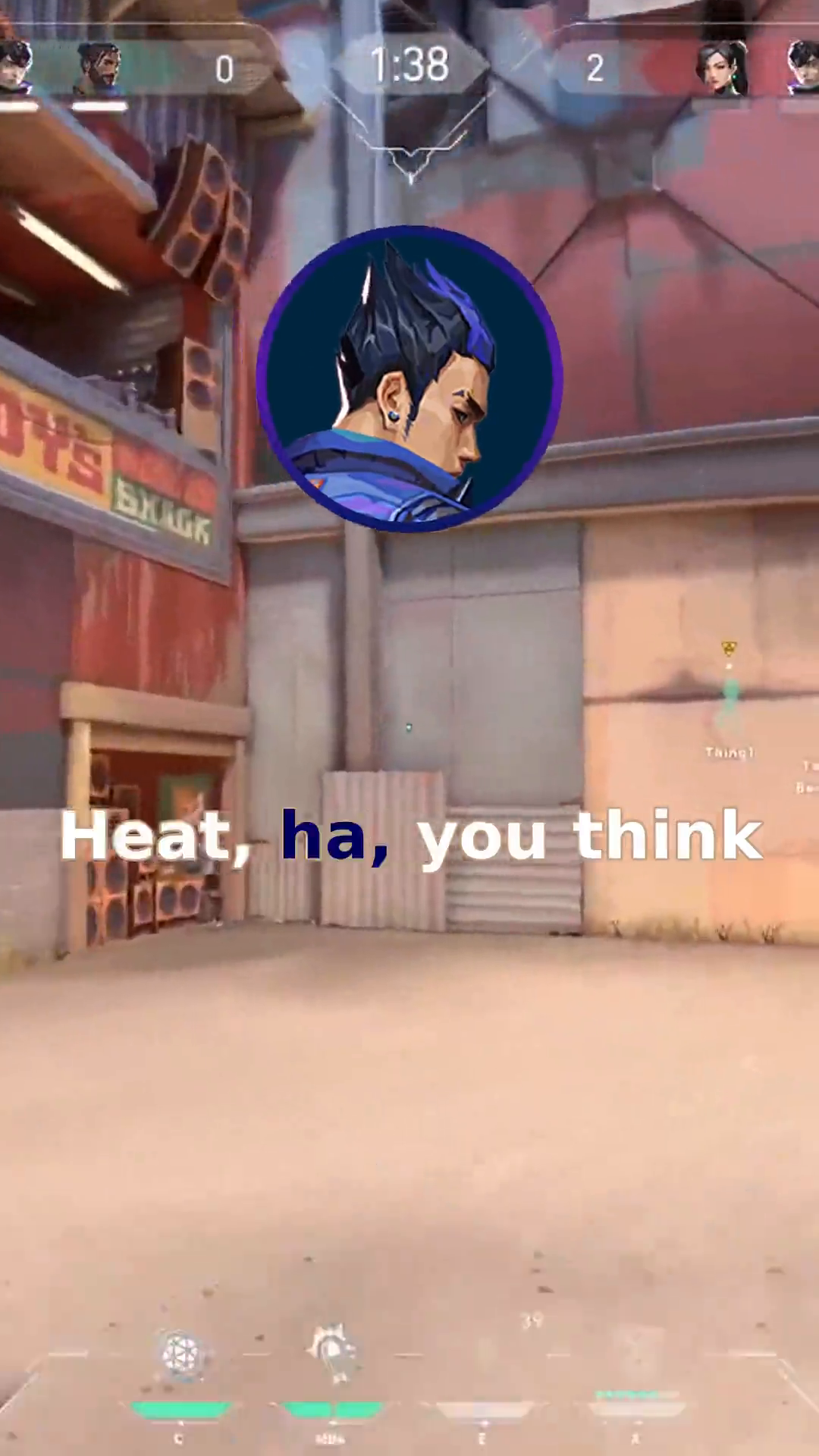
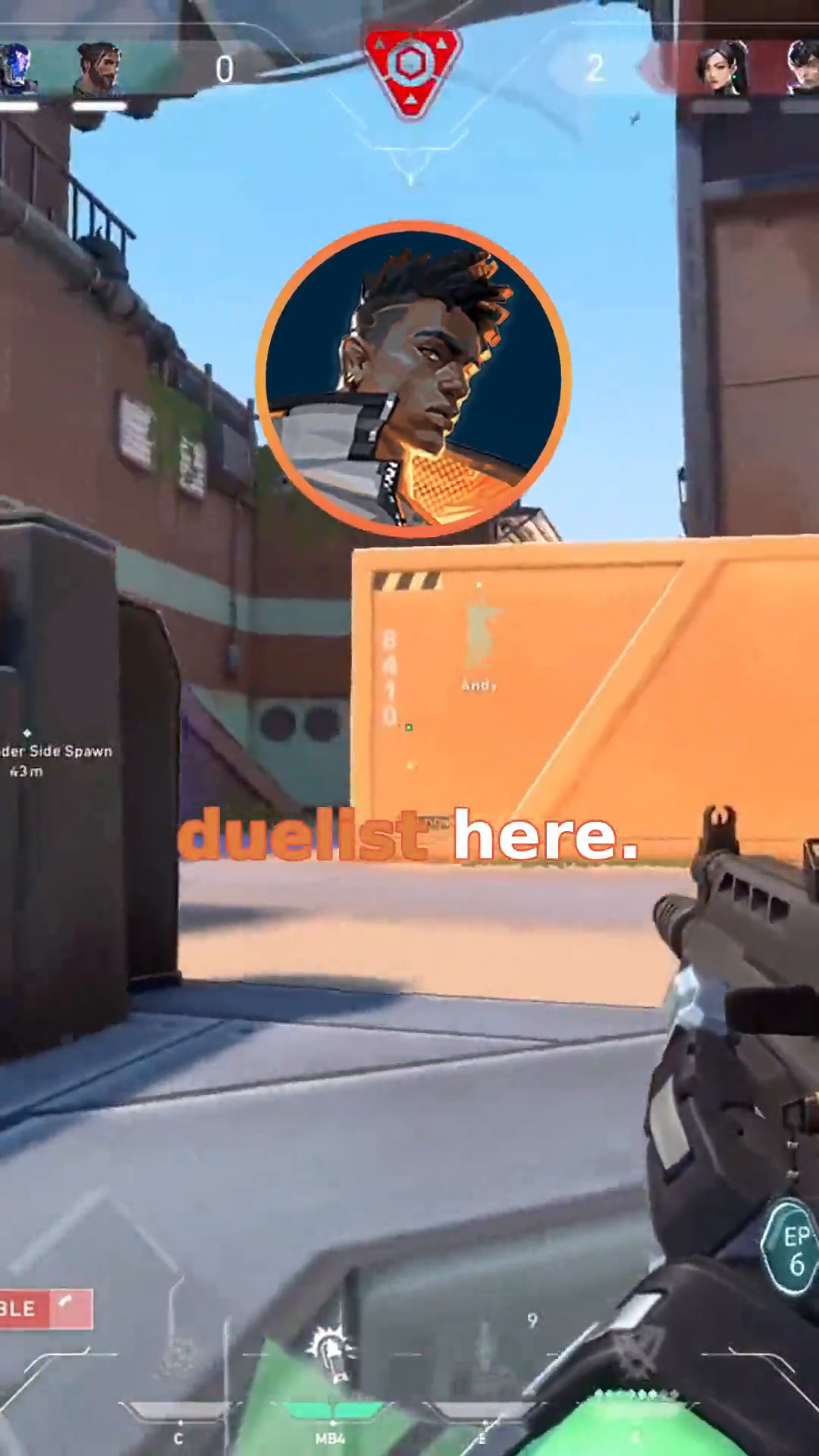
Three frames pulled from the video generated for "Duelist Debate" (Phoenix, Yoru, and Jett):
Short intro, agent circle with the scene title

A line in progress, karaoke subtitle lighting up

Another line, subtitle color changes based on which agent is speaking

The result live on this Short: Duelist Debate -- youtube.com/shorts/SX5Kme58aLU. On the channel, Shorts sit around 1.2 to 1.5k views. Nothing huge, but it's a channel that runs entirely on its own from day one, so the number that really matters is zero -- zero minutes spent on it once the cron job is launched.

The pipeline, in order

1. Writing the script -- Groq + Llama 3.3

Each run picks 3 to 4 random agents out of the 26 available, and sends Llama 3.3 70B (via Groq) a system prompt containing, for each chosen agent, a compact summary of their personality and their relationships with the other agents in the scene (these personas live in src/lore/, one file per agent). The prompt enforces strict rules: one short, punchy sentence per line, fair rotation between characters, humor first, and above all, pauses.

Concrete example with "Duelist Debate" -- Phoenix, Yoru, and Jett argue over who gets to play duelist, generated on July 6, 2026:

phoenix: I'm telling you, I've got the skills to play duelist this match.
yoru: Skills, you call burning things skills, Phoenix.
jett: I'm the fastest one here, I should play duelist.
phoenix: Fastest, but can you handle the heat, Jett [0.3] I doubt it.
yoru: Heat, ha, you think your flames are hotter than my rifts.
jett: This isn't about heat or flames, it's about speed and agility.
phoenix: Oh, I see, so now you're an expert on duelists, Yoru [0.3] that's rich.
yoru: At least I don't rely on cheap fire tricks.
jett: Cheap fire tricks, that's what you call Phoenix's abilities.
phoenix: Hey, my fire tricks have gotten us out of tight spots before [0.3] can't say the same for your rifts, Yoru.
yoru: Tight spots, you mean like the time I rifted us out of that trap.
jett: Enough, this is getting nowhere, let's just decide already.
phoenix: Fine, but I'm still saying I'm the best duelist here.
yoru: Please, you think you can take on the enemy team alone [0.3] I doubt it.
jett: I can take them on, no problem, I'm the fastest.
phoenix: Fastest, yeah, but can you outmaneuver them [0.3] that's the question.
yoru: Outmaneuver, ha, you think you can outmaneuver anyone, Phoenix.
jett: This is stupid, we're not going to agree on this.
phoenix: Fine, let's just play and see who comes out on top [0.3] I'm game if you are.
yoru: Bring it on, I'll show you what a real duelist looks like.
jett: I'm not backing down, I'm playing duelist.
phoenix: Oh, this should be good [0.3] let's see how you two do.
yoru: We'll see who comes out on top, won't we, Jett.
jett: Yeah, let's end this debate once and for all.
pause: 0.3
phoenix: Alright, let's get started then [0.3] may the best duelist win.
yoru: I'll make sure to burn you, Phoenix, not with fire, but with my rifts.
jett: I'll take you both down, no problem.

The pauses are the detail that makes the rhythm natural: [0.3] inserted mid-line creates a 0.3s silence in the audio without cutting off the agent's circle on screen, while a standalone pause: 1.0 line creates a real silence between two speakers, circle hidden. Without them, a TTS chaining lines back to back without breathing sounds robotic.

2. Giving it a voice -- Piper, one model per agent

Each agent has their own specifically trained Piper model (.onnx), stored in voices/<agent>/. The generated text goes through the matching model, which spits out a WAV. It's the same tech I use for custom voice training in general (see the Piper/Kaggle pipeline article) -- here applied directly in production, on the fly, on every video generation.

3. Karaoke subtitles -- generated ASS, color pulled from the icon

The subtitling isn't a plain .srt. It's an .ass (Advanced SubStation Alpha) file generated word by word, with a karaoke effect: each word lights up in a color as it's spoken, while the rest of the text stays in a neutral color. The accent color isn't fixed -- it's dynamically extracted from the icon of the speaking agent (a Python script runs PIL on the icon PNG, samples the non-transparent pixels, and returns the dominant colors). Result: Killjoy's subtitle lights up in purple, Jett's in teal, without a single color ever being hardcoded anywhere.

4. The audio-reactive circle -- one FFmpeg expression per frame

This is the trickiest part of the pipeline, and probably the one I'm most proud of. The round icon of the speaking agent doesn't stay static: it subtly zooms in and out to the rhythm of its own voice.

The computation reads the raw WAV of the line, calculates the RMS envelope (root mean square, a measure of signal energy) frame by frame at 60 fps, normalizes by the maximum, then smooths over a 3-frame window to avoid jerkiness. Each envelope value is then converted into a scale factor bounded by MAX_ZOOM_VARIATION (0.2, so ±20% around the base size).

The result of that computation is not applied through pixel-manipulating code -- it's translated into a massive FFmpeg conditional expression (lt(n,K)*val + between(n,K,K')*val + ..., one branch per frame group) that directly drives the scale parameter of the video filter. FFmpeg evaluates this expression on every render frame. For a line lasting a few seconds at 60 fps, that's quickly hundreds of branches in a single expression -- hence the STEP parameter that groups frames to limit depth.

5. Rendering per segment, then fisheye on the intro

Each line is rendered individually: video background (a random clip from bg-video/, trimmed to the right duration), the agent circle on top with audio-reactive zoom, subtitles burned in via FFmpeg's ass filter, TTS audio mixed with the background gameplay sound.

The very first segment gets special treatment: a fisheye distortion that gradually fades over the first 20% of frames (lenscorrection filter evaluated frame by frame, plus a tmix=frames=3 that blends adjacent frames to simulate motion blur), synced with a "whoosh" sound effect. That's the intro transition that makes the camera feel like it's "entering" the scene.

6. Concatenation and final mix

All segments are concatenated end to end, and the background music (Sneaky Snitch, Kevin MacLeod, Creative Commons license) is mixed in on top with audio ducking -- a sidechain compression that automatically lowers the music volume while an agent is speaking, and raises it back during silences. Everything runs in 60 fps from beginning to end, no framerate conversion between steps.

7. Automatic publishing

The run-cron.sh script, launched by a standard cron job, activates the Python environment, loads the .env, and runs bun src/workflow.ts --upload. The --upload flag additionally triggers metadata generation (title, description, tags) and calls uploaders/upload.py, which publishes the video to YouTube and Instagram via two separate scripts (uploaders/youtube/upload.py and uploaders/instagram/). The entire chain, from the LLM prompt to the video being online, runs without human intervention.

Why TypeScript/Bun instead of an all-Python thing

The choice isn't ideological -- it's that Bun gives direct, fast access to Bun.spawn to drive FFmpeg as a subprocess, strong typing on the pipeline's data structures (Phrase, SegmentInfo), and a runtime that starts much faster than Node for a script that runs on cron every few hours. The only two Python bits in the project are where Python is genuinely the best tool: PIL for color extraction, and the upload APIs (google-api-python-client for YouTube, the Instagram Graph API stack for IG).

What this illustrates

This project is a good example of what you can build today with entirely free or open-source building blocks: a fast, free LLM through the Groq API, a local TTS engine that runs without a dedicated GPU, FFmpeg for all the video rendering -- and the glue is just a few hundred lines of TypeScript. None of these blocks are new individually. What makes the pipeline is the arrangement: generating a coherent script with real character relationships, turning it into expressive audio with natural pauses, syncing a visual render to the energy of that audio frame by frame, and automating the entire chain up to publication.


Resources

3 key points

  1. The script is generated by an LLM (Groq/Llama 3.3) with per-agent personas and relationships, not a simple list of pre-written jokes.
  2. The agent circle zoom is driven by an FFmpeg expression computed frame by frame from the WAV's RMS envelope -- no classic keyframe animation.
  3. The entire chain, from prompt to YouTube/Instagram post, runs through a single cron job without any human intervention.

valorant-short-maker : le pipeline qui génère mes shorts Valorant tout seul

Groq/Llama pour le script, Piper pour les voix, FFmpeg pour tout le reste. Comment un cron job produit et publie une vidéo par jour sur @valorant_agents, de A à Z.

valorant-short-maker : le pipeline qui génère mes shorts Valorant tout seul

Depuis quelques mois, une chaîne YouTube tourne sans que j'y touche : @valorant_agents. Des agents Valorant qui se chambrent entre deux rounds, doublés, sous-titrés en karaoké, publiés en Shorts. Tout est généré par valorant-short-maker, un pipeline TypeScript/Bun qui tourne en cron et publie sans que personne n'ait à cliquer sur quoi que ce soit.

Voici comment ça marche, étape par étape.

Ce que ça donne

Trois frames extraites de la vidéo générée pour "Duelist Debate" (Phoenix, Yoru et Jett) :

Intro d'un short, cercle d'agent avec le titre de la scène

Une réplique en cours, sous-titre karaoké qui s'illumine

Une autre réplique, la couleur du sous-titre change selon l'agent

Le résultat en live sur ce Short : Duelist Debate -- youtube.com/shorts/SX5Kme58aLU. Sur la chaîne, les Shorts tournent autour de 1,2 à 1,5k vues. Rien d'énorme, mais c'est une chaîne qui tourne toute seule depuis le début, donc le nombre qui compte vraiment c'est zéro -- zéro minute passée dessus une fois le cron lancé.

Le pipeline, dans l'ordre

1. Écrire le script -- Groq + Llama 3.3

Chaque run pioche 3 à 4 agents au hasard parmi les 26 disponibles, et envoie à Llama 3.3 70B (via Groq) un prompt système qui contient, pour chaque agent choisi, un résumé compact de sa personnalité et de ses relations avec les autres agents présents dans la scène (ces personas vivent dans src/lore/, un fichier par agent). Le prompt impose des règles précises : une phrase courte et percutante par réplique, rotation équitable entre les personnages, humour en priorité, et surtout des pauses.

Exemple concret avec "Duelist Debate" -- Phoenix, Yoru et Jett se disputent pour savoir qui jouera duelist, généré le 6 juillet 2026 :

phoenix: I'm telling you, I've got the skills to play duelist this match.
yoru: Skills, you call burning things skills, Phoenix.
jett: I'm the fastest one here, I should play duelist.
phoenix: Fastest, but can you handle the heat, Jett [0.3] I doubt it.
yoru: Heat, ha, you think your flames are hotter than my rifts.
jett: This isn't about heat or flames, it's about speed and agility.
phoenix: Oh, I see, so now you're an expert on duelists, Yoru [0.3] that's rich.
yoru: At least I don't rely on cheap fire tricks.
jett: Cheap fire tricks, that's what you call Phoenix's abilities.
phoenix: Hey, my fire tricks have gotten us out of tight spots before [0.3] can't say the same for your rifts, Yoru.
yoru: Tight spots, you mean like the time I rifted us out of that trap.
jett: Enough, this is getting nowhere, let's just decide already.
phoenix: Fine, but I'm still saying I'm the best duelist here.
yoru: Please, you think you can take on the enemy team alone [0.3] I doubt it.
jett: I can take them on, no problem, I'm the fastest.
phoenix: Fastest, yeah, but can you outmaneuver them [0.3] that's the question.
yoru: Outmaneuver, ha, you think you can outmaneuver anyone, Phoenix.
jett: This is stupid, we're not going to agree on this.
phoenix: Fine, let's just play and see who comes out on top [0.3] I'm game if you are.
yoru: Bring it on, I'll show you what a real duelist looks like.
jett: I'm not backing down, I'm playing duelist.
phoenix: Oh, this should be good [0.3] let's see how you two do.
yoru: We'll see who comes out on top, won't we, Jett.
jett: Yeah, let's end this debate once and for all.
pause: 0.3
phoenix: Alright, let's get started then [0.3] may the best duelist win.
yoru: I'll make sure to burn you, Phoenix, not with fire, but with my rifts.
jett: I'll take you both down, no problem.

Les pauses sont le détail qui rend le rythme naturel : [0.3] inséré au milieu d'une réplique crée un silence de 0.3s dans le fichier audio sans couper le cercle de l'agent à l'écran, alors qu'une ligne pause: 1.0 à part entière crée un vrai silence entre deux locuteurs, cercle caché. Sans ça, un TTS qui enchaîne les répliques sans respirer sonne robotique.

2. Donner une voix -- Piper, un modèle par agent

Chaque agent a son propre modèle Piper (.onnx) entraîné spécifiquement, stocké dans voices/<agent>/. Le texte généré passe dans le modèle correspondant, ce qui sort un WAV. C'est la même techno que j'utilise pour le training de voix custom en général (voir l'article sur le pipeline Piper/Kaggle) -- ici appliquée directement en prod, à la volée, à chaque génération de vidéo.

3. Sous-titres karaoké -- ASS généré, couleur extraite de l'icône

Le sous-titrage n'est pas un simple .srt. C'est un fichier .ass (Advanced SubStation Alpha) généré mot par mot, avec un effet karaoké : chaque mot s'illumine dans une couleur au fur et à mesure qu'il est prononcé, pendant que le reste du texte reste dans une couleur neutre. La couleur d'accent n'est pas fixe -- elle est extraite dynamiquement de l'icône de l'agent qui parle (un script Python fait tourner PIL sur le PNG de l'icône, échantillonne les pixels non-transparents, et renvoie les couleurs dominantes). Résultat : le sous-titre de Killjoy s'illumine en violet, celui de Jett en bleu-vert, sans qu'aucune couleur n'ait été codée en dur quelque part.

4. Le cercle audio-réactif -- une expression FFmpeg par frame

C'est la partie la plus tordue du pipeline, et probablement celle dont je suis le plus fier. L'icône ronde de l'agent qui parle ne reste pas statique : elle zoome et dézoome légèrement au rythme de sa propre voix.

Le calcul se fait en lisant le WAV brut de la réplique, en calculant l'enveloppe RMS (root mean square, une mesure de l'énergie du signal) frame par frame à 60 fps, en normalisant par le maximum, puis en lissant sur une fenêtre de 3 frames pour éviter les à-coups. Chaque valeur d'enveloppe est ensuite convertie en un facteur d'échelle borné par MAX_ZOOM_VARIATION (0.2, donc ±20% autour de la taille de base).

Le résultat de ce calcul n'est pas appliqué via du code qui manipule des pixels -- c'est traduit en une immense expression conditionnelle FFmpeg (lt(n,K)*val + between(n,K,K')*val + ..., une branche par groupe de frames) qui pilote directement le paramètre scale du filtre vidéo. FFmpeg évalue cette expression à chaque frame du rendu. Pour une réplique de quelques secondes à 60 fps, ça fait vite des centaines de branches dans une seule expression -- d'où le paramètre STEP qui regroupe les frames pour limiter la profondeur.

5. Rendu par segment, puis fisheye sur l'intro

Chaque réplique est rendue individuellement : fond vidéo (extrait aléatoire d'un des clips de gameplay dans bg-video/, coupé à la bonne durée), cercle de l'agent par-dessus avec le zoom audio-réactif, sous-titres incrustés via le filtre ass d'FFmpeg, audio TTS mixé avec le son du gameplay en fond.

Le tout premier segment reçoit un traitement spécial : une distorsion fisheye qui se résorbe progressivement sur les 20% premiers frames (filtre lenscorrection évalué frame par frame, plus un tmix=frames=3 qui mélange les frames adjacentes pour simuler du motion blur), synchronisée avec un bruit de "whoosh". C'est la transition d'intro qui donne l'impression que la caméra "rentre" dans la scène.

6. Concaténation et mixage final

Tous les segments sont concaténés bout à bout, la musique de fond (Sneaky Snitch, Kevin MacLeod, licence Creative Commons) est mixée par-dessus avec du ducking audio -- une compression sidechain qui baisse automatiquement le volume de la musique pendant qu'un agent parle, et qui remonte pendant les silences. Le tout tourne en 60 fps de bout en bout, aucune conversion de framerate entre les étapes.

7. Publication automatique

Le script run-cron.sh, lancé par un cron classique, active l'environnement Python, charge le .env, et lance bun src/workflow.ts --upload. Le flag --upload déclenche en plus la génération de métadonnées (titre, description, tags) et appelle uploaders/upload.py, qui publie la vidéo sur YouTube et Instagram via deux scripts séparés (uploaders/youtube/upload.py et uploaders/instagram/). Toute la chaîne, du prompt LLM à la vidéo en ligne, tourne sans intervention humaine.

Pourquoi TypeScript/Bun plutôt qu'un truc tout Python

Le choix n'est pas idéologique -- c'est que Bun donne un accès direct et rapide à Bun.spawn pour piloter FFmpeg en sous-processus, un typage fort sur les structures de données du pipeline (Phrase, SegmentInfo), et un runtime largement plus rapide au démarrage que Node pour un script qui tourne en cron toutes les X heures. Les deux seuls bouts de Python dans le projet sont là où Python est réellement le mieux outillé : PIL pour l'extraction de couleurs, et les APIs d'upload (google-api-python-client pour YouTube, la stack Instagram Graph API pour IG).

Ce que ça illustre

Ce projet est un bon exemple de ce qu'on peut construire aujourd'hui avec des briques entièrement gratuites ou open source : un LLM rapide et gratuit via l'API Groq, un moteur TTS local qui tourne sans GPU dédié, FFmpeg pour tout le rendu vidéo -- et le liant, ce n'est que quelques centaines de lignes de TypeScript. Aucune de ces briques n'est nouvelle individuellement. Ce qui fait le pipeline, c'est l'agencement : générer un script cohérent avec de vraies relations entre personnages, le transformer en audio expressif avec des pauses naturelles, synchroniser un rendu visuel sur l'énergie de cet audio frame par frame, et automatiser toute la chaîne jusqu'à la publication.


Ressources

3 points clés

  1. Le script est généré par un LLM (Groq/Llama 3.3) avec des personas et relations par agent, pas une simple liste de blagues pré-écrites.
  2. Le zoom du cercle d'agent est piloté par une expression FFmpeg calculée frame par frame à partir de l'enveloppe RMS du WAV -- pas d'animation par keyframes classique.
  3. Toute la chaîne, du prompt au post YouTube/Instagram, tourne via un seul cron job sans intervention humaine.

valorant-short-maker:自动生成我 Valorant Shorts 的流水线

Groq/Llama 写剧本,Piper 配音,FFmpeg 搞定其余一切。一个 cron job 如何每天从零到一在 @valorant_agents 上生产并发布一条视频。

valorant-short-maker:自动生成我 Valorant Shorts 的流水线

几个月来,一个 YouTube 频道一直在我不插手的情况下自己运转:@valorant_agents。Valorant 特工们在两局之间互怼,有配音,有卡拉OK字幕,以 Shorts 形式发布。一切都是 valorant-short-maker 生成的----一个 TypeScript/Bun 流水线,通过 cron 定时运行,无需任何人点击任何东西就能发布。

下面一步步拆解它是怎么运作的。

效果展示

从"Duelist Debate"(Phoenix、Yoru 和 Jett)生成的视频中截取的三帧:

Shorts 开场,特工圆形图标和场景标题

一句台词进行中,卡拉OK字幕亮起

另一句台词,字幕颜色随说话的特工变化

这个 Short 的成品:Duelist Debate -- youtube.com/shorts/SX5Kme58aLU。频道上每个 Short 大约 1.2 到 1.5k 播放量。不算大,但这是一个从一开始就完全自主运转的频道,真正重要的数字是零----cron job 启动后就再也没花过一分钟在上面。

流水线,按顺序

1. 写剧本----Groq + Llama 3.3

每次运行会从 26 个可选特工中随机选 3 到 4 个,然后向 Llama 3.3 70B(通过 Groq)发送一个系统提示词,提示词中包含每位入选特工的个性简述以及他们与场景中其他特工的关系(这些人设存在于 src/lore/ 目录下,每个特工一个文件)。提示词强制约束:每句台词短小有力,角色间公平轮换,幽默优先,最重要的是----停顿。

以"Duelist Debate"为例----Phoenix、Yoru 和 Jett 争论谁该玩决斗者,生成于 2026 年 7 月 6 日:

phoenix: I'm telling you, I've got the skills to play duelist this match.
yoru: Skills, you call burning things skills, Phoenix.
jett: I'm the fastest one here, I should play duelist.
phoenix: Fastest, but can you handle the heat, Jett [0.3] I doubt it.
yoru: Heat, ha, you think your flames are hotter than my rifts.
jett: This isn't about heat or flames, it's about speed and agility.
phoenix: Oh, I see, so now you're an expert on duelists, Yoru [0.3] that's rich.
yoru: At least I don't rely on cheap fire tricks.
jett: Cheap fire tricks, that's what you call Phoenix's abilities.
phoenix: Hey, my fire tricks have gotten us out of tight spots before [0.3] can't say the same for your rifts, Yoru.
yoru: Tight spots, you mean like the time I rifted us out of that trap.
jett: Enough, this is getting nowhere, let's just decide already.
phoenix: Fine, but I'm still saying I'm the best duelist here.
yoru: Please, you think you can take on the enemy team alone [0.3] I doubt it.
jett: I can take them on, no problem, I'm the fastest.
phoenix: Fastest, yeah, but can you outmaneuver them [0.3] that's the question.
yoru: Outmaneuver, ha, you think you can outmaneuver anyone, Phoenix.
jett: This is stupid, we're not going to agree on this.
phoenix: Fine, let's just play and see who comes out on top [0.3] I'm game if you are.
yoru: Bring it on, I'll show you what a real duelist looks like.
jett: I'm not backing down, I'm playing duelist.
phoenix: Oh, this should be good [0.3] let's see how you two do.
yoru: We'll see who comes out on top, won't we, Jett.
jett: Yeah, let's end this debate once and for all.
pause: 0.3
phoenix: Alright, let's get started then [0.3] may the best duelist win.
yoru: I'll make sure to burn you, Phoenix, not with fire, but with my rifts.
jett: I'll take you both down, no problem.

停顿是让节奏自然的细节:台词中间插入的 [0.3] 会在音频中产生 0.3 秒的静音,而不会打断屏幕上特工的圆形图标;而独立的 pause: 1.0 行则会在两个说话者之间产生真正的静音,图标隐藏。没有这些,TTS 连珠炮似的朗读会听上去像机器人。

2. 配音----Piper,每个特工一个模型

每个特工都有自己专门训练的 Piper 模型(.onnx),存储在 voices/<agent>/ 下。生成的文本通过对应模型,输出 WAV 音频。这就是我一般用来训练自定义语音的技术(见 Piper/Kaggle 流水线文章)----这里直接应用在生产环境,实时生成,每次生成视频都会用到。

3. 卡拉OK字幕----动态生成 ASS,从图标提取颜色

字幕不是简单的 .srt。它是一个逐词生成的 .ass(Advanced SubStation Alpha)文件,带有卡拉OK效果:每个词在朗读时以某种颜色高亮,其余文本保持中性色。高亮颜色不是固定的----它是从说话特工的图标中动态提取的(Python 脚本用 PIL 读取图标的 PNG,采样非透明像素,返回主色调)。结果:Killjoy 的字幕亮起紫色,Jett 的字幕亮起青蓝色,没有任何颜色被硬编码。

4. 音频响应式圆圈----每帧一个 FFmpeg 表达式

这是流水线中最棘手的部分,可能也是我最引以为豪的部分。说话特工的圆形图标不是静止的:它会随着自己声音的节奏微微缩放。

计算过程是读取台词的原始 WAV,逐帧(60 fps)计算 RMS 包络(均方根,信号能量的度量),按最大值归一化,然后在 3 帧窗口上平滑以避免抖动。每个包络值随后被转换为一个缩放因子,受 MAX_ZOOM_VARIATION 约束(0.2,即基准大小的 ±20%)。

计算结果不是通过操作像素的代码来应用的----它被翻译成一个巨大的 FFmpeg 条件表达式(lt(n,K)*val + between(n,K,K')*val + ...,每组帧一个分支),直接驱动视频滤镜的 scale 参数。FFmpeg 在渲染的每一帧上计算这个表达式。对于 60 fps 下几秒钟的台词,一个表达式里很快就有了数百个分支----因此有了 STEP 参数来将帧分组以限制深度。

5. 逐段渲染,开场加鱼眼效果

每句台词单独渲染:视频背景(从 bg-video/ 中随机选一段游戏画面剪辑,裁剪到合适时长),上面叠加带有音频响应式缩放的特工圆圈,通过 FFmpeg 的 ass 滤镜烧录字幕,TTS 音频与背景游戏声音混合。

第一个片段有特殊处理:鱼眼畸变在前 20% 的帧中逐渐消退(每帧计算的 lenscorrection 滤镜,外加 tmix=frames=3 混合相邻帧来模拟运动模糊),与"嗖"声效果同步。这就是让镜头"进入"场景的开场过渡。

6. 拼接和最终混音

所有片段首尾拼接,背景音乐(Sneaky Snitch,Kevin MacLeod,Creative Commons 许可)通过音频闪避混入----侧链压缩在特工说话时自动降低音乐音量,在静音时回升。整个流程从头到尾都是 60 fps,步骤间没有帧率转换。

7. 自动发布

run-cron.sh 脚本由标准 cron 任务启动,激活 Python 环境,加载 .env,运行 bun src/workflow.ts --upload。--upload 标志还触发元数据生成(标题、描述、标签),并调用 uploaders/upload.py,通过两个独立的脚本(uploaders/youtube/upload.py 和 uploaders/instagram/)将视频发布到 YouTube 和 Instagram。整条链路,从 LLM 提示词到视频上线,完全无需人工干预。

为什么用 TypeScript/Bun 而不是全 Python

这个选择不是意识形态----而是因为 Bun 能通过 Bun.spawn 直接快速地驱动 FFmpeg 作为子进程,为流水线的数据结构(Phrase、SegmentInfo)提供强类型,并且启动速度比 Node 快得多,对于每隔几小时通过 cron 运行的脚本来说很重要。项目中仅有的两处 Python 代码恰恰是 Python 最擅长的地方:PIL 用于颜色提取,以及上传 API(YouTube 用 google-api-python-client,IG 用 Instagram Graph API 栈)。

这说明了什么

这个项目是一个很好的例子,展示了如今只用完全免费或开源的组件能搭建出什么:通过 Groq API 接入快速免费的 LLM,无需专用 GPU 的本地 TTS 引擎,FFmpeg 搞定所有视频渲染----而粘合剂只是几百行 TypeScript。这些组件单独来看都不是新东西。让流水线成立的是编排:生成一个包含真实角色关系的一致剧本,将其转化为带有自然停顿的表现力音频,逐帧将视觉渲染同步到该音频的能量上,并自动化整条链路直到发布。


资源

3 个关键点

  1. 剧本由 LLM(Groq/Llama 3.3)基于每个特工的人设和关系生成,不是简单的预写笑话语录。
  2. 特工圆圈的缩放由从 WAV RMS 包络逐帧计算的 FFmpeg 表达式驱动----不是传统的关键帧动画。
  3. 整条链路,从提示词到 YouTube/Instagram 发布,通过一个 cron job 运行,零人工干预。

valorant-short-maker: Valorantのショート動画を自動生成するパイプライン

Groq/Llamaでスクリプト、Piperで音声、FFmpegでそれ以外全部。cronジョブが@valorant_agentsに毎日1本の動画を企画から公開まで全自動で作り上げる仕組み。

valorant-short-maker: Valorantのショート動画を自動生成するパイプライン

ここ数ヶ月、俺が一切触らなくても勝手に回ってるYouTubeチャンネルがある: @valorant_agents。Valorantのエージェントたちがラウンドの合間に言い合いをして、吹き替えされて、カラオケ字幕付きでショート動画として公開されてる。全部 valorant-short-maker が生成してる。TypeScript/Bunのパイプラインがcronで回って、誰もクリックしなくても公開まで済ませてくれる。

どう動いてるか、ステップごとに解説する。

成果物

"Duelist Debate"(フェニックス、ヨル、ジェット)の動画から抜き出した3フレーム:

ショートのイントロ、エージェントの丸アイコンとシーンタイトル

セリフが進行中、カラオケ字幕が光る

別のセリフ、話しているエージェントによって字幕の色が変わる

このショートの実物: Duelist Debate -- youtube.com/shorts/SX5Kme58aLU。チャンネルのショートは大体1.2〜1.5kビューくらい。大した数字じゃないけど、最初から完全自動で回ってるチャンネルだから、本当に大事な数字はゼロだ -- cronを起動してから費やした時間ゼロ分。

パイプライン、順を追って

1. スクリプトを書く -- Groq + Llama 3.3

毎回の実行で、26人のエージェントからランダムに3〜4人を選び、Llama 3.3 70B(Groq経由)にシステムプロンプトを送る。プロンプトには、選ばれた各エージェントの性格の簡潔な要約と、シーンに登場する他のエージェントとの関係性が含まれている(このペルソナデータは src/lore/ にエージェントごとのファイルとして管理されてる)。プロンプトは厳格なルールを課す: 1行は短くパンチの効いた文、キャラクター間の公平なローテーション、ユーモア優先、そして何より -- 間(ポーズ)。

具体例として "Duelist Debate" -- フェニックス、ヨル、ジェットが誰がデュエリストをやるかで言い争うシーン、2026年7月6日生成:

phoenix: I'm telling you, I've got the skills to play duelist this match.
yoru: Skills, you call burning things skills, Phoenix.
jett: I'm the fastest one here, I should play duelist.
phoenix: Fastest, but can you handle the heat, Jett [0.3] I doubt it.
yoru: Heat, ha, you think your flames are hotter than my rifts.
jett: This isn't about heat or flames, it's about speed and agility.
phoenix: Oh, I see, so now you're an expert on duelists, Yoru [0.3] that's rich.
yoru: At least I don't rely on cheap fire tricks.
jett: Cheap fire tricks, that's what you call Phoenix's abilities.
phoenix: Hey, my fire tricks have gotten us out of tight spots before [0.3] can't say the same for your rifts, Yoru.
yoru: Tight spots, you mean like the time I rifted us out of that trap.
jett: Enough, this is getting nowhere, let's just decide already.
phoenix: Fine, but I'm still saying I'm the best duelist here.
yoru: Please, you think you can take on the enemy team alone [0.3] I doubt it.
jett: I can take them on, no problem, I'm the fastest.
phoenix: Fastest, yeah, but can you outmaneuver them [0.3] that's the question.
yoru: Outmaneuver, ha, you think you can outmaneuver anyone, Phoenix.
jett: This is stupid, we're not going to agree on this.
phoenix: Fine, let's just play and see who comes out on top [0.3] I'm game if you are.
yoru: Bring it on, I'll show you what a real duelist looks like.
jett: I'm not backing down, I'm playing duelist.
phoenix: Oh, this should be good [0.3] let's see how you two do.
yoru: We'll see who comes out on top, won't we, Jett.
jett: Yeah, let's end this debate once and for all.
pause: 0.3
phoenix: Alright, let's get started then [0.3] may the best duelist win.
yoru: I'll make sure to burn you, Phoenix, not with fire, but with my rifts.
jett: I'll take you both down, no problem.

間こそが自然なリズムを作る細部だ。セリフの途中に入った [0.3] は画面上のエージェントの丸を切らずに音声に0.3秒の無音を作り、独立行の pause: 1.0 は二人の話者の間に本当の沈黙を作って丸を隠す。これがないと、TTSが息継ぎなしでセリフを連打してロボットみたいになる。

2. 声を与える -- Piper、エージェントごとに1モデル

各エージェントは専用に学習されたPiperモデル(.onnx)を持っていて、voices/<agent>/ に保存されている。生成されたテキストが該当モデルを通り、WAVが出てくる。俺が普段カスタム音声のトレーニングに使ってるのと同じ技術だ(Piper/Kaggleパイプラインの記事参照) -- ここではそのまま本番で、その場で、動画生成のたびに適用される。

3. カラオケ字幕 -- ASS生成、アイコンから色抽出

字幕は単なる .srt じゃない。単語単位で生成された .ass(Advanced SubStation Alpha)ファイルで、カラオケ効果が入ってる: 発話される単語ごとに色が点灯し、残りのテキストは中間色のままだ。強調色は固定じゃなくて -- 話しているエージェントのアイコンから動的に抽出される(PythonスクリプトがPILでアイコンのPNGを読み込み、非透明ピクセルをサンプリングして主要色を返す)。結果: Killjoyの字幕は紫色に、Jettのは青緑に光る。どこにも色がハードコードされてない。

4. 音声反応サークル -- フレームごとに1つのFFmpeg式

パイプラインで一番めんどくさくて、かつ一番誇らしい部分。話してるエージェントの丸いアイコンは静止してない: 自分の声のリズムに合わせて微妙にズームイン・アウトする。

計算はセリフの生WAVを読み、RMSエンベロープ(root mean square、信号エネルギーの測定値)を60fpsでフレームごとに計算し、最大値で正規化し、3フレームウィンドウで平滑化してガタつきを防ぐ。各エンベロープ値は MAX_ZOOM_VARIATION(0.2、基本サイズの±20%)で制限されたスケール係数に変換される。

この計算結果はピクセルを操作するコードで適用されるんじゃない -- 巨大なFFmpeg条件式に変換され(lt(n,K)*val + between(n,K,K')*val + ...、フレームグループごとに1分岐)、ビデオフィルターの scale パラメータを直接駆動する。FFmpegがレンダリングの全フレームでこの式を評価する。60fpsで数秒のセリフなら、1つの式の中にすぐに数百の分岐ができる -- だからフレームをグループ化して深さを制限する STEP パラメータがある。

5. セグメントごとのレンダリング、イントロにfisheye

各セリフは個別にレンダリングされる: 動画背景(bg-video/のゲームプレイクリップからランダムに、適切な長さにカット)、その上に音声反応ズーム付きのエージェントの丸、FFmpegの ass フィルターで字幕を焼き込み、TTS音声を背景ゲームサウンドとミックス。

一番最初のセグメントだけ特別処理: 最初の20%フレームで徐々に消えるfisheye歪み(フレームごとの lenscorrection フィルター + 隣接フレームをブレンドしてモーションブラーをシミュレートする tmix=frames=3)、「whoosh」効果音と同期。これがカメラがシーンに「入っていく」ようなイントロのトランジションだ。

6. 結合と最終ミックス

全セグメントが端から端まで結合され、BGM(Sneaky Snitch, Kevin MacLeod, Creative Commonsライセンス)が オーディオダッキング でミックスされる -- サイドチェインコンプレッションがエージェントの発話中は自動的にBGM音量を下げ、無音中に戻す。全部が最初から最後まで60fpsで動き、ステップ間のフレームレート変換は一切ない。

7. 自動公開

標準的なcronで起動される run-cron.sh スクリプトがPython環境を有効化し、.env を読み込み、bun src/workflow.ts --upload を実行する。--upload フラグはさらにメタデータ(タイトル、説明、タグ)の生成をトリガーし、uploaders/upload.py を呼び出し、YouTubeとInstagramに別々のスクリプト(uploaders/youtube/upload.py と uploaders/instagram/)で動画を公開する。LLMプロンプトから動画がオンラインになるまで、全チェーンが人間の介入なしで回る。

なぜ全部PythonじゃなくてTypeScript/Bunなのか

思想的な選択じゃない -- Bunなら Bun.spawn でFFmpegをサブプロセスとして直接かつ高速に制御でき、パイプラインのデータ構造(Phrase, SegmentInfo)に強い型付けができて、数時間おきにcronで回るスクリプトとしてはNodeより圧倒的に起動が速いからだ。プロジェクトにPythonが2箇所だけあるのは、Pythonが本当に最適な場所だからだ: PILで色抽出、そしてアップロードAPI(YouTube用の google-api-python-client、IG用のInstagram Graph APIスタック)。

これが示すもの

このプロジェクトは、今日完全に無料かオープンソースのブロックだけで何が作れるかの良い例だ: Groq API経由の高速無料LLM、専用GPUなしで動くローカルTTSエンジン、全動画レンダリングにFFmpeg -- そしてつなぎ役はたった数百行のTypeScript。個々のブロックはどれも新しくない。パイプラインを成立させているのは組み合わせだ: 本物のキャラクター関係性を持った一貫性のあるスクリプトを生成し、自然な間のある表現豊かな音声に変換し、その音声のエネルギーにフレーム単位でビジュアルレンダリングを同期させ、公開までの全チェーンを自動化する。


リソース

3つの重要ポイント

  1. スクリプトはLLM(Groq/Llama 3.3)がエージェントごとのペルソナと関係性に基づいて生成する。あらかじめ書かれたジョークのリストじゃない。
  2. エージェントの丸のズームは、WAVのRMSエンベロープからフレームごとに計算されたFFmpeg式で駆動される -- 従来のキーフレームアニメーションじゃない。
  3. プロンプトからYouTube/Instagram投稿まで全チェーンが、1つのcronジョブだけで人間の介入なしに回る。

valorant-short-maker: 발로란트 쇼츠를 혼자서 만들어내는 파이프라인

Groq/Llama로 스크립트, Piper로 목소리, FFmpeg로 나머지 전부. 크론 잡이 @valorant_agents에 하루 한 편의 영상을 처음부터 끝까지 만들어 올리는 방법.

valorant-short-maker: 발로란트 쇼츠를 혼자서 만들어내는 파이프라인

몇 달째, 내가 손대지 않아도 혼자 돌아가는 유튜브 채널이 있다: @valorant_agents. 발로란트 에이전트들이 라운드 사이에 서로 디스하고, 더빙되고, 노래방 자막이 달려 쇼츠로 올라간다. 전부 valorant-short-maker가 만들어낸다. TypeScript/Bun 파이프라인이 크론으로 돌면서 아무도 클릭할 필요 없이 게시까지 다 해준다.

어떻게 돌아가는지 단계별로 설명할게.

결과물

"Duelist Debate" (Phoenix, Yoru, Jett) 영상에서 추출한 세 프레임:

쇼츠 인트로, 에이전트 원형과 장면 제목

대사 진행 중, 노래방 자막이 반짝임

다른 대사, 말하는 에이전트에 따라 자막 색상 변경

이 쇼츠 실물: Duelist Debate -- youtube.com/shorts/SX5Kme58aLU. 채널 영상들은 1.2~1.5k 뷰 정도 나온다. 대단한 숫자는 아니지만, 처음부터 완전 자동으로 돌아가는 채널이라는 게 포인트. 진짜 중요한 숫자는 0이다 -- 크론 한 번 돌려놓은 이후로 투자한 시간 0분.

파이프라인 순서대로

1. 스크립트 쓰기 -- Groq + Llama 3.3

매 실행마다 26명의 에이전트 중 3~4명을 랜덤으로 뽑고, Llama 3.3 70B (Groq 경유)에 시스템 프롬프트를 보낸다. 프롬프트에는 각 에이전트의 성격 요약과 장면 속 다른 에이전트들과의 관계가 담겨 있다 (이 페르소나들은 src/lore/에 에이전트별 파일로 존재한다). 프롬프트는 엄격한 규칙을 강제한다: 대사 한 줄은 짧고 강렬하게, 캐릭터 간 공평한 순번, 유머 우선, 그리고 무엇보다도 -- 쉼.

실제 예시로 "Duelist Debate" -- Phoenix, Yoru, Jett가 누가 듀얼리스트 할지 싸우는 장면, 2026년 7월 6일 생성:

phoenix: I'm telling you, I've got the skills to play duelist this match.
yoru: Skills, you call burning things skills, Phoenix.
jett: I'm the fastest one here, I should play duelist.
phoenix: Fastest, but can you handle the heat, Jett [0.3] I doubt it.
yoru: Heat, ha, you think your flames are hotter than my rifts.
jett: This isn't about heat or flames, it's about speed and agility.
phoenix: Oh, I see, so now you're an expert on duelists, Yoru [0.3] that's rich.
yoru: At least I don't rely on cheap fire tricks.
jett: Cheap fire tricks, that's what you call Phoenix's abilities.
phoenix: Hey, my fire tricks have gotten us out of tight spots before [0.3] can't say the same for your rifts, Yoru.
yoru: Tight spots, you mean like the time I rifted us out of that trap.
jett: Enough, this is getting nowhere, let's just decide already.
phoenix: Fine, but I'm still saying I'm the best duelist here.
yoru: Please, you think you can take on the enemy team alone [0.3] I doubt it.
jett: I can take them on, no problem, I'm the fastest.
phoenix: Fastest, yeah, but can you outmaneuver them [0.3] that's the question.
yoru: Outmaneuver, ha, you think you can outmaneuver anyone, Phoenix.
jett: This is stupid, we're not going to agree on this.
phoenix: Fine, let's just play and see who comes out on top [0.3] I'm game if you are.
yoru: Bring it on, I'll show you what a real duelist looks like.
jett: I'm not backing down, I'm playing duelist.
phoenix: Oh, this should be good [0.3] let's see how you two do.
yoru: We'll see who comes out on top, won't we, Jett.
jett: Yeah, let's end this debate once and for all.
pause: 0.3
phoenix: Alright, let's get started then [0.3] may the best duelist win.
yoru: I'll make sure to burn you, Phoenix, not with fire, but with my rifts.
jett: I'll take you both down, no problem.

쉼이야말로 자연스러운 리듬을 만드는 디테일이다. 대사 중간에 들어간 [0.3]은 화면의 에이전트 원형을 끊지 않으면서 오디오에 0.3초의 묵음을 만들고, 별도 줄의 pause: 1.0은 두 화자 사이에 진짜 묵음을 만들고 원형을 숨긴다. 이게 없으면 TTS가 숨 한 번 안 쉬고 대사를 쏟아내서 로봇처럼 들린다.

2. 목소리 입히기 -- Piper, 에이전트별 모델

각 에이전트마다 전용으로 훈련된 Piper 모델 (.onnx)이 voices/<agent>/에 저장되어 있다. 생성된 텍스트가 해당 모델을 통과하면 WAV가 나온다. 내가 커스텀 보이스 트레이닝에 쓰는 것과 같은 기술이다 (Piper/Kaggle 파이프라인 글 참고) -- 여기서는 바로 프로덕션에서, 그때그때, 매번 영상 생성 시 적용된다.

3. 노래방 자막 -- ASS 생성, 아이콘에서 색상 추출

자막은 그냥 .srt가 아니다. .ass (Advanced SubStation Alpha) 파일이 단어 단위로 생성되며 노래방 효과가 들어간다: 발음되는 단어마다 색상이 점등되고, 나머지 텍스트는 중립 색상으로 유지된다. 강조 색상은 고정이 아니라 -- 말하는 에이전트의 아이콘에서 동적으로 추출된다 (Python 스크립트가 PIL로 아이콘 PNG를 읽고, 투명하지 않은 픽셀을 샘플링해서 주요 색상을 반환한다). 결과: Killjoy 자막은 보라색으로, Jett은 청록색으로 빛난다. 어디에도 하드코딩된 색상은 없다.

4. 오디오 반응형 원형 -- 프레임당 FFmpeg 수식

파이프라인에서 가장 골치 아픈 부분이고, 아마 가장 자랑스러운 부분이기도 하다. 말하는 에이전트의 둥근 아이콘이 가만히 있지 않는다: 자기 목소리 리듬에 맞춰 살짝 확대/축소된다.

계산은 대사의 RAW WAV를 읽고, RMS 엔벨로프(root mean square, 신호 에너지 측정치)를 60fps로 프레임별 계산, 최대값으로 정규화, 그리고 끊김 방지를 위해 3프레임 윈도우로 스무딩한다. 각 엔벨로프 값은 MAX_ZOOM_VARIATION (0.2, 즉 기본 크기의 ±20%)로 제한된 스케일 팩터로 변환된다.

이 계산 결과는 픽셀을 직접 건드리는 코드가 아니라 -- 거대한 FFmpeg 조건식으로 번역되어 (lt(n,K)*val + between(n,K,K')*val + ..., 프레임 그룹당 한 분기) 비디오 필터의 scale 파라미터를 직접 제어한다. FFmpeg가 렌더링의 매 프레임마다 이 수식을 평가한다. 60fps로 몇 초짜리 대사면 금방 하나의 수식 안에 수백 개 분기가 생긴다 -- 그래서 프레임을 그룹화해 깊이를 제한하는 STEP 파라미터가 필요하다.

5. 세그먼트별 렌더링, 인트로에 fisheye

각 대사가 개별 렌더링된다: 비디오 배경 (bg-video/의 게임플레이 클립 중 랜덤으로, 알맞은 길이로 잘라서), 오디오 반응형 줌이 적용된 에이전트 원형을 위에 올리고, FFmpeg의 ass 필터로 자막을 입히고, TTS 오디오를 배경 게임플레이 사운드와 믹스한다.

맨 첫 번째 세그먼트는 특별 처리를 받는다: 처음 20% 프레임에 걸쳐 점점 사라지는 fisheye 왜곡 (프레임별 lenscorrection 필터 + 모션 블러를 흉내 내기 위해 인접 프레임을 블렌딩하는 tmix=frames=3), "whoosh" 효과음과 동기화. 이게 카메라가 장면 안으로 "진입"하는 듯한 인트로 전환이다.

6. 연결 및 최종 믹싱

모든 세그먼트가 끝에서 끝으로 연결되고, 배경 음악 (Sneaky Snitch, Kevin MacLeod, Creative Commons 라이선스)이 오디오 더킹과 함께 믹스된다 -- 사이드체인 컴프레션이 에이전트가 말하는 동안 음악 볼륨을 자동으로 낮추고, 묵음일 때 다시 올린다. 모든 게 처음부터 끝까지 60fps로 돌아가며, 단계 간 프레임레이트 변환은 없다.

7. 자동 게시

표준 크론으로 실행되는 run-cron.sh 스크립트가 Python 환경을 활성화하고, .env를 로드하고, bun src/workflow.ts --upload를 실행한다. --upload 플래그는 메타데이터 생성(제목, 설명, 태그)도 트리거하고 uploaders/upload.py를 호출해 YouTube와 Instagram에 각각 별도 스크립트(uploaders/youtube/upload.py와 uploaders/instagram/)로 영상을 게시한다. LLM 프롬프트부터 영상이 온라인에 올라가기까지 전 과정이 인간 개입 없이 돌아간다.

왜 Python 올인 대신 TypeScript/Bun인가

이념적인 선택이 아니다 -- Bun이 Bun.spawn으로 FFmpeg를 서브프로세스로 빠르고 직접 제어할 수 있고, 파이프라인 데이터 구조(Phrase, SegmentInfo)에 강력한 타입을 제공하며, 몇 시간마다 크론으로 도는 스크립트치고 시작 속도가 Node보다 훨씬 빠르기 때문이다. 프로젝트에 Python이 두 군데만 있는 건, Python이 진짜 최적의 도구인 곳이기 때문이다: PIL로 색상 추출, 그리고 업로드 API (google-api-python-client로 YouTube, Instagram Graph API 스택으로 IG).

이게 보여주는 것

이 프로젝트는 오늘날 완전 무료 혹은 오픈소스 블록만으로 뭘 만들 수 있는지 보여주는 좋은 예다: Groq API로 빠르고 공짜 LLM, 전용 GPU 없이 도는 로컬 TTS 엔진, 모든 비디오 렌더링에 FFmpeg -- 그리고 이걸 잇는 건 고작 몇백 줄 TypeScript. 개별 블록은 새로울 게 없다. 파이프라인을 만드는 건 조합이다: 진짜 캐릭터 관계가 담긴 일관된 스크립트 생성, 자연스러운 쉼이 있는 표현력 있는 오디오로 변환, 그 오디오의 에너지에 프레임 단위로 시각적 렌더링을 동기화, 그리고 게시까지 모든 체인 자동화.


리소스

핵심 3가지

  1. 스크립트는 LLM (Groq/Llama 3.3)이 에이전트별 페르소나와 관계를 바탕으로 생성한다. 미리 써둔 농담 리스트가 아니다.
  2. 에이전트 원형 줌은 WAV의 RMS 엔벨로프에서 프레임별로 계산된 FFmpeg 수식으로 제어된다 -- 일반적인 키프레임 애니메이션이 아니다.
  3. 프롬프트부터 YouTube/Instagram 게시까지 전 체인이 단일 크론 잡 하나로 인간 개입 없이 돌아간다.

valorant-short-maker: Valorant short'larımı kendi kendine üreten pipeline

Groq/Llama senaryo için, Piper sesler için, FFmpeg geri kalan her şey için. Bir cron işi @valorant_agents'te A'dan Z'ye günde bir video nasıl üretip yayınlıyor.

valorant-short-maker: Valorant short'larımı kendi kendine üreten pipeline

Birkaç aydır, hiç dokunmadığım halde kendi kendine çalışan bir YouTube kanalı var: @valorant_agents. Valorant ajanları rauntlar arasında birbirine laf sokuyor, seslendiriliyor, karaoke altyazılı, Shorts olarak yayınlanıyor. Her şeyi valorant-short-maker üretiyor; cron'da çalışan, kimsenin hiçbir şeye tıklamasına gerek kalmadan yayın yapan bir TypeScript/Bun pipeline'ı.

İşte adım adım nasıl çalıştığı.

Ortaya çıkan şey

"Duelist Debate" (Phoenix, Yoru ve Jett) için üretilen videodan alınmış üç kare:

Short girişi, ajan dairesi ve sahne başlığı

Devam eden bir replik, karaoke altyazı parlıyor

Başka bir replik, konuşan ajana göre altyazı rengi değişiyor

Bu Short'un canlı hali: Duelist Debate -- youtube.com/shorts/SX5Kme58aLU. Kanaldaki Short'lar 1,2 ila 1,5k civarında izleniyor. Devasa rakamlar değil, ama baştan beri tamamen kendi başına dönen bir kanal olduğu için asıl önemli sayı sıfır -- cron başlatıldıktan sonra üzerinde harcanan sıfır dakika.

Pipeline, sırasıyla

1. Senaryoyu yazmak -- Groq + Llama 3.3

Her çalıştırmada 26 ajandan rastgele 3–4 tanesi seçilir ve Llama 3.3 70B'ye (Groq üzerinden) bir sistem prompt'u gönderilir. Bu prompt, seçilen her ajan için kişiliğinin ve sahnedeki diğer ajanlarla ilişkilerinin kompakt bir özetini içerir (bu personalar src/lore/ altında, ajan başına bir dosya halinde durur). Prompt katı kurallar dayatır: replik başına kısa ve vurucu bir cümle, karakterler arasında adil dönüşüm, mizah öncelikli ve hepsinden önemlisi -- duraklamalar.

"Duelist Debate" ile somut örnek -- Phoenix, Yoru ve Jett kimin duelist oynayacağını tartışıyor, 6 Temmuz 2026'da üretildi:

phoenix: I'm telling you, I've got the skills to play duelist this match.
yoru: Skills, you call burning things skills, Phoenix.
jett: I'm the fastest one here, I should play duelist.
phoenix: Fastest, but can you handle the heat, Jett [0.3] I doubt it.
yoru: Heat, ha, you think your flames are hotter than my rifts.
jett: This isn't about heat or flames, it's about speed and agility.
phoenix: Oh, I see, so now you're an expert on duelists, Yoru [0.3] that's rich.
yoru: At least I don't rely on cheap fire tricks.
jett: Cheap fire tricks, that's what you call Phoenix's abilities.
phoenix: Hey, my fire tricks have gotten us out of tight spots before [0.3] can't say the same for your rifts, Yoru.
yoru: Tight spots, you mean like the time I rifted us out of that trap.
jett: Enough, this is getting nowhere, let's just decide already.
phoenix: Fine, but I'm still saying I'm the best duelist here.
yoru: Please, you think you can take on the enemy team alone [0.3] I doubt it.
jett: I can take them on, no problem, I'm the fastest.
phoenix: Fastest, yeah, but can you outmaneuver them [0.3] that's the question.
yoru: Outmaneuver, ha, you think you can outmaneuver anyone, Phoenix.
jett: This is stupid, we're not going to agree on this.
phoenix: Fine, let's just play and see who comes out on top [0.3] I'm game if you are.
yoru: Bring it on, I'll show you what a real duelist looks like.
jett: I'm not backing down, I'm playing duelist.
phoenix: Oh, this should be good [0.3] let's see how you two do.
yoru: We'll see who comes out on top, won't we, Jett.
jett: Yeah, let's end this debate once and for all.
pause: 0.3
phoenix: Alright, let's get started then [0.3] may the best duelist win.
yoru: I'll make sure to burn you, Phoenix, not with fire, but with my rifts.
jett: I'll take you both down, no problem.

Duraklamalar ritmi doğal kılan ayrıntıdır: repliğin ortasına yerleştirilen [0.3], ekrandaki ajan dairesini kesmeden seste 0,3 saniyelik bir sessizlik yaratırken, başlı başına bir pause: 1.0 satırı iki konuşmacı arasında gerçek bir sessizlik yaratır, daire gizlenir. Bunlar olmadan, nefes almadan replikleri art arda okuyan bir TTS robot gibi duyulur.

2. Ses vermek -- Piper, ajan başına bir model

Her ajanın kendine özel eğitilmiş bir Piper modeli (.onnx) vardır, voices/<agent>/ altında saklanır. Üretilen metin ilgili modelden geçer, çıktı bir WAV olur. Genel olarak özel ses eğitimi için kullandığım teknolojinin aynısı (Piper/Kaggle pipeline yazısına bakın) -- burada doğrudan production'da, anında, her video üretiminde uygulanıyor.

3. Karaoke altyazılar -- ASS üretiliyor, renk ikondan çekiliyor

Altyazı basit bir .srt değil. Kelime kelime üretilmiş bir .ass (Advanced SubStation Alpha) dosyası, karaoke efektiyle: her kelime söylendikçe bir renkte parlıyor, metnin geri kalanı nötr bir renkte kalıyor. Vurgu rengi sabit değil -- konuşan ajanın ikonundan dinamik olarak çekiliyor (bir Python betiği ikonun PNG'si üzerinde PIL çalıştırıyor, şeffaf olmayan pikselleri örnekliyor ve baskın renkleri döndürüyor). Sonuç: Killjoy'un altyazısı mor, Jett'inki turkuaz parlıyor, hiçbir yerde tek bir renk bile hardcode edilmemiş.

4. Sesle tepkili daire -- kare başına bir FFmpeg ifadesi

Bu, pipeline'ın en çetrefilli kısmı ve muhtemelen en gurur duyduğum yer. Konuşan ajanın yuvarlak ikonu sabit durmuyor: kendi sesinin ritmine göre hafifçe zoom yapıyor.

Hesaplama, repliğin ham WAV'ini okuyor, 60 fps'de kare kare RMS zarfını (root mean square, sinyal enerjisinin bir ölçüsü) hesaplıyor, maksimuma göre normalize ediyor, ardından sarsıntıyı önlemek için 3 karelik bir pencerede yumuşatıyor. Her zarf değeri daha sonra MAX_ZOOM_VARIATION (0,2, yani taban boyutun ±%20'si) ile sınırlanmış bir ölçek faktörüne dönüştürülüyor.

Bu hesaplamanın sonucu piksel manipüle eden kodla uygulanmıyor -- dev bir FFmpeg koşullu ifadesine çevriliyor (lt(n,K)*val + between(n,K,K')*val + ..., kare grubu başına bir dal) ve doğrudan video filtresinin scale parametresini sürüyor. FFmpeg bu ifadeyi render'ın her karesinde değerlendiriyor. 60 fps'de birkaç saniyelik bir replik için, tek bir ifadede yüzlerce dal oluşuyor -- bu yüzden kareleri gruplayarak derinliği sınırlayan STEP parametresi var.

5. Segment segment render, ardından intro'da fisheye

Her replik ayrı ayrı render ediliyor: video arka planı (bg-video/ içinden rastgele bir oynanış klibi, doğru süreye kırpılmış), üstüne sesle tepkili zoom ile ajan dairesi, FFmpeg'in ass filtresiyle yakılan altyazılar, arka plan oynanış sesiyle karıştırılan TTS sesi.

İlk segment özel bir işlem görüyor: ilk %20 karede kademeli olarak kaybolan bir fisheye bozulması (kare kare değerlendirilen lenscorrection filtresi, artı motion blur simülasyonu için bitişik kareleri harmanlayan tmix=frames=3), bir "vuuş" ses efektiyle senkronize. Bu, kameranın sahneye "girdiği" hissini veren intro geçişi.

6. Birleştirme ve son miks

Tüm segmentler uç uca ekleniyor, arka plan müziği (Sneaky Snitch, Kevin MacLeod, Creative Commons lisansı) audio ducking ile üste karıştırılıyor -- bir sidechain kompresyon, bir ajan konuşurken müziğin sesini otomatik olarak kısıyor ve sessizliklerde geri yükseltiyor. Her şey baştan sona 60 fps'de dönüyor, adımlar arasında kare hızı dönüşümü yok.

7. Otomatik yayın

Standart bir cron tarafından başlatılan run-cron.sh betiği, Python ortamını etkinleştiriyor, .env'i yüklüyor ve bun src/workflow.ts --upload komutunu çalıştırıyor. --upload bayrağı ayrıca meta veri üretimini (başlık, açıklama, etiketler) tetikliyor ve iki ayrı betik (uploaders/youtube/upload.py ve uploaders/instagram/) aracılığıyla videoyu YouTube ve Instagram'da yayınlayan uploaders/upload.py'ı çağırıyor. LLM prompt'undan videonun çevrimiçi olmasına kadar tüm zincir, insan müdahalesi olmadan çalışıyor.

Neden tamamen Python yerine TypeScript/Bun

Bu seçim ideolojik değil -- Bun, FFmpeg'i alt süreç olarak sürmek için Bun.spawn'a doğrudan ve hızlı erişim, pipeline'ın veri yapılarında (Phrase, SegmentInfo) güçlü tipleme ve birkaç saatte bir cron'da çalışan bir betik için Node'dan çok daha hızlı başlayan bir çalışma zamanı sunuyor. Projedeki tek iki Python parçası, Python'ın gerçekten en iyi araç olduğu yerlerde: renk çıkarma için PIL ve yükleme API'leri (YouTube için google-api-python-client, IG için Instagram Graph API yığını).

Bu neyi gösteriyor

Bu proje, bugün tamamen ücretsiz veya açık kaynak yapı taşlarıyla neler inşa edilebileceğinin iyi bir örneği: Groq API üzerinden hızlı ve ücretsiz bir LLM, özel GPU olmadan çalışan yerel bir TTS motoru, tüm video render için FFmpeg -- ve bağlayıcı sadece birkaç yüz satır TypeScript. Bu yapı taşlarının hiçbiri tek başına yeni değil. Pipeline'ı yapan şey düzenleme: gerçek karakter ilişkileriyle tutarlı bir senaryo üretmek, onu doğal duraklamalarla ifadeli bir sese dönüştürmek, kare kare o sesin enerjisine görsel bir render senkronize etmek ve yayına kadar tüm zinciri otomatikleştirmek.


Kaynaklar

3 kilit nokta

  1. Senaryo, her ajan için personalar ve ilişkilerle bir LLM (Groq/Llama 3.3) tarafından üretiliyor, önceden yazılmış basit bir şaka listesi değil.
  2. Ajan dairesinin zoom'u, WAV'in RMS zarfından kare kare hesaplanan bir FFmpeg ifadesiyle sürülüyor -- klasik keyframe animasyonu değil.
  3. Tüm zincir, prompt'tan YouTube/Instagram gönderisine kadar, hiçbir insan müdahalesi olmadan tek bir cron işiyle çalışıyor.

valorant-short-maker: la pipeline che genera i miei short di Valorant da sola

Groq/Llama per la sceneggiatura, Piper per le voci, FFmpeg per tutto il resto. Come un cron job produce e pubblica un video al giorno su @valorant_agents, dalla A alla Z.

valorant-short-maker: la pipeline che genera i miei short di Valorant da sola

Da qualche mese, un canale YouTube va avanti senza che io lo tocchi: @valorant_agents. Agenti di Valorant che si prendono in giro tra un round e l'altro, doppiati, con sottotitoli karaoke, pubblicati come Short. Tutto è generato da valorant-short-maker, una pipeline TypeScript/Bun che gira in cron e pubblica senza che nessuno debba cliccare niente.

Ecco come funziona, passo dopo passo.

Cosa produce

Tre frame presi dal video generato per "Duelist Debate" (Phoenix, Yoru e Jett):

Intro di uno short, cerchio dell'agente col titolo della scena

Una battuta in corso, sottotitolo karaoke che si illumina

Un'altra battuta, il colore del sottotitolo cambia in base all'agente che parla

Il risultato live su questo Short: Duelist Debate -- youtube.com/shorts/SX5Kme58aLU. Sul canale, gli Short si aggirano sulle 1,2-1,5k visualizzazioni. Niente di che, ma è un canale che gira da solo dall'inizio, quindi il numero che conta davvero è zero -- zero minuti spesi da quando il cron è partito.

La pipeline, in ordine

1. Scrivere la sceneggiatura -- Groq + Llama 3.3

Ogni esecuzione pesca 3 o 4 agenti a caso tra i 26 disponibili e invia a Llama 3.3 70B (via Groq) un prompt di sistema che contiene, per ogni agente scelto, un riassunto compatto della sua personalità e delle sue relazioni con gli altri agenti presenti nella scena (queste persona stanno in src/lore/, un file per agente). Il prompt impone regole precise: una frase corta e incisiva per battuta, rotazione equa tra i personaggi, umorismo prima di tutto, e soprattutto pause.

Esempio concreto con "Duelist Debate" -- Phoenix, Yoru e Jett litigano su chi farà il duelist, generato il 6 luglio 2026:

phoenix: I'm telling you, I've got the skills to play duelist this match.
yoru: Skills, you call burning things skills, Phoenix.
jett: I'm the fastest one here, I should play duelist.
phoenix: Fastest, but can you handle the heat, Jett [0.3] I doubt it.
yoru: Heat, ha, you think your flames are hotter than my rifts.
jett: This isn't about heat or flames, it's about speed and agility.
phoenix: Oh, I see, so now you're an expert on duelists, Yoru [0.3] that's rich.
yoru: At least I don't rely on cheap fire tricks.
jett: Cheap fire tricks, that's what you call Phoenix's abilities.
phoenix: Hey, my fire tricks have gotten us out of tight spots before [0.3] can't say the same for your rifts, Yoru.
yoru: Tight spots, you mean like the time I rifted us out of that trap.
jett: Enough, this is getting nowhere, let's just decide already.
phoenix: Fine, but I'm still saying I'm the best duelist here.
yoru: Please, you think you can take on the enemy team alone [0.3] I doubt it.
jett: I can take them on, no problem, I'm the fastest.
phoenix: Fastest, yeah, but can you outmaneuver them [0.3] that's the question.
yoru: Outmaneuver, ha, you think you can outmaneuver anyone, Phoenix.
jett: This is stupid, we're not going to agree on this.
phoenix: Fine, let's just play and see who comes out on top [0.3] I'm game if you are.
yoru: Bring it on, I'll show you what a real duelist looks like.
jett: I'm not backing down, I'm playing duelist.
phoenix: Oh, this should be good [0.3] let's see how you two do.
yoru: We'll see who comes out on top, won't we, Jett.
jett: Yeah, let's end this debate once and for all.
pause: 0.3
phoenix: Alright, let's get started then [0.3] may the best duelist win.
yoru: I'll make sure to burn you, Phoenix, not with fire, but with my rifts.
jett: I'll take you both down, no problem.

Le pause sono il dettaglio che rende naturale il ritmo: un [0.3] infilato a metà battuta crea 0,3 secondi di silenzio nell'audio senza tagliare il cerchio dell'agente sullo schermo, mentre una riga pause: 1.0 a sé stante crea un vero silenzio tra due interlocutori, cerchio nascosto. Senza, un TTS che spara battute senza respirare suona robotico.

2. Dare una voce -- Piper, un modello per agente

Ogni agente ha il suo modello Piper (.onnx) addestrato specificamente, salvato in voices/<agent>/. Il testo generato passa nel modello corrispondente, che sforna un WAV. È la stessa tecnologia che uso per il training di voci custom in generale (vedi l'articolo sulla pipeline Piper/Kaggle) -- qui applicata direttamente in produzione, al volo, a ogni generazione di video.

3. Sottotitoli karaoke -- ASS generato, colore estratto dall'icona

I sottotitoli non sono un semplice .srt. È un file .ass (Advanced SubStation Alpha) generato parola per parola, con effetto karaoke: ogni parola si illumina di un colore man mano che viene pronunciata, mentre il resto del testo resta in un colore neutro. Il colore d'accento non è fisso -- viene estratto dinamicamente dall'icona dell'agente che parla (uno script Python fa girare PIL sul PNG dell'icona, campiona i pixel non trasparenti e restituisce i colori dominanti). Risultato: il sottotitolo di Killjoy si illumina in viola, quello di Jett in verde acqua, senza che nessun colore sia mai stato hardcodato da nessuna parte.

4. Il cerchio audio-reattivo -- un'espressione FFmpeg per frame

Questa è la parte più incasinata della pipeline, e probabilmente quella di cui vado più fiero. L'icona tonda dell'agente che parla non sta ferma: zooma leggermente al ritmo della sua stessa voce.

Il calcolo legge il WAV grezzo della battuta, calcola l'inviluppo RMS (root mean square, una misura dell'energia del segnale) frame per frame a 60 fps, normalizza per il massimo e liscia su una finestra di 3 frame per evitare scatti. Ogni valore dell'inviluppo viene poi convertito in un fattore di scala limitato da MAX_ZOOM_VARIATION (0,2, quindi ±20% attorno alla dimensione base).

Il risultato di questo calcolo non viene applicato tramite codice che manipola pixel -- viene tradotto in un'enorme espressione condizionale FFmpeg (lt(n,K)*val + between(n,K,K')*val + ..., un ramo per gruppo di frame) che pilota direttamente il parametro scale del filtro video. FFmpeg valuta questa espressione a ogni frame del render. Per una battuta di qualche secondo a 60 fps, si arriva in fretta a centinaia di rami in una singola espressione -- da qui il parametro STEP che raggruppa i frame per limitare la profondità.

5. Rendering per segmento, poi fisheye sull'intro

Ogni battuta viene renderizzata individualmente: sfondo video (una clip di gameplay casuale da bg-video/, tagliata alla durata giusta), il cerchio dell'agente sopra con lo zoom audio-reattivo, sottotitoli impressi col filtro ass di FFmpeg, audio TTS mixato col suono del gameplay di sottofondo.

Il primissimo segmento riceve un trattamento speciale: una distorsione fisheye che si dissolve gradualmente sul primo 20% dei frame (filtro lenscorrection valutato frame per frame, più un tmix=frames=3 che fonde i frame adiacenti per simulare il motion blur), sincronizzata con un suono "whoosh". È la transizione d'intro che dà l'impressione che la telecamera "entri" nella scena.

6. Concatenazione e mix finale

Tutti i segmenti vengono concatenati uno dopo l'altro, la musica di sottofondo (Sneaky Snitch, Kevin MacLeod, licenza Creative Commons) viene mixata sopra con audio ducking -- una compressione sidechain che abbassa automaticamente il volume della musica mentre un agente parla, e lo rialza durante i silenzi. Tutto gira a 60 fps dall'inizio alla fine, nessuna conversione di framerate tra i passaggi.

7. Pubblicazione automatica

Lo script run-cron.sh, lanciato da un cron normale, attiva l'ambiente Python, carica il .env ed esegue bun src/workflow.ts --upload. Il flag --upload attiva anche la generazione dei metadati (titolo, descrizione, tag) e chiama uploaders/upload.py, che pubblica il video su YouTube e Instagram tramite due script separati (uploaders/youtube/upload.py e uploaders/instagram/). L'intera catena, dal prompt LLM al video online, gira senza intervento umano.

Perché TypeScript/Bun anziché tutto Python

La scelta non è ideologica -- è che Bun dà accesso diretto e rapido a Bun.spawn per pilotare FFmpeg come sottoprocesso, un typing forte sulle strutture dati della pipeline (Phrase, SegmentInfo), e un runtime decisamente più veloce all'avvio di Node per uno script che gira in cron ogni tot ore. Gli unici due pezzetti di Python nel progetto sono dove Python è davvero lo strumento migliore: PIL per l'estrazione dei colori, e le API di upload (google-api-python-client per YouTube, lo stack Instagram Graph API per IG).

Cosa illustra

Questo progetto è un buon esempio di cosa si può costruire oggi con mattoni completamente gratuiti o open source: un LLM veloce e gratuito via API Groq, un motore TTS locale che gira senza GPU dedicata, FFmpeg per tutto il rendering video -- e il collante sono solo qualche centinaio di righe di TypeScript. Nessuno di questi mattoni è nuovo di per sé. Quello che fa la pipeline è l'assemblaggio: generare una sceneggiatura coerente con vere relazioni tra personaggi, trasformarla in audio espressivo con pause naturali, sincronizzare un rendering visivo sull'energia di quell'audio frame per frame, e automatizzare tutta la catena fino alla pubblicazione.


Risorse

3 punti chiave

  1. La sceneggiatura è generata da un LLM (Groq/Llama 3.3) con persona e relazioni per agente, non una semplice lista di battute pre-scritte.
  2. Lo zoom del cerchio dell'agente è pilotato da un'espressione FFmpeg calcolata frame per frame dall'inviluppo RMS del WAV -- niente animazione a keyframe classica.
  3. L'intera catena, dal prompt al post YouTube/Instagram, gira con un singolo cron job senza alcun intervento umano.

valorant-short-maker: die Pipeline, die meine Valorant-Shorts von alleine generiert

Groq/Llama fürs Skript, Piper für die Stimmen, FFmpeg für den Rest. Wie ein Cron-Job jeden Tag ein Video auf @valorant_agents produziert und veröffentlicht, von A bis Z.

valorant-short-maker: die Pipeline, die meine Valorant-Shorts von alleine generiert

Seit ein paar Monaten läuft ein YouTube-Kanal ganz ohne mein Zutun: @valorant_agents. Valorant-Agenten, die sich zwischen zwei Runden ans Bein pinkeln, vertont, mit Karaoke-Untertiteln, als Shorts veröffentlicht. Alles generiert von valorant-short-maker, einer TypeScript/Bun-Pipeline, die per Cron läuft und veröffentlicht, ohne dass jemand irgendwo draufklicken muss.

So funktioniert's, Schritt für Schritt.

Wie's aussieht

Drei Frames aus dem Video, das für „Duelist Debate" (Phoenix, Yoru und Jett) generiert wurde:

Short-Intro, Agentenkreis mit Szenentitel

Eine laufende Zeile, Karaoke-Untertitel leuchtet auf

Noch eine Zeile, Untertitelfarbe wechselt je nach sprechendem Agenten

Das Ergebnis live in diesem Short: Duelist Debate -- youtube.com/shorts/SX5Kme58aLU. Die Shorts auf dem Kanal liegen so bei 1,2 bis 1,5k Views. Nix Riesiges, aber es ist ein Kanal, der von Anfang an komplett eigenständig läuft, also ist die Zahl, die wirklich zählt, null -- null Minuten, die ich drauf verwendet habe, seit der Cron läuft.

Die Pipeline, der Reihe nach

1. Das Skript schreiben -- Groq + Llama 3.3

Jeder Lauf zieht zufällig 3 bis 4 der 26 verfügbaren Agenten und schickt an Llama 3.3 70B (via Groq) einen System-Prompt, der für jeden gewählten Agenten eine kompakte Zusammenfassung seiner Persönlichkeit und seiner Beziehungen zu den anderen Agenten in der Szene enthält (diese Personas liegen in src/lore/, eine Datei pro Agent). Der Prompt setzt strenge Regeln: kurze, knackige Sätze pro Zeile, faire Rotation zwischen den Charakteren, Humor zuerst, und vor allem Pausen.

Konkretes Beispiel mit „Duelist Debate" -- Phoenix, Yoru und Jett streiten, wer den Duelisten spielen darf, generiert am 6. Juli 2026:

phoenix: I'm telling you, I've got the skills to play duelist this match.
yoru: Skills, you call burning things skills, Phoenix.
jett: I'm the fastest one here, I should play duelist.
phoenix: Fastest, but can you handle the heat, Jett [0.3] I doubt it.
yoru: Heat, ha, you think your flames are hotter than my rifts.
jett: This isn't about heat or flames, it's about speed and agility.
phoenix: Oh, I see, so now you're an expert on duelists, Yoru [0.3] that's rich.
yoru: At least I don't rely on cheap fire tricks.
jett: Cheap fire tricks, that's what you call Phoenix's abilities.
phoenix: Hey, my fire tricks have gotten us out of tight spots before [0.3] can't say the same for your rifts, Yoru.
yoru: Tight spots, you mean like the time I rifted us out of that trap.
jett: Enough, this is getting nowhere, let's just decide already.
phoenix: Fine, but I'm still saying I'm the best duelist here.
yoru: Please, you think you can take on the enemy team alone [0.3] I doubt it.
jett: I can take them on, no problem, I'm the fastest.
phoenix: Fastest, yeah, but can you outmaneuver them [0.3] that's the question.
yoru: Outmaneuver, ha, you think you can outmaneuver anyone, Phoenix.
jett: This is stupid, we're not going to agree on this.
phoenix: Fine, let's just play and see who comes out on top [0.3] I'm game if you are.
yoru: Bring it on, I'll show you what a real duelist looks like.
jett: I'm not backing down, I'm playing duelist.
phoenix: Oh, this should be good [0.3] let's see how you two do.
yoru: We'll see who comes out on top, won't we, Jett.
jett: Yeah, let's end this debate once and for all.
pause: 0.3
phoenix: Alright, let's get started then [0.3] may the best duelist win.
yoru: I'll make sure to burn you, Phoenix, not with fire, but with my rifts.
jett: I'll take you both down, no problem.

Die Pausen sind das Detail, das den Rhythmus natürlich macht: [0.3] mitten in einer Zeile erzeugt 0,3s Stille im Audio, ohne den Agentenkreis auf dem Bildschirm zu unterbrechen, während eine eigenständige pause: 1.0-Zeile eine echte Stille zwischen zwei Sprechern schafft, Kreis ausgeblendet. Ohne das klingt ein TTS, das Zeilen am Stück ohne Atempause runterrattert, roboterhaft.

2. Stimme geben -- Piper, ein Modell pro Agent

Jeder Agent hat sein eigenes, speziell trainiertes Piper-Modell (.onnx), gespeichert in voices/<agent>/. Der generierte Text geht durch das passende Modell, was ein WAV ausspuckt. Ist dieselbe Technik, die ich generell für Custom-Voice-Training nutze (siehe den Piper/Kaggle-Pipeline-Artikel) -- hier direkt in Produktion, on the fly, bei jeder Videogenerierung.

3. Karaoke-Untertitel -- ASS generiert, Farbe aus dem Icon gezogen

Die Untertitelung ist kein simples .srt. Es ist eine wortweise generierte .ass-Datei (Advanced SubStation Alpha) mit Karaoke-Effekt: Jedes Wort leuchtet in einer Farbe auf, während es gesprochen wird, der Rest des Textes bleibt neutral. Die Akzentfarbe ist nicht fest -- sie wird dynamisch aus dem Icon des sprechenden Agenten extrahiert (ein Python-Skript lässt PIL über das Icon-PNG laufen, sampelt die nicht-transparenten Pixel und gibt die dominanten Farben zurück). Ergebnis: Killjoys Untertitel leuchtet violett, Jetts in Türkis, ohne dass irgendwo eine Farbe hardgecoded wäre.

4. Der audio-reaktive Kreis -- ein FFmpeg-Ausdruck pro Frame

Das ist der tricky Part der Pipeline, und wahrscheinlich der, auf den ich am meisten stolz bin. Das runde Icon des sprechenden Agenten bleibt nicht statisch: Es zoomt leicht im Rhythmus seiner eigenen Stimme.

Die Berechnung liest das rohe WAV der Zeile, berechnet die RMS-Hüllkurve (Root Mean Square, ein Maß für die Signalenergie) Frame für Frame bei 60 fps, normalisiert am Maximum und glättet über ein 3-Frame-Fenster gegen Ruckler. Jeder Hüllkurvenwert wird dann in einen Skalierungsfaktor umgewandelt, begrenzt durch MAX_ZOOM_VARIATION (0,2, also ±20% um die Basisgröße).

Das Ergebnis dieser Berechnung wird nicht durch pixelmanipulierenden Code angewandt -- es wird in einen riesigen FFmpeg-Bedingungsausdruck übersetzt (lt(n,K)*val + between(n,K,K')*val + ..., ein Zweig pro Frame-Gruppe), der direkt den scale-Parameter des Videofilters steuert. FFmpeg wertet diesen Ausdruck bei jedem gerenderten Frame aus. Für eine Zeile von ein paar Sekunden bei 60 fps sind das schnell Hunderte von Zweigen in einem einzigen Ausdruck -- daher der STEP-Parameter, der Frames gruppiert, um die Tiefe zu begrenzen.

5. Rendering pro Segment, dann Fisheye aufs Intro

Jede Zeile wird einzeln gerendert: Videohintergrund (ein zufälliger Clip aus bg-video/, auf die richtige Länge getrimmt), der Agentenkreis oben drauf mit Audio-reaktivem Zoom, Untertitel via FFmpegs ass-Filter eingebrannt, TTS-Audio mit dem Gameplay-Sound im Hintergrund gemischt.

Das allererste Segment bekommt eine Spezialbehandlung: eine Fisheye-Verzerrung, die sich über die ersten 20% der Frames allmählich auflöst (lenscorrection-Filter frame-weise berechnet, plus ein tmix=frames=3, das benachbarte Frames für Motion Blur vermischt), synchron mit einem „Whoosh"-Sound. Das ist der Intro-Übergang, der das Gefühl gibt, dass die Kamera in die Szene „reinfährt".

6. Konkatenation und finaler Mix

Alle Segmente werden aneinandergereiht, die Hintergrundmusik (Sneaky Snitch, Kevin MacLeod, Creative-Commons-Lizenz) wird mit Audio-Ducking drübergemischt -- eine Sidechain-Kompression, die die Musiklautstärke automatisch senkt, während ein Agent spricht, und in den Pausen wieder hochfährt. Alles läuft durchgehend in 60 fps, keine Framerate-Konvertierung zwischen den Schritten.

7. Automatische Veröffentlichung

Das Skript run-cron.sh, von einem normalen Cron-Job gestartet, aktiviert die Python-Umgebung, lädt die .env und führt bun src/workflow.ts --upload aus. Das --upload-Flag triggert zusätzlich die Metadatengenerierung (Titel, Beschreibung, Tags) und ruft uploaders/upload.py auf, das das Video via zwei separater Skripte (uploaders/youtube/upload.py und uploaders/instagram/) auf YouTube und Instagram veröffentlicht. Die gesamte Kette, vom LLM-Prompt bis zum Video online, läuft ohne menschliches Zutun.

Warum TypeScript/Bun statt eines reinen Python-Dings

Die Entscheidung ist nicht ideologisch -- es liegt daran, dass Bun mit Bun.spawn direkten, schnellen Zugriff zum Steuern von FFmpeg als Subprozess bietet, starke Typisierung auf die Datenstrukturen der Pipeline (Phrase, SegmentInfo), und eine Runtime, die für ein Skript, das alle paar Stunden per Cron läuft, deutlich schneller startet als Node. Die einzigen beiden Python-Stellen im Projekt sind da, wo Python wirklich das beste Werkzeug ist: PIL für die Farbextraktion, und die Upload-APIs (google-api-python-client für YouTube, der Instagram-Graph-API-Stack für IG).

Was das illustriert

Dieses Projekt ist ein gutes Beispiel dafür, was man heute mit komplett kostenlosen oder quelloffenen Bausteinen bauen kann: ein schnelles, kostenloses LLM via Groq-API, eine lokale TTS-Engine, die ohne dedizierte GPU läuft, FFmpeg fürs gesamte Video-Rendering -- und der Kleber dazwischen sind nur ein paar hundert Zeilen TypeScript. Keiner dieser Bausteine ist für sich genommen neu. Was die Pipeline ausmacht, ist das Arrangement: ein kohärentes Skript mit echten Charakterbeziehungen generieren, es in ausdrucksstarkes Audio mit natürlichen Pausen verwandeln, ein visuelles Rendering Frame für Frame auf die Energie dieses Audios synchronisieren, und die ganze Kette bis zur Veröffentlichung automatisieren.


Ressourcen

3 Kernpunkte

  1. Das Skript wird von einem LLM (Groq/Llama 3.3) mit agentenspezifischen Personas und Beziehungen generiert -- keine simple Liste vorgefertigter Witze.
  2. Der Zoom des Agentenkreises wird durch einen FFmpeg-Ausdruck gesteuert, der Frame für Frame aus der RMS-Hüllkurve des WAV berechnet wird -- keine klassische Keyframe-Animation.
  3. Die gesamte Kette, vom Prompt bis zum YouTube-/Instagram-Post, läuft über einen einzigen Cron-Job ohne jeden menschlichen Eingriff.

valorant-short-maker: пайплайн, который сам генерирует мои Shorts по Valorant

Groq/Llama для сценария, Piper для озвучки, FFmpeg для всего остального. Как cron-задача производит и публикует по видео в день на @valorant_agents, от и до.

valorant-short-maker: пайплайн, который сам генерирует мои Shorts по Valorant

Уже несколько месяцев один YouTube-канал крутится без моего участия: @valorant_agents. Агенты Valorant подкалывают друг друга между раундами, озвучены, с караоке-субтитрами, публикуются как Shorts. Всё генерирует valorant-short-maker, пайплайн на TypeScript/Bun, который работает по cron и публикует видео без единого клика.

Вот как это работает, шаг за шагом.

Что получается

Три кадра, вытащенные из видео для «Duelist Debate» (Phoenix, Yoru и Jett):

Интро Shorts, кружок агента с названием сцены

Реплика в процессе, караоке-субтитр загорается

Другая реплика, цвет субтитра меняется в зависимости от говорящего агента

Результат вживую на этом Shorts: Duelist Debate -- youtube.com/shorts/SX5Kme58aLU. Shorts на канале набирают около 1,2–1,5 тысяч просмотров. Ничего грандиозного, но это канал, который с самого начала работает полностью сам, так что число, которое реально важно -- ноль. Ноль минут, потраченных на него после запуска cron.

Пайплайн по порядку

1. Написание сценария -- Groq + Llama 3.3

Каждый запуск выбирает 3–4 случайных агента из 26 доступных и отправляет Llama 3.3 70B (через Groq) системный промпт, содержащий для каждого выбранного агента компактную сводку его личности и отношений с другими агентами в сцене (эти персонажи живут в src/lore/, по файлу на агента). Промпт навязывает строгие правила: короткая, хлёсткая фраза на реплику, равномерное чередование персонажей, юмор прежде всего, и главное -- паузы.

Конкретный пример с «Duelist Debate» -- Phoenix, Yoru и Jett спорят, кто будет играть дуэлянта, сгенерировано 6 июля 2026:

phoenix: I'm telling you, I've got the skills to play duelist this match.
yoru: Skills, you call burning things skills, Phoenix.
jett: I'm the fastest one here, I should play duelist.
phoenix: Fastest, but can you handle the heat, Jett [0.3] I doubt it.
yoru: Heat, ha, you think your flames are hotter than my rifts.
jett: This isn't about heat or flames, it's about speed and agility.
phoenix: Oh, I see, so now you're an expert on duelists, Yoru [0.3] that's rich.
yoru: At least I don't rely on cheap fire tricks.
jett: Cheap fire tricks, that's what you call Phoenix's abilities.
phoenix: Hey, my fire tricks have gotten us out of tight spots before [0.3] can't say the same for your rifts, Yoru.
yoru: Tight spots, you mean like the time I rifted us out of that trap.
jett: Enough, this is getting nowhere, let's just decide already.
phoenix: Fine, but I'm still saying I'm the best duelist here.
yoru: Please, you think you can take on the enemy team alone [0.3] I doubt it.
jett: I can take them on, no problem, I'm the fastest.
phoenix: Fastest, yeah, but can you outmaneuver them [0.3] that's the question.
yoru: Outmaneuver, ha, you think you can outmaneuver anyone, Phoenix.
jett: This is stupid, we're not going to agree on this.
phoenix: Fine, let's just play and see who comes out on top [0.3] I'm game if you are.
yoru: Bring it on, I'll show you what a real duelist looks like.
jett: I'm not backing down, I'm playing duelist.
phoenix: Oh, this should be good [0.3] let's see how you two do.
yoru: We'll see who comes out on top, won't we, Jett.
jett: Yeah, let's end this debate once and for all.
pause: 0.3
phoenix: Alright, let's get started then [0.3] may the best duelist win.
yoru: I'll make sure to burn you, Phoenix, not with fire, but with my rifts.
jett: I'll take you both down, no problem.

Паузы -- та самая деталь, которая делает ритм естественным: [0.3] внутри реплики создаёт 0,3 секунды тишины в аудио, не обрывая кружок агента на экране, а отдельная строка pause: 1.0 даёт настоящую паузу между говорящими, кружок скрыт. Без этого TTS, тараторящий реплики без передышки, звучит как робот.

2. Озвучка -- Piper, по модели на агента

У каждого агента своя, специально обученная модель Piper (.onnx), хранится в voices/<agent>/. Сгенерированный текст проходит через нужную модель, на выходе -- WAV. Та же технология, что я использую для тренировки кастомных голосов в целом (см. статью о пайплайне Piper/Kaggle) -- здесь применяется прямо в проде, на лету, при каждой генерации видео.

3. Караоке-субтитры -- генерируемый ASS, цвет вытаскивается из иконки

Субтитры -- не простой .srt. Это файл .ass (Advanced SubStation Alpha), генерируемый пословно, с караоке-эффектом: каждое слово загорается цветом по мере произнесения, а остальной текст остаётся нейтральным. Цвет акцента не фиксирован -- он динамически извлекается из иконки говорящего агента (Python-скрипт прогоняет PIL по PNG иконки, сэмплирует непрозрачные пиксели и возвращает доминирующие цвета). Результат: субтитр Killjoy горит фиолетовым, Jett -- бирюзовым, и ни один цвет нигде не захардкожен.

4. Аудио-реактивный кружок -- по выражению FFmpeg на каждый кадр

Это самая хитрая часть пайплайна и, наверное, та, которой я больше всего горжусь. Круглая иконка говорящего агента не стоит на месте: она слегка зумит в ритме собственного голоса.

Вычисление читает сырой WAV реплики, считает RMS-огибающую (root mean square, мера энергии сигнала) покадрово на 60 fps, нормирует по максимуму, затем сглаживает окном в 3 кадра от рывков. Каждое значение огибающей преобразуется в коэффициент масштабирования, ограниченный MAX_ZOOM_VARIATION (0,2, т.е. ±20% от базового размера).

Результат этого вычисления применяется не через код, манипулирующий пикселями -- он переводится в огромное условное выражение FFmpeg (lt(n,K)*val + between(n,K,K')*val + ..., по ветке на группу кадров), которое напрямую управляет параметром scale видеофильтра. FFmpeg вычисляет это выражение на каждом кадре рендера. Для реплики в пару секунд на 60 fps это быстро превращается в сотни веток в одном выражении -- отсюда параметр STEP, группирующий кадры для ограничения глубины.

5. Попосегментный рендер, затем fisheye на интро

Каждая реплика рендерится отдельно: видеофон (случайный клип геймплея из bg-video/, обрезанный под нужную длительность), сверху кружок агента с аудио-реактивным зумом, субтитры впечатываются через фильтр ass FFmpeg, звук TTS смешивается с фоновым звуком геймплея.

Самый первый сегмент получает особую обработку: искажение fisheye, постепенно исчезающее на первых 20% кадров (покадрово вычисляемый фильтр lenscorrection плюс tmix=frames=3, смешивающий соседние кадры для имитации motion blur), синхронизированное со звуком «вжух». Это интро-переход, создающий ощущение, что камера «влетает» в сцену.

6. Склейка и финальный микс

Все сегменты склеиваются встык, фоновая музыка (Sneaky Snitch, Kevin MacLeod, лицензия Creative Commons) накладывается сверху с audio ducking -- сайдчейн-компрессия автоматически приглушает музыку, пока агент говорит, и возвращает громкость в паузах. Всё крутится в 60 fps от начала до конца, без конвертации частоты кадров между этапами.

7. Автоматическая публикация

Скрипт run-cron.sh, запускаемый обычным cron'ом, активирует Python-окружение, загружает .env и выполняет bun src/workflow.ts --upload. Флаг --upload дополнительно запускает генерацию метаданных (название, описание, теги) и вызывает uploaders/upload.py, который публикует видео на YouTube и Instagram через два отдельных скрипта (uploaders/youtube/upload.py и uploaders/instagram/). Вся цепочка, от LLM-промпта до видео онлайн, работает без участия человека.

Почему TypeScript/Bun, а не всё на Python

Выбор не идеологический -- Bun даёт прямой и быстрый доступ к Bun.spawn для управления FFmpeg как подпроцессом, строгую типизацию структур данных пайплайна (Phrase, SegmentInfo) и рантайм, который стартует заметно быстрее Node для скрипта, запускаемого по cron каждые несколько часов. Единственные два кусочка Python в проекте там, где Python реально лучший инструмент: PIL для извлечения цветов и API для загрузки (google-api-python-client для YouTube, стек Instagram Graph API для IG).

Что это показывает

Этот проект -- хороший пример того, что сегодня можно построить из полностью бесплатных или опенсорсных кирпичиков: быстрый и бесплатный LLM через Groq API, локальный TTS-движок, работающий без выделенного GPU, FFmpeg для всего видеорендеринга -- а связующее звено, всего несколько сотен строк TypeScript. Ни один из этих кирпичиков по отдельности не нов. Пайплайном их делает компоновка: генерация связного сценария с реальными отношениями персонажей, превращение его в выразительное аудио с естественными паузами, покадровая синхронизация визуального рендера с энергией этого аудио и автоматизация всей цепочки вплоть до публикации.


Ресурсы

3 ключевых момента

  1. Сценарий генерируется LLM (Groq/Llama 3.3) с персоналиями и отношениями каждого агента, а не простым списком заготовленных шуток.
  2. Зум кружка агента управляется выражением FFmpeg, покадрово вычисляемым из RMS-огибающей WAV -- никакой классической анимации по ключевым кадрам.
  3. Вся цепочка, от промпта до поста на YouTube/Instagram, работает через один cron без какого-либо участия человека.

valorant-short-maker: el pipeline que genera mis shorts de Valorant solito

Groq/Llama para el guion, Piper para las voces, FFmpeg para todo lo demás. Cómo un cron job produce y publica un vídeo al día en @valorant_agents, de principio a fin.

valorant-short-maker: el pipeline que genera mis shorts de Valorant solito

Desde hace unos meses, un canal de YouTube funciona sin que yo lo toque: @valorant_agents. Agentes de Valorant que se pican entre rondas, doblados, con subtítulos karaoke, publicados como Shorts. Todo lo genera valorant-short-maker, un pipeline TypeScript/Bun que corre en cron y publica sin que nadie tenga que hacer clic en nada.

Así es cómo funciona, paso a paso.

Cómo queda

Tres frames sacados del vídeo generado para "Duelist Debate" (Phoenix, Yoru y Jett):

Intro de un short, círculo del agente con el título de la escena

Una réplica en curso, subtítulo karaoke iluminándose

Otra réplica, el color del subtítulo cambia según el agente que habla

El resultado en directo en este Short: Duelist Debate -- youtube.com/shorts/SX5Kme58aLU. Los Shorts del canal andan por 1,2 a 1,5k visualizaciones. Nada del otro mundo, pero es un canal que va solo desde el principio, así que el número que de verdad importa es cero -- cero minutos dedicados desde que el cron se puso en marcha.

El pipeline, por orden

1. Escribir el guion -- Groq + Llama 3.3

Cada ejecución elige 3 o 4 agentes al azar de entre los 26 disponibles, y envía a Llama 3.3 70B (vía Groq) un prompt de sistema que contiene, para cada agente elegido, un resumen compacto de su personalidad y sus relaciones con los demás agentes de la escena (estas personas viven en src/lore/, un archivo por agente). El prompt impone reglas estrictas: frase corta y contundente por réplica, rotación justa entre personajes, humor ante todo, y sobre todo pausas.

Ejemplo concreto con "Duelist Debate" -- Phoenix, Yoru y Jett se pelean por quién va de duelista, generado el 6 de julio de 2026:

phoenix: I'm telling you, I've got the skills to play duelist this match.
yoru: Skills, you call burning things skills, Phoenix.
jett: I'm the fastest one here, I should play duelist.
phoenix: Fastest, but can you handle the heat, Jett [0.3] I doubt it.
yoru: Heat, ha, you think your flames are hotter than my rifts.
jett: This isn't about heat or flames, it's about speed and agility.
phoenix: Oh, I see, so now you're an expert on duelists, Yoru [0.3] that's rich.
yoru: At least I don't rely on cheap fire tricks.
jett: Cheap fire tricks, that's what you call Phoenix's abilities.
phoenix: Hey, my fire tricks have gotten us out of tight spots before [0.3] can't say the same for your rifts, Yoru.
yoru: Tight spots, you mean like the time I rifted us out of that trap.
jett: Enough, this is getting nowhere, let's just decide already.
phoenix: Fine, but I'm still saying I'm the best duelist here.
yoru: Please, you think you can take on the enemy team alone [0.3] I doubt it.
jett: I can take them on, no problem, I'm the fastest.
phoenix: Fastest, yeah, but can you outmaneuver them [0.3] that's the question.
yoru: Outmaneuver, ha, you think you can outmaneuver anyone, Phoenix.
jett: This is stupid, we're not going to agree on this.
phoenix: Fine, let's just play and see who comes out on top [0.3] I'm game if you are.
yoru: Bring it on, I'll show you what a real duelist looks like.
jett: I'm not backing down, I'm playing duelist.
phoenix: Oh, this should be good [0.3] let's see how you two do.
yoru: We'll see who comes out on top, won't we, Jett.
jett: Yeah, let's end this debate once and for all.
pause: 0.3
phoenix: Alright, let's get started then [0.3] may the best duelist win.
yoru: I'll make sure to burn you, Phoenix, not with fire, but with my rifts.
jett: I'll take you both down, no problem.

Las pausas son el detalle que hace el ritmo natural: [0.3] metido en medio de una réplica crea un silencio de 0,3s en el audio sin cortar el círculo del agente en pantalla, mientras que una línea pause: 1.0 completa crea un silencio real entre dos interlocutores, círculo oculto. Sin eso, un TTS que encadena réplicas sin respirar suena robótico.

2. Darle voz -- Piper, un modelo por agente

Cada agente tiene su propio modelo Piper (.onnx) entrenado específicamente, guardado en voices/<agent>/. El texto generado pasa por el modelo correspondiente, que escupe un WAV. Es la misma tecnología que uso para el entrenamiento de voces custom en general (ver el artículo del pipeline Piper/Kaggle) -- aquí aplicada directamente en producción, al vuelo, en cada generación de vídeo.

3. Subtítulos karaoke -- ASS generado, color extraído del icono

El subtitulado no es un simple .srt. Es un archivo .ass (Advanced SubStation Alpha) generado palabra por palabra, con efecto karaoke: cada palabra se ilumina en un color a medida que se pronuncia, mientras el resto del texto se queda en un color neutro. El color de acento no es fijo -- se extrae dinámicamente del icono del agente que habla (un script Python corre PIL sobre el PNG del icono, muestrea los píxeles no transparentes y devuelve los colores dominantes). Resultado: el subtítulo de Killjoy se ilumina en violeta, el de Jett en azul verdoso, sin que ningún color esté hardcodeado en ninguna parte.

4. El círculo audio-reactivo -- una expresión FFmpeg por frame

Esta es la parte más retorcida del pipeline, y probablemente de la que más orgulloso estoy. El icono redondo del agente que habla no se queda quieto: hace un ligero zoom al ritmo de su propia voz.

El cálculo lee el WAV crudo de la réplica, calcula la envolvente RMS (root mean square, una medida de la energía de la señal) frame a frame a 60 fps, normaliza por el máximo y suaviza en una ventana de 3 frames para evitar tirones. Cada valor de envolvente se convierte luego en un factor de escala limitado por MAX_ZOOM_VARIATION (0,2, o sea ±20% alrededor del tamaño base).

El resultado de este cálculo no se aplica con código que manipule píxeles -- se traduce en una enorme expresión condicional de FFmpeg (lt(n,K)*val + between(n,K,K')*val + ..., una rama por grupo de frames) que controla directamente el parámetro scale del filtro de vídeo. FFmpeg evalúa esta expresión en cada frame del render. Para una réplica de unos segundos a 60 fps, son cientos de ramas en una sola expresión -- de ahí el parámetro STEP que agrupa frames para limitar la profundidad.

5. Render por segmento, luego fisheye en la intro

Cada réplica se renderiza individualmente: fondo de vídeo (un clip aleatorio de bg-video/, cortado a la duración justa), el círculo del agente encima con el zoom audio-reactivo, subtítulos incrustados con el filtro ass de FFmpeg, audio TTS mezclado con el sonido del gameplay de fondo.

El primer segmento recibe un tratamiento especial: una distorsión fisheye que se disipa gradualmente en el primer 20% de los frames (filtro lenscorrection evaluado frame a frame, más un tmix=frames=3 que mezcla frames adyacentes para simular motion blur), sincronizado con un sonido de "whoosh". Es la transición de intro que da la sensación de que la cámara "entra" en la escena.

6. Concatenación y mezcla final

Todos los segmentos se concatenan uno tras otro, la música de fondo (Sneaky Snitch, Kevin MacLeod, licencia Creative Commons) se mezcla encima con audio ducking -- una compresión sidechain que baja automáticamente el volumen de la música mientras un agente habla, y lo sube en los silencios. Todo corre a 60 fps de principio a fin, sin conversiones de framerate entre etapas.

7. Publicación automática

El script run-cron.sh, lanzado por un cron normal, activa el entorno Python, carga el .env y ejecuta bun src/workflow.ts --upload. El flag --upload activa además la generación de metadatos (título, descripción, tags) y llama a uploaders/upload.py, que publica el vídeo en YouTube e Instagram mediante dos scripts separados (uploaders/youtube/upload.py y uploaders/instagram/). Toda la cadena, desde el prompt LLM hasta el vídeo online, funciona sin intervención humana.

Por qué TypeScript/Bun en vez de todo Python

La elección no es ideológica -- es que Bun da acceso directo y rápido a Bun.spawn para manejar FFmpeg como subproceso, tipado fuerte en las estructuras de datos del pipeline (Phrase, SegmentInfo), y un runtime que arranca mucho más rápido que Node para un script que se ejecuta por cron cada X horas. Los únicos dos trocitos de Python en el proyecto están donde Python es realmente la mejor herramienta: PIL para extraer colores, y las APIs de subida (google-api-python-client para YouTube, el stack de Instagram Graph API para IG).

Lo que ilustra

Este proyecto es un buen ejemplo de lo que se puede construir hoy con bloques completamente gratuitos u open source: un LLM rápido y gratis vía la API de Groq, un motor TTS local que corre sin GPU dedicada, FFmpeg para todo el render de vídeo -- y el pegamento son solo unos cientos de líneas de TypeScript. Ninguno de estos bloques es nuevo por separado. Lo que hace el pipeline es la combinación: generar un guion coherente con relaciones reales entre personajes, transformarlo en audio expresivo con pausas naturales, sincronizar un render visual con la energía de ese audio frame a frame, y automatizar toda la cadena hasta la publicación.


Recursos

3 puntos clave

  1. El guion lo genera un LLM (Groq/Llama 3.3) con personas y relaciones por agente, no una simple lista de chistes preescritos.
  2. El zoom del círculo del agente lo controla una expresión FFmpeg calculada frame a frame a partir de la envolvente RMS del WAV -- nada de animación por keyframes clásica.
  3. Toda la cadena, del prompt al post en YouTube/Instagram, corre con un solo cron job sin intervención humana.

valorant-short-maker: o pipeline que gera os meus shorts de Valorant sozinho

Groq/Llama para o guião, Piper para as vozes, FFmpeg para o resto. Como um cron job produz e publica um vídeo por dia no @valorant_agents, de A a Z.

valorant-short-maker: o pipeline que gera os meus shorts de Valorant sozinho

Há uns meses, um canal do YouTube funciona sem que eu lhe toque: @valorant_agents. Agentes do Valorant a picarem-se entre rondas, com dobragem, legendas karaoke, publicados como Shorts. Tudo é gerado pelo valorant-short-maker, um pipeline TypeScript/Bun que corre em cron e publica sem que ninguém tenha de clicar em nada.

Aqui está como funciona, passo a passo.

O resultado

Três frames tirados do vídeo gerado para "Duelist Debate" (Phoenix, Yoru e Jett):

Intro de um short, círculo do agente com o título da cena

Uma fala em andamento, legenda karaoke a iluminar-se

Outra fala, a cor da legenda muda conforme o agente que fala

O resultado ao vivo neste Short: Duelist Debate -- youtube.com/shorts/SX5Kme58aLU. No canal, os Shorts andam pelas 1,2 a 1,5k visualizações. Nada de extraordinário, mas é um canal que anda sozinho desde o início, por isso o número que realmente importa é zero -- zero minutos gastos nele desde que o cron foi lançado.

O pipeline, por ordem

1. Escrever o guião -- Groq + Llama 3.3

Cada execução escolhe 3 a 4 agentes aleatoriamente entre os 26 disponíveis, e envia ao Llama 3.3 70B (via Groq) um prompt de sistema que contém, para cada agente escolhido, um resumo compacto da sua personalidade e das suas relações com os outros agentes presentes na cena (estas personas vivem em src/lore/, um ficheiro por agente). O prompt impõe regras rigorosas: uma frase curta e impactante por fala, rotação justa entre personagens, humor em primeiro lugar, e sobretudo pausas.

Exemplo concreto com "Duelist Debate" -- Phoenix, Yoru e Jett discutem sobre quem vai de duelista, gerado a 6 de julho de 2026:

phoenix: I'm telling you, I've got the skills to play duelist this match.
yoru: Skills, you call burning things skills, Phoenix.
jett: I'm the fastest one here, I should play duelist.
phoenix: Fastest, but can you handle the heat, Jett [0.3] I doubt it.
yoru: Heat, ha, you think your flames are hotter than my rifts.
jett: This isn't about heat or flames, it's about speed and agility.
phoenix: Oh, I see, so now you're an expert on duelists, Yoru [0.3] that's rich.
yoru: At least I don't rely on cheap fire tricks.
jett: Cheap fire tricks, that's what you call Phoenix's abilities.
phoenix: Hey, my fire tricks have gotten us out of tight spots before [0.3] can't say the same for your rifts, Yoru.
yoru: Tight spots, you mean like the time I rifted us out of that trap.
jett: Enough, this is getting nowhere, let's just decide already.
phoenix: Fine, but I'm still saying I'm the best duelist here.
yoru: Please, you think you can take on the enemy team alone [0.3] I doubt it.
jett: I can take them on, no problem, I'm the fastest.
phoenix: Fastest, yeah, but can you outmaneuver them [0.3] that's the question.
yoru: Outmaneuver, ha, you think you can outmaneuver anyone, Phoenix.
jett: This is stupid, we're not going to agree on this.
phoenix: Fine, let's just play and see who comes out on top [0.3] I'm game if you are.
yoru: Bring it on, I'll show you what a real duelist looks like.
jett: I'm not backing down, I'm playing duelist.
phoenix: Oh, this should be good [0.3] let's see how you two do.
yoru: We'll see who comes out on top, won't we, Jett.
jett: Yeah, let's end this debate once and for all.
pause: 0.3
phoenix: Alright, let's get started then [0.3] may the best duelist win.
yoru: I'll make sure to burn you, Phoenix, not with fire, but with my rifts.
jett: I'll take you both down, no problem.

As pausas são o detalhe que torna o ritmo natural: um [0.3] metido no meio de uma fala cria um silêncio de 0,3s no áudio sem cortar o círculo do agente no ecrã, enquanto uma linha pause: 1.0 completa cria um verdadeiro silêncio entre dois interlocutores, círculo escondido. Sem isto, um TTS a debitar falas sem respirar soa robótico.

2. Dar voz -- Piper, um modelo por agente

Cada agente tem o seu próprio modelo Piper (.onnx) treinado especificamente, guardado em voices/<agent>/. O texto gerado passa pelo modelo correspondente, que cospe um WAV. É a mesma tecnologia que uso para o treino de vozes custom em geral (ver o artigo sobre o pipeline Piper/Kaggle) -- aqui aplicada diretamente em produção, on-the-fly, em cada geração de vídeo.

3. Legendas karaoke -- ASS gerado, cor extraída do ícone

As legendas não são um simples .srt. É um ficheiro .ass (Advanced SubStation Alpha) gerado palavra a palavra, com efeito karaoke: cada palavra acende-se numa cor à medida que é pronunciada, enquanto o resto do texto fica numa cor neutra. A cor de destaque não é fixa -- é extraída dinamicamente do ícone do agente que fala (um script Python corre o PIL sobre o PNG do ícone, amostra os pixels não transparentes e devolve as cores dominantes). Resultado: a legenda da Killjoy acende-se a roxo, a da Jett a azul-petróleo, sem que nenhuma cor tenha sido hardcoded em lado nenhum.

4. O círculo audio-reativo -- uma expressão FFmpeg por frame

Esta é a parte mais retorcida do pipeline, e provavelmente aquela de que mais me orgulho. O ícone redondo do agente que fala não fica quieto: faz um ligeiro zoom ao ritmo da sua própria voz.

O cálculo lê o WAV bruto da fala, calcula o envelope RMS (root mean square, uma medida da energia do sinal) frame a frame a 60 fps, normaliza pelo máximo e suaviza numa janela de 3 frames para evitar solavancos. Cada valor do envelope é depois convertido num fator de escala limitado por MAX_ZOOM_VARIATION (0,2, ou seja ±20% em torno do tamanho base).

O resultado deste cálculo não é aplicado por código que manipula pixels -- é traduzido numa enorme expressão condicional FFmpeg (lt(n,K)*val + between(n,K,K')*val + ..., um ramo por grupo de frames) que controla diretamente o parâmetro scale do filtro de vídeo. O FFmpeg avalia esta expressão a cada frame do render. Para uma fala de alguns segundos a 60 fps, são rapidamente centenas de ramos numa única expressão -- daí o parâmetro STEP que agrupa os frames para limitar a profundidade.

5. Render por segmento, depois fisheye na intro

Cada fala é renderizada individualmente: fundo de vídeo (um clip de gameplay aleatório de bg-video/, cortado à duração certa), o círculo do agente por cima com o zoom audio-reativo, legendas incrustadas via o filtro ass do FFmpeg, áudio TTS misturado com o som do gameplay de fundo.

O primeiríssimo segmento recebe um tratamento especial: uma distorção fisheye que se dissipa gradualmente nos primeiros 20% dos frames (filtro lenscorrection avaliado frame a frame, mais um tmix=frames=3 que mistura frames adjacentes para simular motion blur), sincronizado com um som de "whoosh". É a transição de intro que dá a sensação de que a câmara "entra" na cena.

6. Concatenação e mistura final

Todos os segmentos são concatenados de ponta a ponta, a música de fundo (Sneaky Snitch, Kevin MacLeod, licença Creative Commons) é misturada por cima com audio ducking -- uma compressão sidechain que baixa automaticamente o volume da música enquanto um agente fala, e volta a subir durante os silêncios. Tudo corre a 60 fps do início ao fim, sem conversão de framerate entre etapas.

7. Publicação automática

O script run-cron.sh, lançado por um cron normal, ativa o ambiente Python, carrega o .env e executa bun src/workflow.ts --upload. A flag --upload dispara também a geração de metadados (título, descrição, tags) e chama uploaders/upload.py, que publica o vídeo no YouTube e Instagram através de dois scripts separados (uploaders/youtube/upload.py e uploaders/instagram/). Toda a cadeia, do prompt LLM ao vídeo online, corre sem intervenção humana.

Porquê TypeScript/Bun em vez de tudo Python

A escolha não é ideológica -- é que o Bun dá acesso direto e rápido ao Bun.spawn para pilotar o FFmpeg como subprocesso, tipagem forte nas estruturas de dados do pipeline (Phrase, SegmentInfo), e um runtime bem mais rápido a arrancar que o Node para um script que corre em cron de X em X horas. Os únicos dois bocadinhos de Python no projeto estão onde Python é realmente a melhor ferramenta: PIL para extração de cores, e as APIs de upload (google-api-python-client para YouTube, o stack Instagram Graph API para IG).

O que isto ilustra

Este projeto é um bom exemplo do que se pode construir hoje com blocos totalmente gratuitos ou open source: um LLM rápido e grátis via a API Groq, um motor TTS local que corre sem GPU dedicada, FFmpeg para toda a renderização de vídeo -- e a cola são apenas umas centenas de linhas de TypeScript. Nenhum destes blocos é novo individualmente. O que faz o pipeline é a organização: gerar um guião coerente com relações reais entre personagens, transformá-lo em áudio expressivo com pausas naturais, sincronizar uma renderização visual com a energia desse áudio frame a frame, e automatizar toda a cadeia até à publicação.


Recursos

3 pontos-chave

  1. O guião é gerado por um LLM (Groq/Llama 3.3) com personas e relações por agente, não uma simples lista de piadas pré-escritas.
  2. O zoom do círculo do agente é controlado por uma expressão FFmpeg calculada frame a frame a partir do envelope RMS do WAV -- nada de animação por keyframes clássica.
  3. Toda a cadeia, do prompt ao post no YouTube/Instagram, corre através de um único cron job sem qualquer intervenção humana.

valorant-short-maker: pipeline yang menghasilkan Shorts Valorant saya sendirian

Groq/Llama untuk skrip, Piper untuk suara, FFmpeg untuk sisanya. Bagaimana cron job memproduksi dan mempublikasikan satu video per hari di @valorant_agents, dari A sampai Z.

valorant-short-maker: pipeline yang menghasilkan Shorts Valorant saya sendirian

Selama beberapa bulan, sebuah channel YouTube berjalan tanpa saya sentuh: @valorant_agents. Agen-agen Valorant yang saling mengejek di antara ronde, di-dubbing, dengan subtitle karaoke, dipublikasikan sebagai Shorts. Semuanya dihasilkan oleh valorant-short-maker, sebuah pipeline TypeScript/Bun yang berjalan di cron dan mempublikasikan tanpa siapa pun harus mengklik apa pun.

Begini cara kerjanya, langkah demi langkah.

Hasilnya

Tiga frame diambil dari video yang dihasilkan untuk "Duelist Debate" (Phoenix, Yoru, dan Jett):

Intro Short, lingkaran agen dengan judul adegan

Sebuah dialog sedang berlangsung, subtitle karaoke menyala

Dialog lain, warna subtitle berubah sesuai agen yang berbicara

Hasil langsung di Short ini: Duelist Debate -- youtube.com/shorts/SX5Kme58aLU. Di channel, Shorts berkisar di 1,2 sampai 1,5k views. Bukan apa-apa, tapi ini channel yang berjalan sendiri sejak awal, jadi angka yang benar-benar penting adalah nol -- nol menit yang dihabiskan sejak cron dinyalakan.

Pipeline-nya, berurutan

1. Menulis skrip -- Groq + Llama 3.3

Setiap run mengambil 3 sampai 4 agen secara acak dari 26 yang tersedia, dan mengirim ke Llama 3.3 70B (via Groq) sebuah prompt sistem yang berisi, untuk setiap agen yang dipilih, ringkasan singkat tentang kepribadiannya dan hubungannya dengan agen lain yang ada di adegan (persona ini disimpan di src/lore/, satu file per agen). Prompt memberlakukan aturan ketat: satu kalimat pendek dan tajam per dialog, rotasi adil antar karakter, humor diprioritaskan, dan yang terpenting -- jeda.

Contoh nyata dengan "Duelist Debate" -- Phoenix, Yoru, dan Jett berdebat siapa yang akan main duelist, dihasilkan 6 Juli 2026:

phoenix: I'm telling you, I've got the skills to play duelist this match.
yoru: Skills, you call burning things skills, Phoenix.
jett: I'm the fastest one here, I should play duelist.
phoenix: Fastest, but can you handle the heat, Jett [0.3] I doubt it.
yoru: Heat, ha, you think your flames are hotter than my rifts.
jett: This isn't about heat or flames, it's about speed and agility.
phoenix: Oh, I see, so now you're an expert on duelists, Yoru [0.3] that's rich.
yoru: At least I don't rely on cheap fire tricks.
jett: Cheap fire tricks, that's what you call Phoenix's abilities.
phoenix: Hey, my fire tricks have gotten us out of tight spots before [0.3] can't say the same for your rifts, Yoru.
yoru: Tight spots, you mean like the time I rifted us out of that trap.
jett: Enough, this is getting nowhere, let's just decide already.
phoenix: Fine, but I'm still saying I'm the best duelist here.
yoru: Please, you think you can take on the enemy team alone [0.3] I doubt it.
jett: I can take them on, no problem, I'm the fastest.
phoenix: Fastest, yeah, but can you outmaneuver them [0.3] that's the question.
yoru: Outmaneuver, ha, you think you can outmaneuver anyone, Phoenix.
jett: This is stupid, we're not going to agree on this.
phoenix: Fine, let's just play and see who comes out on top [0.3] I'm game if you are.
yoru: Bring it on, I'll show you what a real duelist looks like.
jett: I'm not backing down, I'm playing duelist.
phoenix: Oh, this should be good [0.3] let's see how you two do.
yoru: We'll see who comes out on top, won't we, Jett.
jett: Yeah, let's end this debate once and for all.
pause: 0.3
phoenix: Alright, let's get started then [0.3] may the best duelist win.
yoru: I'll make sure to burn you, Phoenix, not with fire, but with my rifts.
jett: I'll take you both down, no problem.

Jeda adalah detail yang membuat ritme terasa natural: [0.3] yang disisipkan di tengah dialog menciptakan keheningan 0,3 detik di audio tanpa memotong lingkaran agen di layar, sementara baris pause: 1.0 yang utuh menciptakan keheningan nyata antara dua pembicara, lingkaran disembunyikan. Tanpa ini, TTS yang membacakan dialog tanpa jeda terdengar seperti robot.

2. Memberi suara -- Piper, satu model per agen

Setiap agen punya model Piper (.onnx) sendiri yang dilatih khusus, disimpan di voices/<agent>/. Teks yang dihasilkan melewati model yang sesuai, yang menghasilkan WAV. Teknologi yang sama yang saya gunakan untuk training suara kustom secara umum (lihat artikel pipeline Piper/Kaggle) -- di sini diterapkan langsung di production, on-the-fly, setiap kali generasi video.

3. Subtitle karaoke -- ASS dihasilkan, warna diekstrak dari ikon

Subtitling bukan sekadar .srt. Ini adalah file .ass (Advanced SubStation Alpha) yang dihasilkan kata per kata, dengan efek karaoke: setiap kata menyala dalam satu warna saat diucapkan, sementara teks lainnya tetap dalam warna netral. Warna aksen tidak tetap -- diekstrak secara dinamis dari ikon agen yang berbicara (script Python menjalankan PIL pada PNG ikon, mengambil sampel piksel non-transparan, dan mengembalikan warna dominan). Hasilnya: subtitle Killjoy menyala ungu, Jett menyala biru kehijauan, tanpa ada satu warna pun yang di-hardcode di mana pun.

4. Lingkaran reaktif audio -- satu ekspresi FFmpeg per frame

Ini bagian paling rumit dari pipeline, dan mungkin yang paling saya banggakan. Ikon bulat agen yang berbicara tidak diam: dia zoom sedikit mengikuti irama suaranya sendiri.

Perhitungannya membaca WAV mentah dari dialog, menghitung envelope RMS (root mean square, ukuran energi sinyal) frame demi frame pada 60 fps, dinormalisasi dengan nilai maksimum, lalu dihaluskan pada jendela 3 frame untuk menghindari sentakan. Setiap nilai envelope kemudian dikonversi menjadi faktor skala yang dibatasi oleh MAX_ZOOM_VARIATION (0,2, atau ±20% dari ukuran dasar).

Hasil perhitungan ini tidak diterapkan lewat kode yang memanipulasi piksel -- melainkan diterjemahkan menjadi ekspresi kondisional FFmpeg raksasa (lt(n,K)*val + between(n,K,K')*val + ..., satu cabang per kelompok frame) yang langsung mengendalikan parameter scale dari filter video. FFmpeg mengevaluasi ekspresi ini di setiap frame render. Untuk dialog beberapa detik pada 60 fps, dengan cepat terbentuk ratusan cabang dalam satu ekspresi -- makanya ada parameter STEP yang mengelompokkan frame untuk membatasi kedalaman.

5. Render per segmen, lalu fisheye di intro

Setiap dialog dirender secara individual: latar video (klip gameplay acak dari bg-video/, dipotong sesuai durasi), lingkaran agen di atasnya dengan zoom reaktif audio, subtitle dibakar via filter ass FFmpeg, audio TTS dicampur dengan suara gameplay latar.

Segmen pertama mendapat perlakuan khusus: distorsi fisheye yang perlahan menghilang pada 20% frame pertama (filter lenscorrection dievaluasi frame demi frame, ditambah tmix=frames=3 yang memadukan frame berdekatan untuk mensimulasikan motion blur), disinkronkan dengan suara "whoosh". Itu adalah transisi intro yang memberi kesan kamera "masuk" ke dalam adegan.

6. Konkatenasi dan mixing final

Semua segmen disambung dari ujung ke ujung, musik latar (Sneaky Snitch, Kevin MacLeod, lisensi Creative Commons) dicampur di atasnya dengan audio ducking -- kompresi sidechain yang otomatis menurunkan volume musik saat agen berbicara, dan menaikkannya kembali saat hening. Semuanya berjalan dalam 60 fps dari awal hingga akhir, tidak ada konversi framerate antar langkah.

7. Publikasi otomatis

Script run-cron.sh, dijalankan oleh cron biasa, mengaktifkan environment Python, memuat .env, dan menjalankan bun src/workflow.ts --upload. Flag --upload juga memicu generasi metadata (judul, deskripsi, tag) dan memanggil uploaders/upload.py, yang mempublikasikan video ke YouTube dan Instagram melalui dua script terpisah (uploaders/youtube/upload.py dan uploaders/instagram/). Seluruh rantai, dari prompt LLM hingga video online, berjalan tanpa campur tangan manusia.

Kenapa TypeScript/Bun bukan semuanya Python

Pilihannya bukan ideologis -- Bun memberi akses langsung dan cepat ke Bun.spawn untuk mengendalikan FFmpeg sebagai subproses, strong typing pada struktur data pipeline (Phrase, SegmentInfo), dan runtime yang mulai jauh lebih cepat daripada Node untuk script yang berjalan di cron setiap beberapa jam. Dua potongan Python satu-satunya di proyek ini adalah di tempat Python benar-benar alat terbaik: PIL untuk ekstraksi warna, dan API upload (google-api-python-client untuk YouTube, stack Instagram Graph API untuk IG).

Apa yang diilustrasikan

Proyek ini adalah contoh bagus tentang apa yang bisa dibangun hari ini dengan blok bangunan yang sepenuhnya gratis atau open source: LLM cepat dan gratis via Groq API, mesin TTS lokal yang berjalan tanpa GPU khusus, FFmpeg untuk semua rendering video -- dan perekatnya hanya beberapa ratus baris TypeScript. Tak satu pun dari blok-blok ini baru secara individual. Yang membuat pipeline adalah pengaturannya: menghasilkan skrip yang koheren dengan hubungan karakter nyata, mengubahnya menjadi audio ekspresif dengan jeda alami, menyinkronkan render visual ke energi audio itu frame demi frame, dan mengotomatiskan seluruh rantai sampai publikasi.


Sumber Daya

3 poin kunci

  1. Skrip dihasilkan oleh LLM (Groq/Llama 3.3) dengan persona dan hubungan per agen, bukan sekadar daftar lelucon yang sudah ditulis sebelumnya.
  2. Zoom lingkaran agen dikendalikan oleh ekspresi FFmpeg yang dihitung frame demi frame dari envelope RMS WAV -- bukan animasi keyframe klasik.
  3. Seluruh rantai, dari prompt hingga posting YouTube/Instagram, berjalan lewat satu cron job tanpa campur tangan manusia.

valorant-short-maker: वह पाइपलाइन जो खुद-ब-खुद मेरे Valorant शॉर्ट्स बनाती है

Groq/Llama स्क्रिप्ट के लिए, Piper आवाज़ों के लिए, FFmpeg बाकी सब के लिए। कैसे एक cron job @valorant_agents पर रोज़ एक वीडियो A से Z तक बनाता और पब्लिश करता है।

valorant-short-maker: वह पाइपलाइन जो खुद-ब-खुद मेरे Valorant शॉर्ट्स बनाती है

पिछले कुछ महीनों से, एक YouTube चैनल बिना मेरे छुए चल रहा है: @valorant_agents। Valorant एजेंट राउंड के बीच एक-दूसरे को चिढ़ाते हैं, डब होते हैं, कराओके सबटाइटल के साथ, Shorts के रूप में पब्लिश होते हैं। सब कुछ valorant-short-maker से जनरेट होता है, एक TypeScript/Bun पाइपलाइन जो cron पर चलती है और बिना किसी के क्लिक किए पब्लिश करती है।

यहाँ बताता हूँ कि यह कैसे काम करता है, स्टेप बाय स्टेप।

नतीजा कैसा दिखता है

"Duelist Debate" (Phoenix, Yoru, और Jett) के लिए जनरेट किए गए वीडियो से तीन फ्रेम:

शॉर्ट का इंट्रो, एजेंट सर्कल के साथ सीन का टाइटल

एक डायलॉग चल रहा है, कराओके सबटाइटल चमक रहा है

एक और डायलॉग, बोलने वाले एजेंट के हिसाब से सबटाइटल का रंग बदलता है

इस Short का लाइव रिज़ल्ट: Duelist Debate -- youtube.com/shorts/SX5Kme58aLU। चैनल पर Shorts करीब 1.2 से 1.5k व्यूज़ पर चलते हैं। कुछ बड़ा नहीं, लेकिन यह एक ऐसा चैनल है जो शुरू से पूरी तरह अपने आप चलता है, तो असली मायने रखने वाला नंबर है ज़ीरो -- cron जॉब शुरू करने के बाद से उस पर बिताए गए ज़ीरो मिनट।

पाइपलाइन, क्रम से

1. स्क्रिप्ट लिखना -- Groq + Llama 3.3

हर रन 26 उपलब्ध एजेंटों में से 3 से 4 को रैंडम चुनता है, और Llama 3.3 70B (Groq के ज़रिए) को एक सिस्टम प्रॉम्प्ट भेजता है जिसमें हर चुने हुए एजेंट के लिए उसकी पर्सनैलिटी और सीन में मौजूद दूसरे एजेंटों के साथ उसके रिलेशनशिप का कॉम्पैक्ट समरी होता है (ये personas src/lore/ में रहते हैं, हर एजेंट की एक फ़ाइल)। प्रॉम्प्ट सख्त नियम लागू करता है: हर लाइन एक छोटा और दमदार वाक्य, किरदारों के बीच न्यायसंगत रोटेशन, ह्यूमर को प्राथमिकता, और सबसे ज़रूरी -- ठहराव।

"Duelist Debate" का ठोस उदाहरण -- Phoenix, Yoru, और Jett इस बात पर बहस कर रहे हैं कि duelist कौन खेलेगा, 6 जुलाई 2026 को जनरेट किया गया:

phoenix: I'm telling you, I've got the skills to play duelist this match.
yoru: Skills, you call burning things skills, Phoenix.
jett: I'm the fastest one here, I should play duelist.
phoenix: Fastest, but can you handle the heat, Jett [0.3] I doubt it.
yoru: Heat, ha, you think your flames are hotter than my rifts.
jett: This isn't about heat or flames, it's about speed and agility.
phoenix: Oh, I see, so now you're an expert on duelists, Yoru [0.3] that's rich.
yoru: At least I don't rely on cheap fire tricks.
jett: Cheap fire tricks, that's what you call Phoenix's abilities.
phoenix: Hey, my fire tricks have gotten us out of tight spots before [0.3] can't say the same for your rifts, Yoru.
yoru: Tight spots, you mean like the time I rifted us out of that trap.
jett: Enough, this is getting nowhere, let's just decide already.
phoenix: Fine, but I'm still saying I'm the best duelist here.
yoru: Please, you think you can take on the enemy team alone [0.3] I doubt it.
jett: I can take them on, no problem, I'm the fastest.
phoenix: Fastest, yeah, but can you outmaneuver them [0.3] that's the question.
yoru: Outmaneuver, ha, you think you can outmaneuver anyone, Phoenix.
jett: This is stupid, we're not going to agree on this.
phoenix: Fine, let's just play and see who comes out on top [0.3] I'm game if you are.
yoru: Bring it on, I'll show you what a real duelist looks like.
jett: I'm not backing down, I'm playing duelist.
phoenix: Oh, this should be good [0.3] let's see how you two do.
yoru: We'll see who comes out on top, won't we, Jett.
jett: Yeah, let's end this debate once and for all.
pause: 0.3
phoenix: Alright, let's get started then [0.3] may the best duelist win.
yoru: I'll make sure to burn you, Phoenix, not with fire, but with my rifts.
jett: I'll take you both down, no problem.

ठहराव वह डिटेल है जो रिदम को नैचुरल बनाती है: लाइन के बीच में डाला गया [0.3] ऑडियो में 0.3 सेकंड की ख़ामोशी बनाता है बिना स्क्रीन पर एजेंट सर्कल को काटे, जबकि एक अलग pause: 1.0 लाइन दो बोलने वालों के बीच असली ख़ामोशी बनाती है, सर्कल छिपा हुआ। इसके बिना, TTS बिना साँस लिए लाइनें पढ़ता है और रोबोटिक लगता है।

2. आवाज़ देना -- Piper, हर एजेंट का अपना मॉडल

हर एजेंट का अपना खास तौर पर ट्रेन किया हुआ Piper मॉडल (.onnx) है, जो voices/<agent>/ में स्टोर है। जनरेट किया गया टेक्स्ट उसी मॉडल से गुज़रता है, जो WAV आउटपुट देता है। यह वही टेक्नोलॉजी है जो मैं आमतौर पर कस्टम वॉइस ट्रेनिंग के लिए इस्तेमाल करता हूँ (Piper/Kaggle पाइपलाइन आर्टिकल देखें) -- यहाँ सीधे प्रोडक्शन में, ऑन-द-फ्लाई, हर वीडियो जनरेशन पर लागू होती है।

3. कराओके सबटाइटल -- ASS जनरेटेड, आइकन से कलर निकाला गया

सबटाइटलिंग सिर्फ एक .srt नहीं है। यह एक .ass (Advanced SubStation Alpha) फ़ाइल है जो शब्द दर शब्द जनरेट होती है, कराओके इफ़ेक्ट के साथ: हर शब्द बोले जाने पर एक रंग में चमकता है, जबकि बाकी टेक्स्ट न्यूट्रल रंग में रहता है। एक्सेंट कलर फिक्स नहीं है -- यह बोलने वाले एजेंट के आइकन से डायनामिकली निकाला जाता है (एक Python स्क्रिप्ट आइकन के PNG पर PIL चलाती है, नॉन-ट्रांसपेरेंट पिक्सल सैंपल करती है, और डॉमिनेंट कलर्स लौटाती है)। नतीजा: Killjoy का सबटाइटल पर्पल में चमकता है, Jett का टील में, बिना कहीं कोई कलर हार्डकोड किए।

4. ऑडियो-रिएक्टिव सर्कल -- हर फ्रेम पर एक FFmpeg एक्सप्रेशन

यह पाइपलाइन का सबसे पेचीदा हिस्सा है, और शायद वह जिस पर मुझे सबसे ज़्यादा गर्व है। बोलने वाले एजेंट का गोल आइकन स्थिर नहीं रहता: यह अपनी ही आवाज़ की लय पर हल्का ज़ूम इन और आउट करता है।

कैलकुलेशन लाइन के रॉ WAV को पढ़ता है, RMS एन्वलप (root mean square, सिग्नल एनर्जी का माप) को 60 fps पर फ्रेम दर फ्रेम कैलकुलेट करता है, मैक्सिमम से नॉर्मलाइज़ करता है, फिर झटके रोकने के लिए 3-फ्रेम विंडो पर स्मूथ करता है। हर एन्वलप वैल्यू फिर MAX_ZOOM_VARIATION (0.2, यानी बेस साइज़ का ±20%) से सीमित स्केल फ़ैक्टर में बदली जाती है।

इस कैलकुलेशन का नतीजा पिक्सल मैनिपुलेट करने वाले कोड से लागू नहीं होता -- यह एक विशाल FFmpeg कंडीशनल एक्सप्रेशन में अनुवादित होता है (lt(n,K)*val + between(n,K,K')*val + ..., हर फ्रेम ग्रुप के लिए एक ब्रांच) जो सीधे वीडियो फ़िल्टर के scale पैरामीटर को ड्राइव करता है। FFmpeg इस एक्सप्रेशन को रेंडर के हर फ्रेम पर इवैल्यूएट करता है। 60 fps पर कुछ सेकंड की लाइन के लिए, एक ही एक्सप्रेशन में सैकड़ों ब्रांच बन जाती हैं -- इसीलिए STEP पैरामीटर है जो फ्रेम को ग्रुप करके गहराई सीमित करता है।

5. सेगमेंट-दर-सेगमेंट रेंडर, फिर इंट्रो पर fisheye

हर लाइन अलग-अलग रेंडर होती है: वीडियो बैकग्राउंड (bg-video/ से एक रैंडम गेमप्ले क्लिप, सही अवधि में कटा हुआ), एजेंट सर्कल ऊपर ऑडियो-रिएक्टिव ज़ूम के साथ, सबटाइटल FFmpeg के ass फ़िल्टर से जड़े गए, TTS ऑडियो बैकग्राउंड गेमप्ले साउंड के साथ मिक्स।

सबसे पहले सेगमेंट को स्पेशल ट्रीटमेंट मिलता है: एक fisheye डिस्टॉर्शन जो पहले 20% फ्रेम पर धीरे-धीरे गायब होता है (फ्रेम दर फ्रेम इवैल्यूएट होने वाला lenscorrection फ़िल्टर, प्लस tmix=frames=3 जो मोशन ब्लर सिम्युलेट करने के लिए आस-पास के फ्रेम ब्लेंड करता है), "whoosh" साउंड के साथ सिंक। यह इंट्रो ट्रांज़िशन है जो ऐसा महसूस कराता है कि कैमरा सीन में "घुस" रहा है।

6. कनकैटनेशन और फ़ाइनल मिक्स

सभी सेगमेंट आख़िर से आख़िर तक जोड़े जाते हैं, बैकग्राउंड म्यूज़िक (Sneaky Snitch, Kevin MacLeod, Creative Commons लाइसेंस) ऑडियो डकिंग के साथ ऊपर मिक्स होती है -- एक साइडचेन कंप्रेशन जो एजेंट के बोलने के दौरान म्यूज़िक का वॉल्यूम ऑटोमैटिकली कम करता है, और ख़ामोशी के दौरान वापस बढ़ा देता है। सब कुछ शुरू से आख़िर तक 60 fps पर चलता है, स्टेप्स के बीच कोई framerate कन्वर्ज़न नहीं।

7. ऑटोमैटिक पब्लिशिंग

run-cron.sh स्क्रिप्ट, एक स्टैंडर्ड cron जॉब से लॉन्च होकर, Python एन्वायरमेंट एक्टिवेट करती है, .env लोड करती है, और bun src/workflow.ts --upload चलाती है। --upload फ़्लैग अतिरिक्त रूप से मेटाडेटा जनरेशन (टाइटल, डिस्क्रिप्शन, टैग्स) ट्रिगर करता है और uploaders/upload.py को कॉल करता है, जो दो अलग स्क्रिप्ट्स (uploaders/youtube/upload.py और uploaders/instagram/) के ज़रिए YouTube और Instagram पर वीडियो पब्लिश करता है। पूरी चेन, LLM प्रॉम्प्ट से लेकर वीडियो ऑनलाइन होने तक, बिना किसी इंसानी दखल के चलती है।

TypeScript/Bun क्यों, पूरा Python क्यों नहीं

यह चुनाव विचारधारा का नहीं है -- Bun Bun.spawn के ज़रिए FFmpeg को सबप्रोसेस की तरह डायरेक्ट और तेज़ एक्सेस देता है, पाइपलाइन के डेटा स्ट्रक्चर (Phrase, SegmentInfo) पर स्ट्रॉन्ग टाइपिंग, और एक रनटाइम जो हर कुछ घंटों में cron से चलने वाली स्क्रिप्ट के लिए Node से काफ़ी तेज़ स्टार्ट होता है। प्रोजेक्ट में Python के सिर्फ दो टुकड़े हैं जहाँ Python सचमुच सबसे अच्छा टूल है: कलर एक्सट्रैक्शन के लिए PIL, और अपलोड APIs (YouTube के लिए google-api-python-client, IG के लिए Instagram Graph API स्टैक)।

यह क्या दिखाता है

यह प्रोजेक्ट इस बात का अच्छा उदाहरण है कि आज पूरी तरह फ्री या ओपन सोर्स बिल्डिंग ब्लॉक्स से क्या बनाया जा सकता है: Groq API के ज़रिए एक तेज़ और फ्री LLM, बिना डेडिकेटेड GPU के चलने वाला लोकल TTS इंजन, सारे वीडियो रेंडरिंग के लिए FFmpeg -- और जोड़ने वाला सिर्फ कुछ सौ लाइनों का TypeScript है। इनमें से कोई भी ब्लॉक अलग से नया नहीं है। पाइपलाइन को बनाने वाली चीज़ है संयोजन: असली कैरेक्टर रिलेशनशिप के साथ एक कोहेरेंट स्क्रिप्ट जनरेट करना, उसे नैचुरल ठहराव के साथ एक्सप्रेसिव ऑडियो में बदलना, उस ऑडियो की एनर्जी पर फ्रेम दर फ्रेम विज़ुअल रेंडर सिंक करना, और पब्लिकेशन तक पूरी चेन ऑटोमेट करना।


संसाधन

3 मुख्य बातें

  1. स्क्रिप्ट एक LLM (Groq/Llama 3.3) द्वारा हर एजेंट की persona और रिलेशनशिप के साथ जनरेट होती है, पहले से लिखे चुटकुलों की लिस्ट नहीं।
  2. एजेंट सर्कल का ज़ूम WAV के RMS एन्वलप से फ्रेम दर फ्रेम कैलकुलेट किए गए FFmpeg एक्सप्रेशन से ड्राइव होता है -- क्लासिक कीफ्रेम एनिमेशन नहीं।
  3. पूरी चेन, प्रॉम्प्ट से YouTube/Instagram पोस्ट तक, एक ही cron job से बिना किसी इंसानी दखल के चलती है।

valorant-short-maker: البنية التي تولد Shorts Valorant الخاصة بي تلقائياً

Groq/Llama للكتابة، Piper للأصوات، FFmpeg لكل شيء آخر. كيف ينتج cron job وينشر فيديو يومياً على @valorant_agents، من الألف إلى الياء.

valorant-short-maker: البنية التي تولد Shorts Valorant الخاصة بي تلقائياً

منذ بضعة أشهر، هناك قناة يوتيوب تعمل دون أن ألمسها: @valorant_agents. عملاء Valorant يتناقشون بين الجولات، مدبلجين، مع ترجمة كاريوكي، منشورين كـ Shorts. كل شيء يولده valorant-short-maker، بنية TypeScript/Bun تعمل بـ cron وتنشر دون أن يضطر أحد للنقر على أي شيء.

إليكم كيف يعمل، خطوة بخطوة.

النتيجة

ثلاث إطارات مأخوذة من الفيديو المولد لـ "Duelist Debate" (Phoenix، Yoru، و Jett):

مقدمة Short، دائرة العميل مع عنوان المشهد

جملة حوار جارية، ترجمة كاريوكي تضيء

جملة أخرى، لون الترجمة يتغير حسب العميل المتحدث

النتيجة المباشرة على هذا الـ Short: Duelist Debate -- youtube.com/shorts/SX5Kme58aLU. على القناة، تدور الـ Shorts حول 1.2 إلى 1.5 ألف مشاهدة. لا شيء ضخم، لكنها قناة تعمل بمفردها منذ البداية، لذا الرقم المهم حقاً هو صفر -- صفر دقيقة قضيتها عليها منذ تشغيل cron.

البنية، بالترتيب

1. كتابة النص -- Groq + Llama 3.3

كل دورة تختار عشوائياً 3 إلى 4 عملاء من أصل 26 متاحاً، وترسل إلى Llama 3.3 70B (عبر Groq) توجيهاً نظامياً يحتوي، لكل عميل مختار، على ملخص مدمج لشخصيته وعلاقاته مع العملاء الآخرين الموجودين في المشهد (هذه الشخصيات تعيش في src/lore/، ملف لكل عميل). يفرض التوجيه قواعد صارمة: جملة قصيرة وقوية لكل سطر، تناوب عادل بين الشخصيات، الفكاهة أولاً، وقبل كل شيء الوقفات.

مثال ملموس مع "Duelist Debate" -- Phoenix، Yoru، و Jett يتجادلون حول من سيلعب duelist، تم توليده في 6 يوليو 2026:

phoenix: I'm telling you, I've got the skills to play duelist this match.
yoru: Skills, you call burning things skills, Phoenix.
jett: I'm the fastest one here, I should play duelist.
phoenix: Fastest, but can you handle the heat, Jett [0.3] I doubt it.
yoru: Heat, ha, you think your flames are hotter than my rifts.
jett: This isn't about heat or flames, it's about speed and agility.
phoenix: Oh, I see, so now you're an expert on duelists, Yoru [0.3] that's rich.
yoru: At least I don't rely on cheap fire tricks.
jett: Cheap fire tricks, that's what you call Phoenix's abilities.
phoenix: Hey, my fire tricks have gotten us out of tight spots before [0.3] can't say the same for your rifts, Yoru.
yoru: Tight spots, you mean like the time I rifted us out of that trap.
jett: Enough, this is getting nowhere, let's just decide already.
phoenix: Fine, but I'm still saying I'm the best duelist here.
yoru: Please, you think you can take on the enemy team alone [0.3] I doubt it.
jett: I can take them on, no problem, I'm the fastest.
phoenix: Fastest, yeah, but can you outmaneuver them [0.3] that's the question.
yoru: Outmaneuver, ha, you think you can outmaneuver anyone, Phoenix.
jett: This is stupid, we're not going to agree on this.
phoenix: Fine, let's just play and see who comes out on top [0.3] I'm game if you are.
yoru: Bring it on, I'll show you what a real duelist looks like.
jett: I'm not backing down, I'm playing duelist.
phoenix: Oh, this should be good [0.3] let's see how you two do.
yoru: We'll see who comes out on top, won't we, Jett.
jett: Yeah, let's end this debate once and for all.
pause: 0.3
phoenix: Alright, let's get started then [0.3] may the best duelist win.
yoru: I'll make sure to burn you, Phoenix, not with fire, but with my rifts.
jett: I'll take you both down, no problem.

الوقفات هي التفصيل الذي يجعل الإيقاع طبيعياً: [0.3] المدرج في منتصف الجملة يخلق صمتاً لمدة 0.3 ثانية في الصوت دون قطع دائرة العميل على الشاشة، بينما سطر pause: 1.0 المستقل يخلق صمتاً حقيقياً بين متحدثين اثنين، الدائرة مخفية. بدون ذلك، TTS الذي يسرد الجمل دون توقف يبدو آلياً.

2. إعطاء صوت -- Piper، نموذج لكل عميل

كل عميل لديه نموذج Piper (.onnx) الخاص به والمدرّب خصيصاً، مخزن في voices/<agent>/. النص المولد يمر عبر النموذج المناسب، الذي يخرج ملف WAV. إنها نفس التقنية التي أستخدمها لتدريب الأصوات المخصصة بشكل عام (انظر المقال حول بنية Piper/Kaggle) -- هنا مطبقة مباشرة في الإنتاج، بشكل فوري، عند كل توليد فيديو.

3. ترجمة كاريوكي -- ASS مولد، لون مستخرج من الأيقونة

الترجمة ليست مجرد .srt. إنها ملف .ass (Advanced SubStation Alpha) مولد كلمة بكلمة، بتأثير كاريوكي: كل كلمة تضيء بلون أثناء نطقها، بينما يبقى باقي النص بلون محايد. لون التمييز ليس ثابتاً -- يتم استخراجه ديناميكياً من أيقونة العميل المتحدث (سكريبت Python يشغل PIL على PNG الأيقونة، يعيّن البكسلات غير الشفافة، ويعيد الألوان السائدة). النتيجة: ترجمة Killjoy تضيء بالبنفسجي، وترجمة Jett بالأزرق المخضر، دون أن يتم ترميز أي لون بشكل ثابت في أي مكان.

4. الدائرة المتفاعلة مع الصوت -- تعبير FFmpeg لكل إطار

هذا هو الجزء الأكثر تعقيداً في البنية، وربما الأكثر فخراً به. الأيقونة الدائرية للعميل المتحدث لا تبقى ثابتة: إنها تكبر وتصغر قليلاً على إيقاع صوته.

الحساب يقرأ WAV الخام للجملة، ويحسب غلاف RMS (جذر متوسط المربعات، مقياس لطاقة الإشارة) إطاراً إطاراً بمعدل 60 إطاراً في الثانية، يعيّره بالنسبة للقيمة القصوى، ثم ينعمه على نافذة من 3 إطارات لتجنب الاهتزاز. كل قيمة غلاف تُحول بعد ذلك إلى عامل مقياس محدد بـ MAX_ZOOM_VARIATION (0.2، أي ±20% حول الحجم الأساسي).

نتيجة هذا الحساب لا تُطبق عبر كود يتلاعب بالبكسلات -- بل تُترجم إلى تعبير شرطي FFmpeg ضخم (lt(n,K)*val + between(n,K,K')*val + ...، فرع لكل مجموعة إطارات) يقود مباشرة معامل scale لمرشح الفيديو. FFmpeg يقيم هذا التعبير في كل إطار من العرض. لجملة من بضع ثوانٍ بمعدل 60 إطاراً في الثانية، سرعان ما يصبح هناك مئات الفروع في تعبير واحد -- ومن هنا يأتي معامل STEP الذي يجمع الإطارات للحد من العمق.

5. العرض لكل مقطع، ثم تأثير عين السمكة على المقدمة

كل جملة تُعرض بشكل فردي: خلفية فيديو (مقطع لعب عشوائي من bg-video/، مقصوص للمدة المناسبة)، دائرة العميل فوقها مع تكبير متفاعل مع الصوت، الترجمة مدمجة عبر مرشح ass في FFmpeg، صوت TTS ممزوج بصوت اللعب في الخلفية.

المقطع الأول يتلقى معالجة خاصة: تشويه عين السمكة يتلاشى تدريجياً على أول 20% من الإطارات (مرشح lenscorrection يُقيم إطاراً إطاراً، بالإضافة إلى tmix=frames=3 الذي يمزج الإطارات المتجاورة لمحاكاة ضبابية الحركة)، متزامناً مع صوت "whoosh". هذا هو انتقال المقدمة الذي يعطي انطباعاً بأن الكاميرا "تدخل" المشهد.

6. التوصيل والمزج النهائي

جميع المقاطع موصولة من البداية إلى النهاية، الموسيقى الخلفية (Sneaky Snitch، Kevin MacLeod، رخصة Creative Commons) تُمزج فوقها مع audio ducking -- ضغط جانبي يخفض تلقائياً مستوى صوت الموسيقى أثناء حديث العميل، ويرفعه أثناء فترات الصمت. كل شيء يعمل بمعدل 60 إطاراً في الثانية من البداية إلى النهاية، دون أي تحويل لمعدل الإطارات بين المراحل.

7. النشر التلقائي

سكريبت run-cron.sh، الذي يشغله cron عادي، ينشط بيئة Python، يحمل .env، ويشغل bun src/workflow.ts --upload. العلم --upload يشغل بالإضافة إلى ذلك توليد البيانات الوصفية (العنوان، الوصف، الوسوم) ويستدعي uploaders/upload.py، الذي ينشر الفيديو على YouTube و Instagram عبر سكريبتين منفصلين (uploaders/youtube/upload.py و uploaders/instagram/). السلسلة بأكملها، من توجيه LLM إلى الفيديو على الإنترنت، تعمل دون تدخل بشري.

لماذا TypeScript/Bun بدلاً من Python بالكامل

الاختيار ليس أيديولوجياً -- بل لأن Bun يتيح وصولاً مباشراً وسريعاً إلى Bun.spawn لتحكم في FFmpeg كعملية فرعية، وتنميطاً قوياً على هياكل بيانات البنية (Phrase، SegmentInfo)، وبيئة تشغيل أسرع بكثير في البدء من Node لسكريبت يعمل بـ cron كل بضع ساعات. القطعتان الوحيدتان من Python في المشروع هما حيث Python هي الأداة الأفضل فعلاً: PIL لاستخراج الألوان، وواجهات API للنشر (google-api-python-client لـ YouTube، وInstagram Graph API لـ IG).

ما يوضحه هذا

هذا المشروع مثال جيد على ما يمكن بناؤه اليوم بمكونات مجانية بالكامل أو مفتوحة المصدر: LLM سريع ومجاني عبر Groq API، محرك TTS محلي يعمل بدون GPU مخصص، FFmpeg لكل عرض الفيديو -- والرابط بينها ليس سوى بضع مئات من أسطر TypeScript. لا شيء من هذه المكونات جديد بمفرده. ما يصنع البنية هو التنسيق: توليد نص متماسك بعلاقات شخصيات حقيقية، تحويله إلى صوت معبر بوقفات طبيعية، مزامنة عرض مرئي مع طاقة ذلك الصوت إطاراً بإطار، وأتمتة السلسلة بأكملها حتى النشر.


الموارد

3 نقاط رئيسية

  1. النص يولده LLM (Groq/Llama 3.3) بشخصيات وعلاقات خاصة بكل عميل، وليس مجرد قائمة نكات مكتوبة مسبقاً.
  2. تكبير دائرة العميل يُدار بتعبير FFmpeg يُحسب إطاراً بإطار من غلاف RMS لـ WAV -- ليس تحريكاً تقليدياً بـ keyframes.
  3. السلسلة بأكملها، من التوجيه إلى منشور YouTube/Instagram، تعمل عبر cron job واحد دون أي تدخل بشري.

valorant-short-maker: pipeline tự sinh short Valorant của tôi

Groq/Llama viết kịch bản, Piper lồng tiếng, FFmpeg xử lý phần còn lại. Cách một cron job sản xuất và đăng tải một video mỗi ngày lên @valorant_agents, từ A đến Z.

valorant-short-maker: pipeline tự sinh short Valorant của tôi

Vài tháng nay, một kênh YouTube chạy mà tôi không phải động tay vào: @valorant_agents. Các đặc vụ Valorant cãi nhau giữa các vòng đấu, được lồng tiếng, phụ đề karaoke, đăng dưới dạng Shorts. Mọi thứ đều do valorant-short-maker tạo ra, một pipeline TypeScript/Bun chạy cron và tự đăng tải mà không ai phải bấm gì cả.

Đây là cách nó hoạt động, từng bước một.

Kết quả ra sao

Ba khung hình trích từ video tạo cho "Duelist Debate" (Phoenix, Yoru và Jett):

Intro short, vòng tròn đặc vụ với tiêu đề cảnh

Một câu thoại đang chạy, phụ đề karaoke sáng lên

Một câu khác, màu phụ đề thay đổi theo đặc vụ đang nói

Kết quả thực tế trên Short này: Duelist Debate -- youtube.com/shorts/SX5Kme58aLU. Shorts trên kênh dao động khoảng 1,2 đến 1,5k lượt xem. Không có gì to tát, nhưng đó là một kênh tự chạy từ đầu, nên con số thực sự quan trọng là không -- không phút nào bỏ ra kể từ khi cron được khởi động.

Pipeline, theo thứ tự

1. Viết kịch bản -- Groq + Llama 3.3

Mỗi lần chạy chọn ngẫu nhiên 3 đến 4 đặc vụ trong số 26 có sẵn, và gửi cho Llama 3.3 70B (qua Groq) một prompt hệ thống chứa, với mỗi đặc vụ được chọn, một bản tóm tắt gọn về tính cách và quan hệ của họ với các đặc vụ khác trong cảnh (những persona này nằm trong src/lore/, mỗi đặc vụ một file). Prompt áp đặt các quy tắc chặt chẽ: mỗi câu thoại ngắn gọn và sắc bén, luân phiên công bằng giữa các nhân vật, hài hước ưu tiên, và trên hết là khoảng nghỉ.

Ví dụ cụ thể với "Duelist Debate" -- Phoenix, Yoru và Jett tranh cãi xem ai sẽ chơi duelist, tạo ngày 6 tháng 7 năm 2026:

phoenix: I'm telling you, I've got the skills to play duelist this match.
yoru: Skills, you call burning things skills, Phoenix.
jett: I'm the fastest one here, I should play duelist.
phoenix: Fastest, but can you handle the heat, Jett [0.3] I doubt it.
yoru: Heat, ha, you think your flames are hotter than my rifts.
jett: This isn't about heat or flames, it's about speed and agility.
phoenix: Oh, I see, so now you're an expert on duelists, Yoru [0.3] that's rich.
yoru: At least I don't rely on cheap fire tricks.
jett: Cheap fire tricks, that's what you call Phoenix's abilities.
phoenix: Hey, my fire tricks have gotten us out of tight spots before [0.3] can't say the same for your rifts, Yoru.
yoru: Tight spots, you mean like the time I rifted us out of that trap.
jett: Enough, this is getting nowhere, let's just decide already.
phoenix: Fine, but I'm still saying I'm the best duelist here.
yoru: Please, you think you can take on the enemy team alone [0.3] I doubt it.
jett: I can take them on, no problem, I'm the fastest.
phoenix: Fastest, yeah, but can you outmaneuver them [0.3] that's the question.
yoru: Outmaneuver, ha, you think you can outmaneuver anyone, Phoenix.
jett: This is stupid, we're not going to agree on this.
phoenix: Fine, let's just play and see who comes out on top [0.3] I'm game if you are.
yoru: Bring it on, I'll show you what a real duelist looks like.
jett: I'm not backing down, I'm playing duelist.
phoenix: Oh, this should be good [0.3] let's see how you two do.
yoru: We'll see who comes out on top, won't we, Jett.
jett: Yeah, let's end this debate once and for all.
pause: 0.3
phoenix: Alright, let's get started then [0.3] may the best duelist win.
yoru: I'll make sure to burn you, Phoenix, not with fire, but with my rifts.
jett: I'll take you both down, no problem.

Khoảng nghỉ chính là chi tiết tạo nên nhịp điệu tự nhiên: [0.3] chèn giữa câu thoại tạo ra 0,3 giây im lặng trong audio mà không cắt vòng tròn đặc vụ trên màn hình, còn một dòng pause: 1.0 riêng biệt tạo khoảng lặng thực sự giữa hai người nói, vòng tròn ẩn đi. Không có chúng, TTS đọc liền tù tì không nghỉ sẽ nghe như robot.

2. Lồng tiếng -- Piper, mỗi đặc vụ một mô hình

Mỗi đặc vụ có mô hình Piper (.onnx) riêng được huấn luyện đặc biệt, lưu trong voices/<agent>/. Văn bản sinh ra đi qua mô hình tương ứng, đầu ra là file WAV. Cùng công nghệ tôi dùng để huấn luyện giọng tùy chỉnh nói chung (xem bài về pipeline Piper/Kaggle) -- ở đây áp dụng trực tiếp trong môi trường production, on-the-fly, mỗi lần tạo video.

3. Phụ đề karaoke -- file ASS tạo động, màu trích từ icon

Phụ đề không phải là file .srt đơn giản. Đó là file .ass (Advanced SubStation Alpha) được tạo từng từ một, với hiệu ứng karaoke: mỗi từ sáng lên với một màu khi được phát âm, phần còn lại của văn bản giữ màu trung tính. Màu nhấn không cố định -- nó được trích xuất động từ icon của đặc vụ đang nói (một script Python dùng PIL đọc PNG của icon, lấy mẫu các pixel không trong suốt, và trả về các màu chủ đạo). Kết quả: phụ đề của Killjoy sáng màu tím, của Jett sáng màu xanh ngọc, không màu nào bị hardcode ở bất cứ đâu.

4. Vòng tròn phản ứng âm thanh -- một biểu thức FFmpeg cho mỗi khung hình

Đây là phần phức tạp nhất của pipeline, và có lẽ là phần tôi tự hào nhất. Icon tròn của đặc vụ đang nói không đứng yên: nó zoom nhẹ theo nhịp giọng nói của chính mình.

Quá trình tính toán đọc WAV thô của câu thoại, tính đường bao RMS (root mean square, thước đo năng lượng tín hiệu) từng khung hình ở 60 fps, chuẩn hóa theo giá trị tối đa, rồi làm mịn qua cửa sổ 3 khung hình để tránh giật. Mỗi giá trị đường bao sau đó được chuyển thành hệ số tỷ lệ giới hạn bởi MAX_ZOOM_VARIATION (0,2, tức ±20% quanh kích thước cơ bản).

Kết quả tính toán này không được áp dụng qua code thao tác pixel -- nó được dịch thành một biểu thức điều kiện FFmpeg khổng lồ (lt(n,K)*val + between(n,K,K')*val + ..., một nhánh cho mỗi nhóm khung hình) trực tiếp điều khiển tham số scale của bộ lọc video. FFmpeg đánh giá biểu thức này trên từng khung hình render. Với một câu thoại vài giây ở 60 fps, nhanh chóng có hàng trăm nhánh trong một biểu thức duy nhất -- vì thế có tham số STEP để nhóm khung hình nhằm giới hạn độ sâu.

5. Render từng phân đoạn, rồi fisheye cho intro

Mỗi câu thoại được render riêng lẻ: nền video (một clip gameplay ngẫu nhiên từ bg-video/, cắt đúng thời lượng), vòng tròn đặc vụ phủ lên với zoom phản ứng âm thanh, phụ đề được chèn qua bộ lọc ass của FFmpeg, audio TTS trộn với âm thanh gameplay nền.

Phân đoạn đầu tiên được xử lý đặc biệt: hiệu ứng méo fisheye tan dần trong 20% khung hình đầu tiên (bộ lọc lenscorrection đánh giá từng khung hình, cộng với tmix=frames=3 trộn các khung hình liền kề để mô phỏng motion blur), đồng bộ với âm thanh "whoosh". Đó là hiệu ứng chuyển cảnh intro khiến camera như đang "lao vào" khung cảnh.

6. Ghép nối và trộn âm thanh cuối cùng

Tất cả phân đoạn được ghép nối tiếp nhau, nhạc nền (Sneaky Snitch, Kevin MacLeod, giấy phép Creative Commons) được trộn vào với audio ducking -- nén sidechain tự động giảm âm lượng nhạc khi đặc vụ đang nói, và tăng trở lại khi im lặng. Toàn bộ chạy ở 60 fps từ đầu đến cuối, không chuyển đổi framerate giữa các bước.

7. Đăng tải tự động

Script run-cron.sh, được cron thông thường khởi chạy, kích hoạt môi trường Python, tải .env, và chạy bun src/workflow.ts --upload. Cờ --upload còn kích hoạt tạo metadata (tiêu đề, mô tả, thẻ) và gọi uploaders/upload.py, đăng video lên YouTube và Instagram qua hai script riêng biệt (uploaders/youtube/upload.py và uploaders/instagram/). Toàn bộ chuỗi, từ prompt LLM đến video online, chạy không cần can thiệp của con người.

Tại sao TypeScript/Bun thay vì toàn Python

Lựa chọn này không mang tính ý thức hệ -- Bun cho phép truy cập trực tiếp và nhanh chóng tới Bun.spawn để điều khiển FFmpeg như tiến trình con, kiểu dữ liệu mạnh cho cấu trúc dữ liệu của pipeline (Phrase, SegmentInfo), và runtime khởi động nhanh hơn nhiều so với Node cho một script chạy cron mỗi vài giờ. Hai chỗ Python duy nhất trong dự án là nơi Python thực sự là công cụ tốt nhất: PIL để trích xuất màu, và các API đăng tải (google-api-python-client cho YouTube, stack Instagram Graph API cho IG).

Điều này minh họa cho điều gì

Dự án này là một ví dụ tốt về những gì có thể xây dựng ngày nay với các khối hoàn toàn miễn phí hoặc mã nguồn mở: một LLM nhanh và miễn phí qua Groq API, một engine TTS cục bộ chạy không cần GPU riêng, FFmpeg cho toàn bộ render video -- và chất kết dính chỉ là vài trăm dòng TypeScript. Không khối nào trong số này là mới. Điều làm nên pipeline chính là sự sắp xếp: tạo một kịch bản mạch lạc với quan hệ nhân vật thực sự, chuyển thành audio biểu cảm với các khoảng nghỉ tự nhiên, đồng bộ render hình ảnh với năng lượng của audio đó theo từng khung hình, và tự động hóa toàn bộ chuỗi cho đến khi đăng tải.


Tài nguyên

3 điểm chính

  1. Kịch bản được sinh bởi LLM (Groq/Llama 3.3) với persona và quan hệ riêng cho từng đặc vụ, không phải danh sách truyện cười viết sẵn.
  2. Zoom vòng tròn đặc vụ được điều khiển bởi biểu thức FFmpeg tính toán từng khung hình từ đường bao RMS của WAV -- không phải animation keyframe cổ điển.
  3. Toàn bộ chuỗi, từ prompt đến bài đăng YouTube/Instagram, chạy qua một cron job duy nhất không cần can thiệp của con người.

valorant-short-maker: ไปป์ไลน์ที่สร้าง Shorts Valorant ให้ผมแบบอัตโนมัติ

Groq/Llama สำหรับสคริปต์ Piper สำหรับเสียง FFmpeg สำหรับทุกอย่างที่เหลือ cron job ผลิitและเผยแพร่วิดีโอวันละคลิปบน @valorant_agents ได้ยังไงตั้งแต่ต้นจนจบ

valorant-short-maker: ไปป์ไลน์ที่สร้าง Shorts Valorant ให้ผมแบบอัตโนมัติ

ไม่กี่เดือนมานี้ มีช่อง YouTube ช่องหนึ่งที่ทำงานโดยผมไม่ต้องแตะอะไรเลย: @valorant_agents เอเจนต์ Valorant เถียงกันระหว่างยก พากย์เสียง มีซับคาราโอเกะ ลงเป็น Shorts ทุกอย่างสร้างโดย valorant-short-maker ไปป์ไลน์ TypeScript/Bun ที่ทำงานผ่าน cron และเผยแพร่โดยไม่มีใครต้องกดอะไรทั้งนั้น

นี่คือวิธีการทำงาน ทีละขั้น

ผลลัพธ์หน้าตาเป็นยังไง

สามเฟรมจากวิดีโอที่สร้างให้ "Duelist Debate" (Phoenix, Yoru และ Jett):

อินโทร Shorts วงกลมเอเจนต์กับชื่อฉาก

บทพูดกำลังดำเนินอยู่ ซับคาราโอเกะกำลังสว่าง

อีกบทพูด สีซับเปลี่ยนตามเอเจนต์ที่พูด

ผลลัพธ์ของจริงใน Shorts นี้: Duelist Debate -- youtube.com/shorts/SX5Kme58aLU Shorts ในช่องมียอดวิวประมาณ 1.2 ถึง 1.5k วิว ไม่ได้เยอะอะไร แต่เป็นช่องที่เดินเองตั้งแต่แรก ดังนั้นตัวเลขที่สำคัญจริง ๆ คือศูนย์ -- ศูนย์นาทีที่ใช้ไปกับมันตั้งแต่ cron ทำงาน

ไปป์ไลน์ ตามลำดับ

1. เขียนสคริปต์ -- Groq + Llama 3.3

แต่ละรอบจะสุ่มเลือก 3 ถึง 4 เอเจนต์จากทั้งหมด 26 ตัว แล้วส่งให้ Llama 3.3 70B (ผ่าน Groq) พร้อม system prompt ที่มีสรุปสั้น ๆ เกี่ยวกับบุคลิกของแต่ละเอเจนต์และความสัมพันธ์กับเอเจนต์อื่นในฉาก (persona พวกนี้อยู่ใน src/lore/ ไฟล์ละเอเจนต์) prompt บังคับกฎตายตัว: ประโยคสั้น ๆ หนึ่งประโยคต่อหนึ่งบทพูด สลับตัวละครอย่างยุติธรรม เน้นความตลก และสำคัญที่สุด -- การเว้นจังหวะ

ตัวอย่างจริงจาก "Duelist Debate" -- Phoenix, Yoru และ Jett เถียงกันว่าใครควรเล่น duelist สร้างเมื่อ 6 กรกฎาคม 2026:

phoenix: I'm telling you, I've got the skills to play duelist this match.
yoru: Skills, you call burning things skills, Phoenix.
jett: I'm the fastest one here, I should play duelist.
phoenix: Fastest, but can you handle the heat, Jett [0.3] I doubt it.
yoru: Heat, ha, you think your flames are hotter than my rifts.
jett: This isn't about heat or flames, it's about speed and agility.
phoenix: Oh, I see, so now you're an expert on duelists, Yoru [0.3] that's rich.
yoru: At least I don't rely on cheap fire tricks.
jett: Cheap fire tricks, that's what you call Phoenix's abilities.
phoenix: Hey, my fire tricks have gotten us out of tight spots before [0.3] can't say the same for your rifts, Yoru.
yoru: Tight spots, you mean like the time I rifted us out of that trap.
jett: Enough, this is getting nowhere, let's just decide already.
phoenix: Fine, but I'm still saying I'm the best duelist here.
yoru: Please, you think you can take on the enemy team alone [0.3] I doubt it.
jett: I can take them on, no problem, I'm the fastest.
phoenix: Fastest, yeah, but can you outmaneuver them [0.3] that's the question.
yoru: Outmaneuver, ha, you think you can outmaneuver anyone, Phoenix.
jett: This is stupid, we're not going to agree on this.
phoenix: Fine, let's just play and see who comes out on top [0.3] I'm game if you are.
yoru: Bring it on, I'll show you what a real duelist looks like.
jett: I'm not backing down, I'm playing duelist.
phoenix: Oh, this should be good [0.3] let's see how you two do.
yoru: We'll see who comes out on top, won't we, Jett.
jett: Yeah, let's end this debate once and for all.
pause: 0.3
phoenix: Alright, let's get started then [0.3] may the best duelist win.
yoru: I'll make sure to burn you, Phoenix, not with fire, but with my rifts.
jett: I'll take you both down, no problem.

การเว้นจังหวะคือรายละเอียดที่ทำให้ลีลาดูเป็นธรรมชาติ: [0.3] ที่แทรกกลางบทพูดสร้างความเงียบ 0.3 วินาทีในเสียงโดยไม่ตัดวงกลมเอเจนต์บนจอ ส่วนบรรทัด pause: 1.0 แบบเต็มสร้างความเงียบจริงระหว่างผู้พูดสองคน ซ่อนวงกลม ถ้าไม่มีสิ่งนี้ TTS ที่พูดต่อกันไม่หยุดหายใจจะฟังดูเหมือนหุ่นยนต์

2. ให้เสียง -- Piper หนึ่งโมเดลต่อเอเจนต์

เอเจนต์แต่ละตัวมีโมเดล Piper (.onnx) ที่ฝึกมาเฉพาะ เก็บใน voices/<agent>/ ข้อความที่สร้างขึ้นจะผ่านโมเดลที่ตรงกัน ได้ออกมาเป็นไฟล์ WAV เป็นเทคโนโลยีเดียวกับที่ผมใช้ฝึกเสียง custom ทั่วไป (ดูบทความเกี่ยวกับ Piper/Kaggle pipeline) -- ที่นี่ใช้โดยตรงใน production แบบ on-the-fly ทุกครั้งที่สร้างวิดีโอ

3. ซับคาราโอเกะ -- สร้าง ASS ดึงสีจากไอคอน

ซับไม่ใช่ .srt ธรรมดา แต่เป็นไฟล์ .ass (Advanced SubStation Alpha) ที่สร้างทีละคำ พร้อมเอฟเฟกต์คาราโอเกะ: แต่ละคำสว่างขึ้นเป็นสีหนึ่งตอนที่ถูกพูด ส่วนข้อความที่เหลือจะอยู่เป็นสีกลาง ๆ สีเน้นไม่ตายตัว -- มันถูกดึงออกมาแบบไดนามิกจากไอคอนของเอเจนต์ที่กำลังพูด (สคริปต์ Python รัน PIL บน PNG ของไอคอน สุ่มพิกเซลที่ไม่โปร่งใส แล้วคืนค่าสีเด่น) ผลลัพธ์: ซับของ Killjoy สว่างเป็นสีม่วง ของ Jett เป็นสีน้ำเงินอมเขียว โดยไม่มีสีไหนถูก hardcode ไว้ที่ไหนเลย

4. วงกลมตอบสนองเสียง -- นิพจน์ FFmpeg หนึ่งนิพจน์ต่อเฟรม

นี่คือส่วนที่ซับซ้อนที่สุดของไปป์ไลน์ และน่าจะเป็นส่วนที่ผมภูมิใจที่สุด ไอคอนวงกลมของเอเจนต์ที่กำลังพูดไม่หยุดนิ่ง: มันซูมเข้า-ออกเบา ๆ ตามจังหวะเสียงของตัวเอง

การคำนวณอ่าน WAV ดิบของบทพูด คำนวณ RMS envelope (root mean square มาตรวัดพลังงานสัญญาณ) ทีละเฟรมที่ 60 fps ปรับค่าให้เป็นมาตรฐานด้วยค่าสูงสุด แล้วทำให้เรียบด้วยหน้าต่าง 3 เฟรมเพื่อป้องกันการกระตุก แต่ละค่า envelope จะถูกแปลงเป็นค่าสเกลที่ถูกจำกัดด้วย MAX_ZOOM_VARIATION (0.2 หรือ ±20% จากขนาดพื้นฐาน)

ผลลัพธ์ของการคำนวณนี้ไม่ได้ถูกใช้ผ่านโค้ดที่จัดการพิกเซล -- แต่มันถูกแปลเป็นนิพจน์เงื่อนไข FFmpeg ขนาดมหึมา (lt(n,K)*val + between(n,K,K')*val + ... หนึ่งสาขาต่อกลุ่มเฟรม) ที่ขับเคลื่อนพารามิเตอร์ scale ของฟิลเตอร์วิดีโอโดยตรง FFmpeg ประเมินนิพจน์นี้ทุกเฟรมของการเรนเดอร์ สำหรับบทพูดไม่กี่วินาทีที่ 60 fps จะมีหลายร้อยสาขาในนิพจน์เดียว -- จึงมีพารามิเตอร์ STEP ที่รวมเฟรมเป็นกลุ่มเพื่อจำกัดความลึก

5. เรนเดอร์ทีละส่วน แล้ว fisheye บนอินโทร

แต่ละบทพูดถูกเรนเดอร์แยกกัน: พื้นหลังวิดีโอ (คลิป gameplay สุ่มจาก bg-video/ ตัดให้ยาวพอดี) วงกลมเอเจนต์ซ้อนทับพร้อมซูมตามเสียง ซับฝังผ่านฟิลเตอร์ ass ของ FFmpeg เสียง TTS ผสมกับเสียง gameplay พื้นหลัง

ส่วนแรกสุดได้รับการดูแลเป็นพิเศษ: การบิดเบือนแบบ fisheye ที่ค่อย ๆ จางหายในช่วง 20% แรกของเฟรม (ฟิลเตอร์ lenscorrection ประเมินทีละเฟรม บวกกับ tmix=frames=3 ที่ผสมเฟรมติดกันเพื่อจำลอง motion blur) ซิงก์กับเสียง "whoosh" นั่นคือทรานสิชั่นอินโทรที่ทำให้กล้องดูเหมือน "พุ่งเข้าไป" ในฉาก

6. ต่อคลิปและมิกซ์เสียงสุดท้าย

ทุกส่วนถูกต่อกันจากต้นถึงท้าย เพลงพื้นหลัง (Sneaky Snitch, Kevin MacLeod, สัญญาอนุญาต Creative Commons) ถูกมิกซ์ทับด้วย audio ducking -- sidechain compression ที่ลดระดับเสียงเพลงโดยอัตโนมัติขณะที่เอเจนต์กำลังพูด และเพิ่มกลับมาในช่วงเงียบ ทุกอย่างทำงานที่ 60 fps ตลอดทั้งกระบวนการ ไม่มีการแปลง framerate ระหว่างขั้นตอน

7. เผยแพร่อัตโนมัติ

สคริปต์ run-cron.sh ที่ถูกเรียกโดย cron ปกติ เปิดใช้งานสภาพแวดล้อม Python โหลด .env และรัน bun src/workflow.ts --upload แฟล็ก --upload ยังเรียกการสร้าง metadata (ชื่อ คำอธิบาย แท็ก) และเรียก uploaders/upload.py ซึ่งเผยแพร่วิดีโอขึ้น YouTube และ Instagram ผ่านสองสคริปต์แยกกัน (uploaders/youtube/upload.py และ uploaders/instagram/) ทั้งสายพาน ตั้งแต่ prompt LLM ไปจนถึงวิดีโอออนไลน์ ทำงานโดยไม่มีการแทรกแซงจากมนุษย์

ทำไมต้อง TypeScript/Bun แทนที่จะเป็น Python ล้วน

ตัวเลือกนี้ไม่เกี่ยวกับอุดมคติ -- แต่เพราะ Bun ให้การเข้าถึง Bun.spawn โดยตรงและรวดเร็วเพื่อควบคุม FFmpeg แบบ subprocess มี strong typing บนโครงสร้างข้อมูลของไปป์ไลน์ (Phrase, SegmentInfo) และ runtime ที่เริ่มต้นเร็วกว่า Node มากสำหรับสคริปต์ที่รัน cron ทุก ๆ ไม่กี่ชั่วโมง Python สองที่เดียวในโปรเจกต์นี้คือที่ที่ Python เป็นเครื่องมือที่ดีที่สุดจริง ๆ: PIL สำหรับดึงสี และ API อัปโหลด (google-api-python-client สำหรับ YouTube, Instagram Graph API stack สำหรับ IG)

สิ่งนี้แสดงให้เห็นอะไร

โปรเจกต์นี้เป็นตัวอย่างที่ดีของสิ่งที่สร้างได้ในวันนี้ด้วยบล็อกที่ฟรีหรือโอเพนซอร์สทั้งหมด: LLM ที่เร็วและฟรีผ่าน Groq API, เอ็นจิน TTS ในเครื่องที่ทำงานโดยไม่ต้องมี GPU เฉพาะ, FFmpeg สำหรับการเรนเดอร์วิดีโอทั้งหมด -- และตัวเชื่อมก็แค่ TypeScript ไม่กี่ร้อยบรรทัด ไม่มีบล็อกไหนใหม่เอี่ยมเลย สิ่งที่ทำให้เป็นไปป์ไลน์คือการจัดเรียง: สร้างสคริปต์ที่สอดคล้องกับความสัมพันธ์ตัวละครจริง แปลงเป็นเสียงที่มีอารมณ์พร้อมการเว้นจังหวะธรรมชาติ ซิงก์การเรนเดอร์ภาพกับพลังงานของเสียงนั้นทีละเฟรม และทำทุกอย่างอัตโนมัติไปจนถึงการเผยแพร่


ทรัพยากร

3 ประเด็นสำคัญ

  1. สคริปต์ถูกสร้างโดย LLM (Groq/Llama 3.3) พร้อม persona และความสัมพันธ์เฉพาะเอเจนต์ ไม่ใช่แค่ลิสต์มุกที่เขียนไว้ล่วงหน้า
  2. การซูมวงกลมเอเจนต์ถูกขับเคลื่อนด้วยนิพจน์ FFmpeg ที่คำนวณทีละเฟรมจาก RMS envelope ของ WAV -- ไม่ใช่ animation แบบ keyframe ทั่วไป
  3. ทั้งสายพาน ตั้งแต่ prompt จนถึงโพสต์ YouTube/Instagram ทำงานผ่าน cron job เดียว โดยไม่มีการแทรกแซงจากมนุษย์

Related Articles